
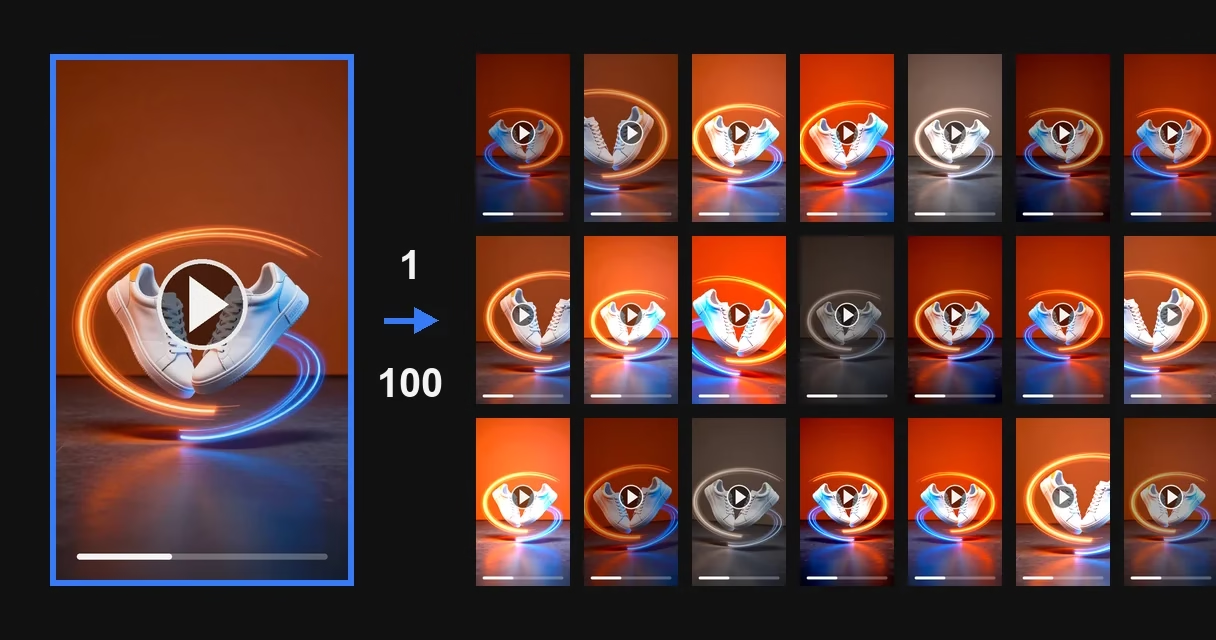
You have one video that works. And thirty accounts to upload it to. You upload the same file to all of them. Some accounts get zero impressions. Some get their ads rejected. In testing, the campaign setup brought leads. At scale, it stopped.
Then the trial and error begins. Run the file through a bot. Add a filter. Clean the metadata. It is hit or miss. The advice circulating in the niche does not explain why it is hit or miss.
The short answer first. Cleaning metadata has no effect at all on whether the platform recognizes a copy. Metadata is not in the frame, and the platform compares frames. Below are numbers from measurements: how far each edit moves the fingerprint. And our estimate of the limit beyond which a copy starts to look damaged. That is an estimate, not a measurement, and the table marks it as such.
Who this article is for, and who does not need it
It is for media buyers. For those who run ads from several accounts and prepare ad creatives in batches. And for those who distribute one video across several secondary channels.
If you have one account and one offer, you do not need any of this yet. Shooting a second video is cheaper than dealing with fingerprints.
One more caveat. There will be no promise here to get past ad review. Many make that promise: one of the services claims “99% success.” Nobody provides proof, and that is no accident: ad review looks at the content of the ad, and processing the file does not change it. This is covered below, in the section “What uniquification does not do.”
Video Unique Booster for Windows: hundreds of unique copies in one goBy hand, you edit copy after copy. The program creates them in batches. Each copy gets its own image, sound, metadata and duration.
Video Unique Booster: video uniquification for WindowsYou add a video and set the setting ranges. The program creates hundreds of copies. Each has its own image, sound and duration.
Hundreds of unique copies from one original videoThe manual way runs into one problem. Each copy has to be edited separately. More copies take more time.
Unique video copies for TikTok, YouTube and InstagramYou set the setting ranges once. Then the Windows program creates copies in batches. Hundreds in one go.
Video uniquification for Windows – Video Unique BoosterYou add one video. The program creates hundreds of copies. Each has its own image, sound, metadata and duration.
Three levels of similarity checking, and usually only one is discussed
“Facebook will catch the re-upload”: there are three mechanisms behind that phrase. They work differently. And they react to processing differently.
Level 1. Exact file match. A cryptographic checksum is computed. A single bit changes it. Re-save the file, and the checksum is different. Any edit gets past this level. That is why nobody stops there.
Level 2. Approximate byte-level match. It is useless for media files. The paper by McKeown and Buchanan 1 states it plainly: changing the encoding parameters produces completely different binary content. The picture stays exactly the same.
Level 3. Perceptual fingerprint. This is the level platforms work at. The frame is converted to brightness. Averaged. Shrunk to a coarse grid: for the PDQ algorithm, 64 points per side. A short fingerprint is computed from that grid. Files are not compared. What is compared is how the frame looks.
This leads to the conclusion that the rest of the article rests on. The codec name, container, frame rate and resolution are not part of the perceptual fingerprint. This is not a guess. Meta has an open algorithm for finding copies of videos, TMK+PDQF 6. Its technical description says so in so many words. The algorithm finds visually identical videos at different frame rates. And in different file formats. And at different resolutions.
And right away, a caveat without which this statement would claim more than was measured. Meta’s open algorithm is about tracking down copies of content, not about checking the similarity of creatives inside an ad platform. How exactly Meta Ads and TikTok Ads deduplicate ad creatives, and what thresholds they use, nobody says publicly. We don’t know either, and we won’t pretend to.
What changes the fingerprint and what doesn’t: numbers from measurements
The key open measurement on this topic is the 2023 paper by McKeown and Buchanan 1. A Flickr set of a million images, about 50 million random pairwise comparisons. The edits were applied to a randomly drawn subset of 250,000 images. Six algorithms. Seven kinds of edits. The paper gives a ready-made scale.
The table shows the normalized distance between two fingerprints: the original’s and the edited copy’s. Zero means “exactly the same fingerprint.” A reference point at the top: for two random, unrelated images the distance comes out at 0.49-0.50. Each fingerprint has its own such value: for NeuralHash, which comes up below, it is 0.4973.
And a reference point at the bottom, without which the table cannot be read. The PDQ technical description 6 says that the threshold is set by whoever builds the system, and that distances of 30, 20 and below gave good results. Let’s take the upper value: 30 out of 256, or about 0.117. Meta itself uses a little more in its own measurements, 32, which is 0.125; the difference does not affect the conclusions below. With a stricter setting the threshold is lower, and borderline techniques stop getting through. To the algorithm, a copy shifted by less than the threshold is still the same frame. Shifted by more, it is a different one.
| What was done to the image | pHash | PDQ | What it means in practice |
|---|---|---|---|
| Recompressed as JPEG at quality 30 | 0.0053 | 0.0094 | for pHash, 83.9% of fingerprints matched bit for bit |
| Enlarged 1.5 times | 0.0020 | 0.0237 | for pHash, 94.0% of fingerprints matched bit for bit |
| Added a watermark 10% of the height | 0.1227 | 0.1029 | the threshold is not crossed: for PDQ it is still the same frame |
| Cropped 5% from each side | 0.1686 | 0.3255 | exact fingerprint matches: 0.04% for pHash and 0% for PDQ |
| Added a 30 px black border | 0.2656 | 0.3949 | no fingerprint matched exactly; the border is set in pixels, not as a share of the frame |
| Flipped on the x-axis, as the paper puts it | 0.4904 | 0.4975 | the distance is the same as for an unrelated image |
Two rows here are worth all the rest.
The first is the top row, JPEG recompression at quality 30. A file can hardly be compressed harder. JPEG quality 30 already means visible blocks. And yet for pHash, 84 fingerprints out of 100 stayed exactly the same. For PDQ, 23 out of 100. For that much damage to the picture, that is a lot too. The authors’ conclusion, verbatim: “All algorithms also coped very well with poor quality JPEGs.”
The reason is simple. The fingerprint is computed from how the frame looks. After re-encoding, the frame looks the same.
The second is the bottom row, the flip. A horizontal flip sends the fingerprint to where unrelated images lie. To the algorithm, a flipped copy is a different image. The authors write that flipping disturbs the fingerprint the most, with the border second.
There is one more unexpected number. It comes from the 2022 measurement by Struppek and co-authors 2 on the neural network fingerprint NeuralHash. Rotating by one degree changes more than 5% of the fingerprint’s bits. JPEG compression changes about 2%. The paper uses a compression strength of 92 out of 100 on the scale of the imgaug library, and the authors call the resulting image quality acceptable. A person won’t notice a one-degree rotation. Yet it moves the fingerprint more than such re-encoding does.
The same paper found an asymmetry that the niche’s advice never mentions. Doubling the contrast changes 37% of the bits, doubling the brightness 22%. Halving them does almost nothing. Pushing a slider up and pushing it down are not the same thing.
This table has no metadata, and that is not an oversight
A list of edits appears on eight of the ten pages from Russian-language search results that we analyzed for the Russian-language query meaning “ad creative uniquifier”. Another analysis of ours, of Russian-language discussions and videos, also shows the order: metadata cleaning comes first there. The videos present it the same way. Open, clean, done.
But the perceptual fingerprint is computed from pixels. Metadata is not in the frame: it does not get into that grid and does not affect the distance between fingerprints.
We looked for papers in which changing metadata shifted perceptual similarity. We did not find a single one: not in OpenAlex, not in arXiv, not in the platforms’ own descriptions.
This matches our own measurement. We tested thirteen uniquification bots with the same method (in Russian). Six of them clean metadata, seven leave it alone. In the ones that clean it, the creation date most often comes out broken: zeros instead of a value. None of them made any significant change to the frame.
Metadata does play a part in similarity checking. At the first of its three levels. It changes the exact checksum of the file and affects the platform’s internal checks. But “the algorithm recognized the re-upload” is about the third level. Metadata does not reach that level. There is a different reason to deal with it: identical technical fields in a hundred files are a ready-made sign of a batch for any check that does not look at the frame. That does not move the fingerprint, and it does not count as uniquification.
Edits, what they cost and safe limits
The second table answers a question that none of the analyzed pages asks. How far each edit moves the fingerprint. And what you pay for it.
The “Fingerprint shift” column is put together from two measurements, and they must not be mixed up. Fractions like 0.49 are the pHash and PDQ measurements from the McKeown paper. Percentages of bits are the measurement of the neural network fingerprint NeuralHash from the Struppek paper. The quantity is the same in both: the share of differing bits, on a scale from zero to one. The algorithms are different. A pHash fingerprint is 64 bits long, PDQ 256, NeuralHash 96, and each has its own decision threshold.
How much the choice of algorithm changes the number is clear from the flip. For pHash a flip gives 0.49, for PDQ 0.50: exactly as much as an unrelated image. For NeuralHash, the same flip gives 0.29. One edit, one scale, different algorithms. So comparisons only make sense within one measurement.
| Edit | Fingerprint shift | What you risk | Reasonable limit |
|---|---|---|---|
| Horizontal flip (pHash, PDQ) | 0.49, the same as an unrelated frame | text and logos in the frame read backwards | once, if there is no text in the frame |
| Black border or padding (pHash, PDQ) | 0.27-0.39, but the measurement was made on a 30 px border added outside the frame; the setting in the program paints over the edge inside the frame and does not enlarge it, and there is no number of its own for it | reduces the usable area of the frame, looks cheap in the feed | up to 50 px, the most the program’s field accepts |
| Edge cropping (pHash, PDQ) | 0.17-0.33 | cuts off captions and faces at the edges | 10-25 px on each side, the program’s field accepts at most 30 px |
| Rotation (NeuralHash) | more than 5% of bits per 1 degree, but the measurement was made on a rotation that adds black wedges to the frame, and the paper says directly that the fingerprint is changed most by losing or adding picture area; the setting in the program leaves no wedges, and there is no number of its own for it | leaves no black corners: the program enlarges the frame before rotating and crops it back, so a little of the picture is lost at the edges | 1-2 degrees: the program’s field accepts only whole numbers |
| Watermark or overlay (pHash, PDQ) | 0.10 for PDQ, below its threshold; 0.12 for pHash, whose threshold we don’t know | someone else’s mark in the frame is unacceptable, your own is recognizable | 8-12% of the height, only your own mark; but it does not work as a technique on its own: it does not cross the PDQ threshold |
| Duration change | moves the time axis; the audio fingerprint of the classic scheme survives time stretching 5 | with strong stretching, speech audibly changes; we have no measurement of that threshold | 3-8% |
| Scale (pHash, PDQ) | 0.002-0.024, measured on a plain 1.5x enlargement of the image; the setting in the program works differently: an enlarged foreground is laid over a blurred background, and the frame size stays the same, so this number does not apply to it | gives almost nothing | as an addition, not as the basis |
| Saturation (NeuralHash) | 1-2% of bits | gives almost nothing | as an addition |
| Brightness and contrast (NeuralHash) | 22-37% of bits, but the measurement was made on a twofold change | overexposure is visible to the eye | 5-15%, and nobody has measured what this limit gives |
| Noise | depends on the strength | heavy noise hurts ad performance | light, over the frame |
| Re-encoding, bitrate, codec | about zero | wastes time | does not work as a technique on its own |
| Metadata cleaning | zero at the third level | creates a false sense of a job done | do it, but don’t count it as uniquification |
The “Fingerprint shift” column holds numbers from two measurements, 1 and 2; which is which is explained before the table. The “Reasonable limit” column is our estimate based on the risk of damaging the frame, not a measurement: nobody has measured these numbers, us included.
The bottom two rows are exactly the edits the niche recommends most often.
The debate about audio that numbers settle
Russian-language videos on the topic give opposite advice about audio. One says you can leave the audio alone, since social networks themselves let you use other people’s tracks. Two others insist on the opposite. The audio has to be processed, down to changing the voice and mixing in noise.
Both sides are partly right. Here is what the measurements show.
The audio fingerprint barely cares about noise. In a 2003 paper 4, Wang described the Shazam algorithm. Half of the fifteen-second clips are recognized even at a signal-to-noise ratio of minus 9 decibels. That is, when the noise is louder than the music. GSM encoding moves this point to minus 3 decibels, and that is all. Mixing noise into the track for uniquification is pointless.
Speed is more subtle than it seems. Six and Leman measured this in a 2014 paper 5. What they measured was Audfprint, an open implementation of Wang’s scheme, not Shazam itself, and what follows is about Audfprint. The scheme does not recover after a pitch shift of more than 3% and falls apart where pitch and time change together. But the scheme survives pure time stretching (a different tempo, the same pitch): “Surprisingly, Audfprint is rather robust against time-stretching,” the authors write. The duration setting in the program does exactly this: it stretches the picture and the audio along with it, keeping the pitch of the voice. So it barely affects the audio fingerprint, and its only target is the video’s time axis.
One edit is not enough, and that has been measured too
From December 2022 to April 2023, Meta ran an open competition in video copy detection 3. The copies for it were made with a chain of two to five transformations. Color, overlays, blending two videos, blur, noise, pixelation, cropping, padding, rotation, flipping, aspect ratio, scale, encoding quality, speed change, frame dropping, repeating a copied segment, embedding in a screenshot, grid, perspective, shaking.
The winner scored 87.2% on the micro-AP metric on these copies, on the track where a copy had to be described by a fingerprint. On the second track, where it had to be matched to the original, the same winner took 91.5%. That does not mean “found 87 copies out of 100”: the metric measures ranking quality, not the share found. But it sets the order of magnitude clearly.
Two conclusions follow. First: against a modern detector one edit is not enough, you need a chain. A caveat is required. Single edits were not measured in this competition at all. And in the image measurement, a flip alone moves the fingerprint farther than anything else. Second: a chain does not make you invisible either. Someone promises you a way around detection? Then they have not read these numbers. Or they are counting on you not having read them.
The niche recommends exactly the half of the edits that works worse
The same paper ranks the transformations by difficulty. It is calculated like this. Take all the copies whose chain included the transformation. See how the detector handled them. So this is the difficulty of a transformation as part of a chain, not on its own.
The easiest for the detector are edits in time. The authors name them explicitly: speed change and repeating a copied segment. The reason lies in how the participants’ solutions were built. Almost all of them relied on features of individual frames, and such features do not use the time axis. Not everyone did it that way: one of the prize winners had a temporal feature as well, and the winner of the second track estimated how a copy had been stretched in time. But that did not become the rule.
The hardest is blending frames from different videos. Close to it is geometry that adds or removes frame area. That means embedding in a screenshot and cropping.
Now compare this with what videos and articles on the topic recommend. Speed, flip, black-and-white filter, scale, text overlay: all in the easy half of the list. Blending with other footage and cropping are in the hard half. The niche recommends exactly the half the detector finds easier.
And yes, the flip landed in the easy half. There is no contradiction with the table above. A flip completely changes a simple fingerprint like pHash. A trained copy detector recognizes it. These are different systems. Confusing them is the main mistake in this topic.
The same caveat as above. This is a measurement of tracking down copies of content, not of deduplication inside an ad platform. It sets the order of difficulty, not a verdict.
What uniquification does not do
Three limits worth spelling out before the instructions.
It does not guarantee that a creative will pass ad review. Ad review looks at the content of the ad. The question “have I seen this file before” is not the only one it asks. An explicit creative stays explicit after any processing.
It does not fix an account. What happens to an ad account depends on warm-up, proxies, payment method, history and behavior. The creative is just one of the variables. In a thread on a Russian-language affiliate marketing forum, one practitioner describes waves of mass bans of agency ad accounts. The share of instant bans he gives is large, but that is one person’s estimate, not a measurement, so we don’t quote the number. What matters here is something else, and the whole analysis confirms it: the file is not what decides.
It does not hide borrowed content from the copyright owner. Google says so openly in its report on fighting piracy 7. Content ID can catch attempts to evade detection. Among them are changing the aspect ratio, flipping horizontally, and speeding up or slowing down the audio: exactly the techniques that change the perceptual fingerprint for ad deduplication. In other words, the system is built precisely for them. And this is no small-scale system: YouTube’s own policy page says that in 2024 Content ID made more than two billion claims, and less than one percent of them were disputed.
Uniquification sets your own creatives apart from each other. It does not stop other people’s content from being tracked down.
The manual way: nine steps per copy
This is what it looks like without tools. Exactly as the videos show it.
- Open the video in a mobile or desktop editor.
- Change the speed to 1.05-1.10.
- Flip the frame if there is no text in it.
- Shift the color correction: temperature by 2-3 steps, exposure by one, contrast by 2-3.
- Crop the edges and add padding.
- Overlay your own mark or a grid.
- Export.
- Clean the metadata with a separate tool.
- Repeat with different values for the next copy.
Nobody measures how long a manual cycle in an editor takes. Time figures do come up in the videos (“in 10 minutes” for a walkthrough of three methods, “about 20 minutes” to create a finished video), but that is the length of one demonstration, not of a cycle for a hundred copies. So we don’t make up numbers: time your own cycle. Nine steps per copy, and the values must not repeat from copy to copy, or the point is lost. Multiply by a hundred. That much manual work is usually not done at all, and that is what bulk mode exists for.
That is exactly why the whole niche relies on bots. And exactly why it runs into their ceiling.
Why a bot runs into a ceiling
Let’s put in one place what search results for the Russian-language query meaning “ad creative uniquifier” offer today.
| Solution | Limit | File size | Folder processing | Price |
|---|---|---|---|---|
| Web uniquifier profitweb.tools, guest access | 5 creatives per day | up to 10 MB | no | free |
| The same, after registration | 20 creatives per day | up to 50 MB | no | free |
| Shinobi Telegram bot, pay per file | no limit, you pay for each file | up to 170 MB | no | about $0.20 per video |
| Unikcreo Telegram bot, subscription | there is a free limit | not published | no | 199 rubles a month |
| ImgFactory, a web service for images | 20 images per day | – | no | then 0.1-0.3 rubles per copy; does not process video |
| Apps4you bot | 5 free runs | not published | no | price not published |
| Desktop program, local mode | no daily limit on a paid license; the trial has a limit, and the program shows the number right in its panel | no upload limit: the file does not leave your disk | yes, a whole folder | from €39 a week, free trial |
None of the other solutions in this table processes a whole folder. One of the reviews on the topic even advises it outright: run the bot five to twenty times by hand. Twenty files a day with a 50 MB limit is not launching ads at scale. It is a test.
We hit this ceiling ourselves. Before we had our own program, we tried online uniquifiers, and they could not handle a large account network: two dozen unique versions at most, and then the limit.
File size is a separate trap. A 10 MB limit cuts off exactly the creatives people actually use. We measured the bitrate on our own set of phone footage, 683 Full HD videos from some thirty devices: the median is 10.8 megabits per second, so one minute weighs about 81 MB. Even compressed fourfold, a minute comes to about 20 MB and still will not fit under the limit.
What a hundred copies of one ad creative cost
The prices are scattered across all the pages in the search results. None of them does the math. Let’s do it.
| Method | A hundred copies of one video | What else it costs |
|---|---|---|
| Bot with pay per file, $0.20 per video | about $20 | one file at a time, by hand |
| Subscription at 199 rubles a month | 199 rubles within the subscription’s limits | runs into the subscription’s limits, the size limit is not published |
| By hand in an editor | free | nine steps per copy, that is, nine hundred steps per hundred; we have no time measurement of our own |
| Your own script on a rented server | from 45 rubles on a promo plan with cut-down capabilities | several evenings of setup |
| Desktop program, a whole folder per run | €39 a week, €99 a month, €2,999 lifetime | minutes of processing |
The last row is about us. Video Unique Booster is our product, and this blog is ours too. So the numbers in its row are not made up: you can see them on the pricing page. Local processing does not spend credits, but it counts toward your video allowance just like cloud processing. How much is available on the trial key is shown by the balance panel in the program itself, and it is enough to test the ranges on your own video before you pay.
The row about your own script needs an explanation. The cost of that path is usually not counted at all.
We know this path from videos that show it; we have no experience of our own here, and the authors name neither the script nor the hosting. The authors walk through every step: renting a server, then uploading the files, then editing the upload limits in the settings. That is where the trap is. The default limit is 2 MB. A larger video simply does not get processed. The result comes out empty, and there is not a single error. Plus debugging. This path looks free only if money is the only thing you count.
Whose server sees your campaign setup
There is an argument that none of the analyzed search results makes.
All the other solutions in the table above are bots and web services. Your creative is uploaded to someone else’s server. Along with it goes everything that is visible in it. The offer. The pitch. The target region. The language. The app name. The campaign ID in the tracking link, if it made it into the frame. Whether the bot owner looks at what gets uploaded, we don’t know and cannot check. What we do know: technically, nothing stops them.
A desktop program has something here that a bot does not have at all: a choice. Video Unique Booster in local mode processes the frames on your own machine’s processor: the video file itself does not leave your disk. What goes up to the server is the processing settings, information about the video and the file paths: the server builds the command from them. So keep the file name as neutral as everything else. The program also has a cloud mode. That mode does send the video to the server. But that is your decision, not a condition of use. A bot gives you no choice: you always have to hand over the file.
The second difference is the volume per run. The program takes a whole folder, a bot takes one file at a time.
That is how we worked with our Instagram Reels account network: about 300 accounts, three videos a day from each. We only ever processed them as a whole folder, never one at a time. Our program put the finished copies into a folder, and the account management app took the videos for publishing from that same folder.
How to get a hundred copies in one run
Step 1. Add the source videos
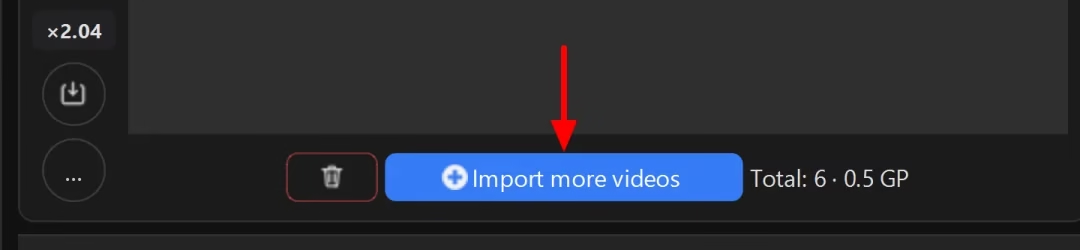
Files are added with the “Import more videos” button under the list of imported videos, and a whole folder by dragging it with the mouse right into the list.
The screenshots below show placeholder videos: horizontal, three seconds each, filled with color gradients instead of a picture. In their place you will have your own vertical creatives.
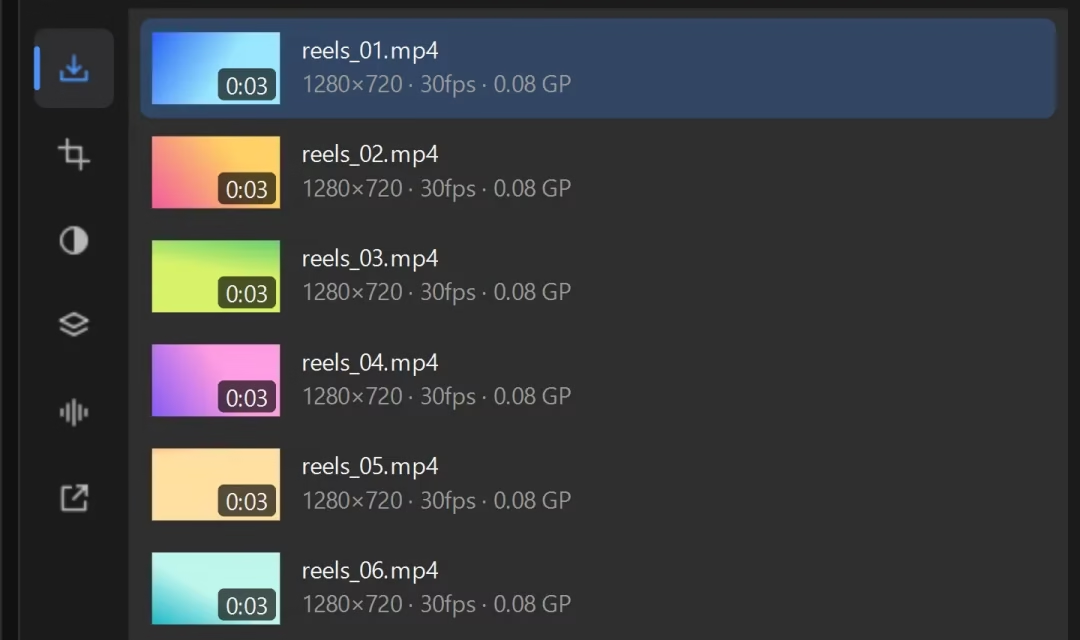
Under each name, the program shows the resolution, frame rate and size in gigapixels, GP. This is a measure of work: the larger the frame, the higher the frame rate and the longer the video, the higher it is. The cost of cloud processing is calculated from it, but not from it alone: the project’s complexity also counts, and the program shows its multiplier on a separate badge.
Step 2. Set the number of copies for each video
The setting is called “Number of unique copies of each video” and lives in the “Export” section. The section opens in two moves: the Output icon in the left bar (it opens the OUTPUT menu), then the “Export” item in that menu.
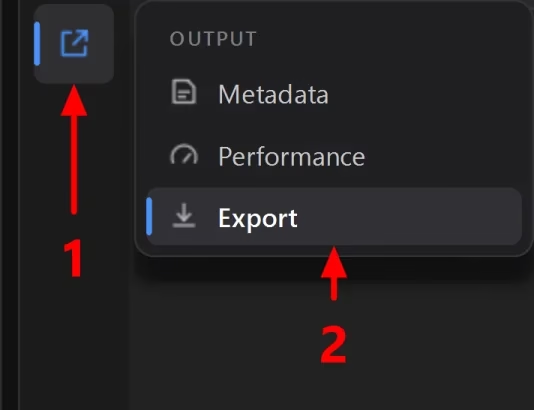
A hundred copies is one number in one field, not a hundred runs.
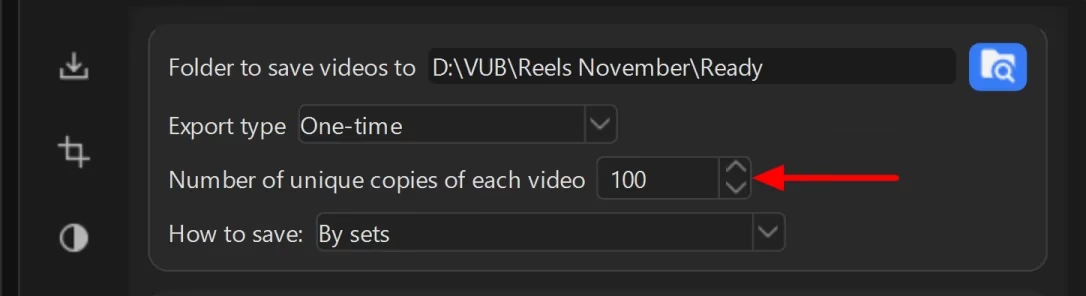
The same card has two more settings, and both answer questions that come up right after the run. “Export type: One-time” means “make the requested number of copies and stop”; the other modes work differently: they keep a set number of videos in the folder or check sources on a schedule. “How to save: By sets” puts the results into a VUB_result_<date_time> folder. Inside it, the program makes one folder per copy, pack0, pack1 and so on; with a hundred copies there will be a hundred of them. Each holds one copy of every video, that is, a ready set for one account.
Step 3. Set ranges, not fixed values
Each copy will take its own random value within the range. Then the copies differ both from the original and from each other. A single fixed number gives a hundred identical copies, and the whole point of processing is lost.
Start with the horizontal flip: according to the numbers in the table above, it moves a simple fingerprint the most. It is not an on/off switch but a choice of three items: “No,” “Always” and “Randomly.” “Always” flips every copy, “Randomly” decides for each copy separately: roughly half will stay unflipped, but the copies will differ in this too. Just check that the frame has no text and no faces in profile: mirrored text reads as a defect, and then the flip has to go. The same caveat as above applies: a trained copy detector handles a flip easily.
Next, turn on the border. It is not next to the flip in the list: three disabled cards lie between them. It is set as a thickness range: in the screenshot below it is 2 to 6 px, which is exactly how the scale in the app is labeled. And remember that the number in the table was measured on a border outside the frame, while this one paints over the edge inside it.
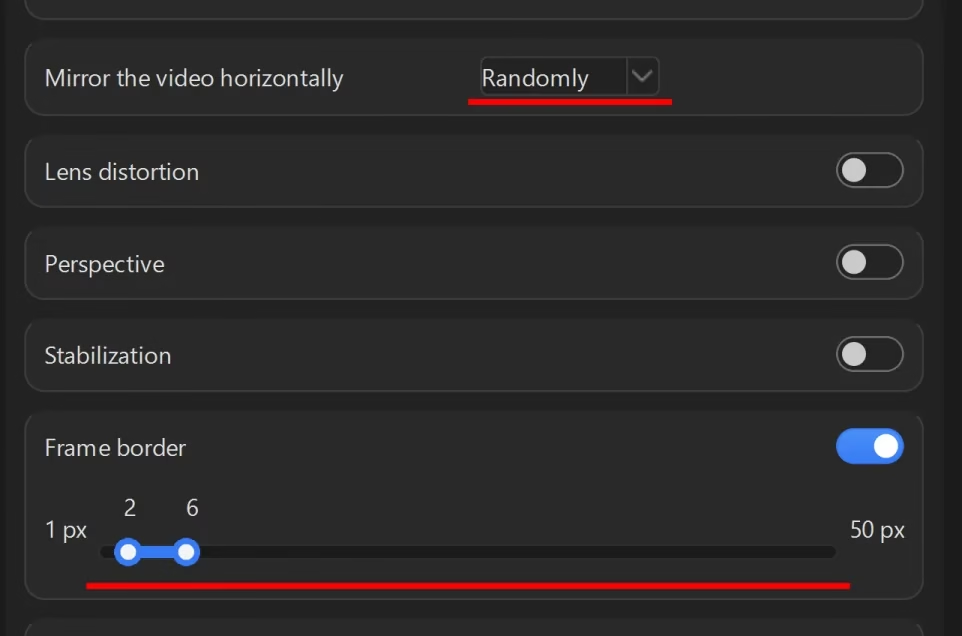
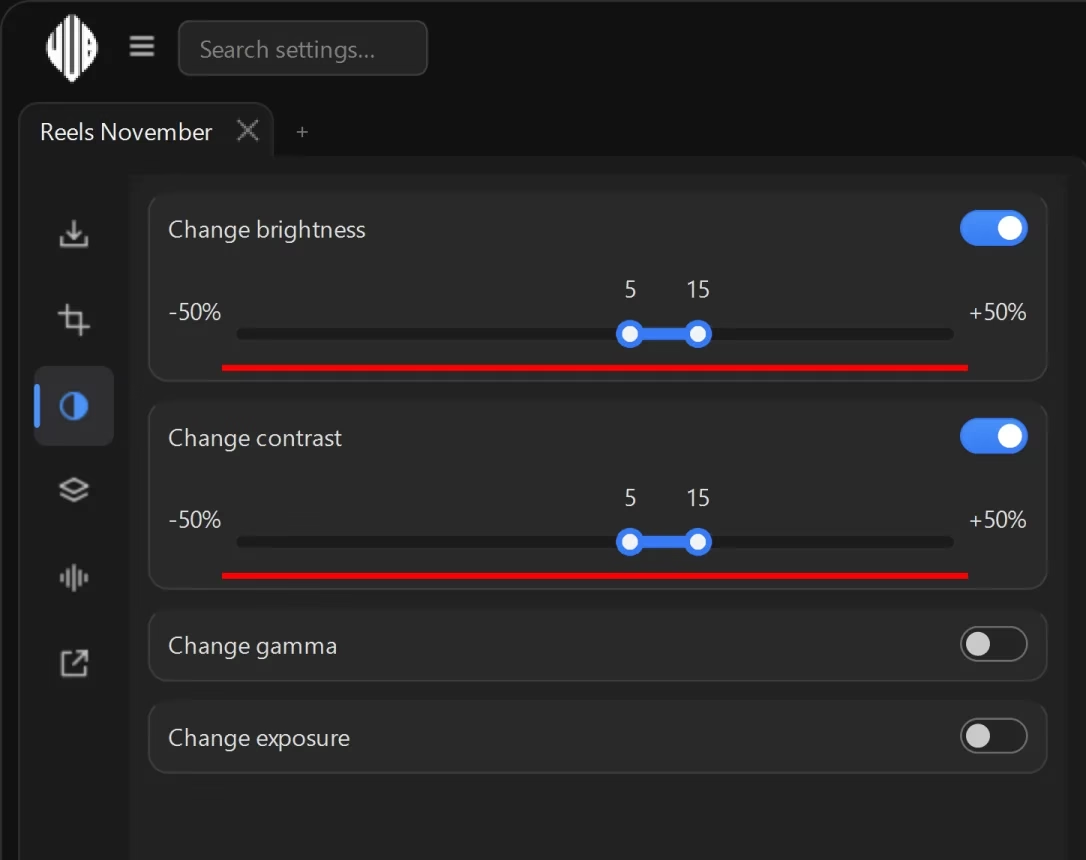
On top of that, add smaller ranges: cropping 10-25 px, brightness and contrast 5-15%, rotation 1-2 degrees and duration 3-8%. The setting is called “Change video duration,” and its sign means what it says: plus makes the video longer and slower, minus makes it shorter and faster. It works on the time axis and barely touches the audio. And a trained copy detector handles it most easily, so on its own it decides nothing. Each of these values is set as a range, not a single number: within it, the program picks its own value for each copy.
Step 4. Make three copies and look at them yourself
Do not skip this step. A range set by guesswork produces damaged copies at its edges. Without a trial run, you will find out only after the upload.
So in the field from step 2, temporarily set 3 and start. Once you have looked, put your number back and do the full run.
Just remember what these three copies do not show. The value of each setting is drawn at random within the range, with a separate draw for each copy. So three copies will almost certainly not hit the edges, and it is the edge that damages the frame. To see it, narrow the range to its upper bound, make one more copy and set the range back.

Step 5. Start the full processing
No overexposure and no visible damage on the three copies means the ranges are right. From here, the program does the work: six videos with a hundred copies each give six hundred files in one run.

Click the “Start” button: it sits to the left of this summary, on the same bar.

After that, the window shows the progress: a ring with the share completed and the number of the file the program is working on right now.

How to make sure the copies are really different
None of the analyzed pages measures how different the copies are: the best of them only compares metadata. We have not measured the distances between copies ourselves either: the numbers in the edits table come from two third-party papers, 1 and 2. But there is a check you can do with your own eyes in a minute.
The first check, and it means almost nothing. The checksums of the copies and the original always differ: that is the first level of similarity checking, and any edit passes it. You cannot consider the job done. We mention it only because that is where the niche stops.
The second check, the one that matters. Look at the copies one after another, shrunk to the size of a fingernail on the screen. The perceptual fingerprint is computed on roughly the same coarse grid. What you can tell apart at this size, the algorithm can tell apart too.
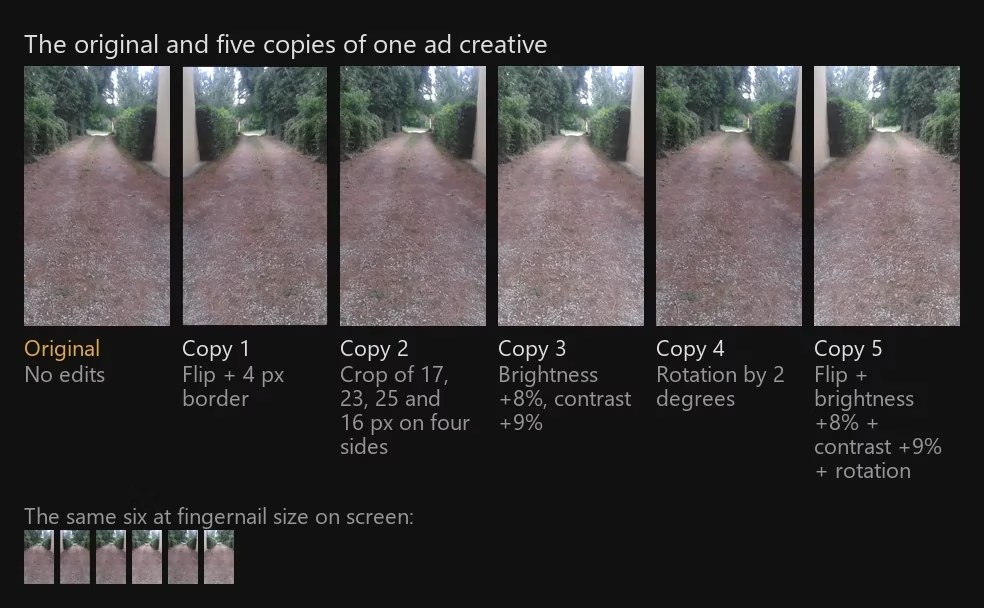
The copies in this image were made with the same edits the program uses, and within the same ranges that step 3 recommends. Rotation comes with enlarging the frame and cropping it back, so there are no black corners at the edges. The border paints over the edge inside the frame. Cropping takes its own number for each of the four sides and returns the frame to its original size, so the picture shifts slightly and zooms in slightly.
The 4 px border cannot be seen in either row: it is 4 px out of 720 across the width of the frame, and in the image above it shrinks to a single column of pixels out of 146. That is the fair trade-off of this technique: it does not bother the eye. The flip, on the other hand, is the first thing you notice in the bottom row: the light pillar is on the right in the original and on the left in the flipped copies. It will not always be like this, and that is the whole point: how noticeable a flip is depends on what is in the frame. If the frame has a distinctive asymmetric detail (a pillar, a logo, a caption in a corner), the viewer will catch the flip at once. A symmetric frame takes a flip unnoticed.
The second thing you catch in the same row is even brightening: the two copies made with brightness and contrast look lighter than the rest even at fingernail size. Keep these two differences in mind, they will come in handy in a moment: the first is visible and moves the fingerprint far, the second is just as visible but moves the fingerprint little, at the levels these copies were made with.
This check has two known failure modes, and without correcting for them it misleads in both directions. A flipped copy stands out more than the others if the frame has an asymmetric feature, and it is easy to conclude from that that the edit is too crude, while it actually moves the fingerprint more than any other. Saturation misleads the other way: it is visible at once, yet it moves the fingerprint by only 1-2%.
Hence the rule for reading this check, and it is about what the difference is made of, not about how big it is. Don’t ask “different or not”; look at which edits are at work in the copy. If there is a flip, a border or noticeable cropping, the copy’s fingerprint has moved far, even if to the eye it is almost the same. If the difference is made only of color or brightness at the levels in the ranges above, the fingerprint has barely moved, and that alone is not enough, however much difference you can see. Size does matter after all, just not where people look for it: doubling the contrast moves the fingerprint by 37% of bits, more than a flip, but by then the frame is ruined and unfit for the feed.
The third check, for the damage threshold. Make a copy at the upper bound of the range: it will not turn up among the usual three, since the values there are random. Look at it the way a viewer would. See overexposure, shimmering edges after rotation or a cut-off caption? Narrow the range.
Set it up once, repeat on the next creative
None of the analyzed search results and none of the scientific papers mention repeatability. Yet that is exactly what saves most of the time. The program saves the set of ranges you have chosen, and the next creative uses it without setting up again.
Here is the idea. It makes sense to choose ranges for a vertical and a platform, not for a specific video; this is our estimate based on the risk of damaging the frame, and nobody has measurements by vertical. For gambling with bright visuals, the limits are one thing. For health supplement offers with calm footage, they are another.
Keep two or three sets for your verticals. Then preparing a new creative takes as long as the processing does.
Where this won’t work
Videos with large text in the frame. A flip mirrors the text, cropping cuts it off at the edge. Without these two edits the set becomes noticeably weaker. For such creatives, speed, padding and overlays are what remain.
Long videos. Processing time grows with length for any video, but for long ones it becomes an obstacle: a hundred copies of a half-hour video take hours. And similarity checking still looks for a match across the whole length, not just at the beginning.
Other people’s content. Uniquification does not make compilations of other people’s short videos legal. Content ID catches flips and speed changes, as mentioned above.
Identical ad text and landing pages. Thirty ads with one headline and one landing page? Differences in the frames help little. The creative is part of the campaign setup, not the whole setup.
We saw this not in advertising but in an account network on X (Twitter), which at its peak had 150,000 accounts. The platform blocked every account that had the same domain in its link field.
Questions and answers
Where to start
Take one video that has already performed well for you. Make three copies with a flip and a border plus the smaller ranges from the edits table. Look at them as thumbnails next to the original. Judge them not by whether a difference is visible but by what it is made of: whether the set includes strong edits and whether the frame is damaged at the edges of the ranges. That is your ready-made set for the whole folder.
Want to check this on your own folder rather than on someone else’s server? Download Video Unique Booster and process that same video into three copies. Only the cloud mode spends credits, local processing runs without them; how many videos are available on the trial key is shown by the balance panel in the program.
The same techniques for specific platforms are covered separately. For TikTok, in the article video uniquification for TikTok (in Russian). For YouTube, in the article how to make videos unique for YouTube (in Russian). Web services, in the article online video uniquifier (in Russian).
Sources
The numbers in square brackets in the text refer to this list: they mark figures taken from third-party papers and reports. The limits and prices of the services were collected in September 2026 from the services’ own pages and from reviews in the niche; they change without notice, and some of the pages no longer opened by the time of checking.
- McKeown S., Buchanan W. J. Hamming distributions of popular perceptual hashing techniques. Forensic Science International: Digital Investigation, 2023, vol. 44, 301509. Preprint on arXiv, journal version. ↩︎
- Struppek L., Hintersdorf D., Neider D., Kersting K. Learning to Break Deep Perceptual Hashing: The Use Case NeuralHash. ACM FAccT, 2022. Preprint on arXiv. ↩︎
- Pizzi E. et al. The 2023 video similarity dataset and challenge. Computer Vision and Image Understanding, 2024, vol. 243, 103997. Preprint on arXiv, journal version. ↩︎
- Wang A. L.-C. An Industrial-Strength Audio Search Algorithm. ISMIR, 2003. Conference paper PDF. ↩︎
- Six J., Leman M. Panako: A Scalable Acoustic Fingerprinting System Handling Time-Scale and Pitch Modification. ISMIR, 2014. Record on Zenodo. ↩︎
- Meta ThreatExchange. The TMK+PDQF Video-Hashing Algorithm and the PDQ Image-Hashing Algorithm, technical report. Report PDF on GitHub. ↩︎
- YouTube’s current copyright policies: the source of the number of Content ID claims for 2024 and the share disputed. Separately, Google, How Google Fights Piracy, 2018: the report for that year gives the same share disputed, and of course no figure for 2024. ↩︎
