

One video is published on several accounts. On the first account people watch it; on the others it gets far fewer views. Someone on a Russian-language forum wrote in 2023: “The video I post first gets several times more views, I guess Insta sees it’s a re-upload even when the video is trimmed” 9.
This article is about an Instagram account network, that is, multiple Instagram accounts publishing the same video. Laying out a profile’s grid in a 3×3 pattern is a different topic.
The short answer. The number of copies by itself decides nothing. Since 2024, when several videos are identical, Instagram recommends only the original 1. So what you need to count is how much the copies differ from one another, every copy against every other. We did not find a ready-made number of copies backed by a method. We searched on September 23, 2026: ten pages from US search results, research papers and five videos. On September 27, we added five pages from Russian-language search results.
We are the Video Unique Booster team; we make a program for video uniquification. We made 480 copies of three videos and measured how similar they are to one another. The measure was the perceptual hash pHash, one of the open matching algorithms. The more of the 64 bits differ, the more the copies differ. Of twenty copies with different edits, you can keep 13 to 16 so that any two differ by at least two bits. Sets built by the program’s own code gave 15 to 18. If you change only brightness, contrast and noise, twenty copies are, by this measure, one and the same video. The measurement does not show what threshold Instagram uses or how the bits affect reach. In our network of 300 accounts, from memory, one video produced more than 100 copies, and there was no mass drop in views. But that is an observation, not a measurement.
Here is what this means in practice. Make twice as many copies of a video as there are accounts it goes to. Then check them in pairs with the script from this article: it removes copies from the closest pairs. For a network of 10 accounts, this margin was enough for all of our videos. For a network of 50, it was not enough for every video; the details are in the section “A set for a network of 50 accounts.” You need edits of different kinds: color, frame geometry, timing and sound. Sound is changed together with the picture. Mirroring is not the main edit.
Copies are only part of a network. You also need accounts, proxies, warm-up and scheduled publishing. Below are the platform’s rules, our network of 300 accounts, the measurement and how to build a set.
Who this is for
For people who run five, twenty or a hundred accounts and publish the same video on them: mass publishing of Reels, selling products, promoting your own product from several profiles. The measurement below was done for networks of 10 and 50 accounts. For a larger network the procedure is the same, and the script will show the result. A general overview of uniquification techniques is in the article on a video uniquifier for Instagram (in Russian).
We ran such a network on Instagram ourselves from March to August 2025. It had about 300 accounts, and we published only Reels on them. One video was published on many accounts, and each account got its own copy from Video Unique Booster.
Video Unique Booster for Windows: hundreds of unique copies in one goBy hand, you edit copy after copy. The program creates them in batches. Each copy gets its own image, sound, metadata and duration.
Video Unique Booster: video uniquification for WindowsYou add a video and set the setting ranges. The program creates hundreds of copies. Each has its own image, sound and duration.
Hundreds of unique copies from one original videoThe manual way runs into one problem. Each copy has to be edited separately. More copies take more time.
Unique video copies for TikTok, YouTube and InstagramYou set the setting ranges once. Then the Windows program creates copies in batches. Hundreds in one go.
Video uniquification for Windows – Video Unique BoosterYou add one video. The program creates hundreds of copies. Each has its own image, sound, metadata and duration.
What Instagram’s rules say
There are two rules. The first is about identical videos. Instagram announced it in April 2024, according to TechCrunch. If the platform finds two or more identical videos, it recommends only the original 1. The copy is not deleted. It disappears from the places where the platform picks videos itself: Reels, Explore and recommendations in Feed. A substantially changed video, such as a meme or a parody, is not replaced by the original 1. Instagram promised to show followers of the account that published the copy a label linking to the author of the original 1.
A new account has almost no followers. If its copy does not get into recommendations, almost nobody will see it. We did not measure reach; this is a conclusion from the rule.
Our network shows how few followers such accounts have. In a snapshot of 217 of its accounts, they had 141 followers between them, while 6,690 Reels got 190,134 views. Those views came from recommendations, not from followers.
The second rule is about the account as a whole. An account that mostly publishes other people’s content without substantial changes is removed from recommendations 23. It can come back once most of its recent posts over 30 days are recognized as original 2. A substantial edit of someone else’s video, “material edits,” can count as original 2. A border, a watermark and a speed change are explicitly called “low-effort edits” in the rules 2. In 2024, as reported by Digital Music News, the threshold was given as a number: more than 10 posts of other people’s content in 30 days 4. Instagram’s announcement of April 30, 2026 has no number, only the word “primarily” 3.
The number five often comes up on search result pages about multiple accounts. It has nothing to do with a network. That is how many accounts the Instagram app lets you add and switch between without signing in again 15. It is a convenience of one phone, not a limit on a network.
Two things are missing from the rule pages we opened. There is no number of copies of one video. There is no description of how the platform finds identical videos. The rules say “identical” and “material edits” but give no threshold.
How we ran an Instagram account network
Besides copies, a network needs accounts, proxies, warm-up and publishing. Below is our network from March to August 2025. This is the experience of one network, not a platform rule. The exact numbers come from our test log and from a snapshot exported from the account management software. The rest are from memory.
Accounts and profile setup
We bought ready-made accounts. The first supplier did not work out: Instagram blocked its accounts after any first action, whether a new profile picture, a like or a first video. From the second supplier we took accounts at least three months old. There, five accounts out of five survived a change of profile picture, bio and password at first sign-in.
Accounts with no bio, profile picture or link at all did best. Ten such accounts out of ten published their videos. With a bio and tags, two out of five did; the rest were blocked. Changing the username also led to blocks: six accounts out of ten published their videos. But 21 accounts out of 22 survived having a link added to the profile during setup.
Management, devices and proxies
We did not use an antidetect browser. We managed the network with InstAccountsManager 20. In it, almost every account is assigned its own Android device. The snapshot of 217 accounts has 213 different devices. The accounts worked through mobile proxies that we set up ourselves. One account worked through one mobile proxy at a time. Then the proxy changed its IP address, and the next account started working through it. This way the whole network ran on 10 mobile proxies. How to set up such proxies yourself is described in the article on mobile proxies at home (in Russian).
Warm-up
The same program warmed up the accounts; we did not touch them by hand. First an account published videos for reach, then videos with a call to follow the link. We tested the length of the first stage day by day. If the reach videos ran for one day, Instagram blocked half of the accounts after the link videos. After two, three and four days there were also many blocks. After five days, 26 accounts out of 30 published link videos without problems. From then on the order was: profile setup, five days of reach videos, then link videos. From memory, the whole warm-up took a week or longer.
Publishing
Each account published three videos a day: at 7 a.m., noon and 6 p.m. The account management software published them, with no manual uploads. It took the videos from the folder where Video Unique Booster saved the finished copies. The videos were other people’s: we took them from YouTube channels and Telegram channels in our niche. We uniquified about 50 videos at once. Their copies went out across the network mixed together, not all copies of one video at once. Over the whole period, one video produced more than 100 copies.
We first published a new video on part of the network, on 30-50 accounts, and watched it for a day or two. If views were coming in but there were no link clicks, the video was removed.
The main account and the outcome
The videos led to one main account inside Instagram. It was private. So that it would not look empty, we made about 50 posts on it. Only this account had a link to the Telegram channel. It was never blocked.
Views per video were modest. The snapshot has 190,134 views across 6,690 Reels, about 28 on average. The snapshot is incomplete: not all accounts are in it. Some videos, from memory, got 10,000-15,000 views each. But the goal of the network was clicks, not views. Videos with views and no clicks were removed. The network paid off. In the month described in our case study, it brought in $4,046 in revenue, $3,750 of it net.

Platform checkpoints
From memory, about 60% of the accounts with videos ran into platform checkpoints. In the snapshot, which kept only working accounts, the share is lower: 84 accounts out of 217 got at least one checkpoint, or 39%. Most often it was the automated behavior checkpoint, where Instagram asks you to confirm that the actions are not automated. The snapshot has 1,342 of these. There were 195 “I’m not a robot” checkpoints and 23 phone number checkpoints. We had to recover accounts and, in parallel, warm up new ones as replacements. The “I’m not a robot” checkpoint was passed through a captcha-solving service: in our test log this worked three times out of three. For the phone checkpoint we used a service where one number receives many messages. That way we recovered about ten accounts per number.
From accounts where videos stopped getting views, we removed the link and set them aside for a month. About 20% of them later started getting views again.
We covered this network in more detail, with screenshots, in the recommendations for using uniquified videos (in Russian).
Why you need to count pairs of copies
The rule is about any two identical videos on the platform 1. So it concerns every pair of videos on the platform, including pairs of copies. A network of ten accounts has ten copies. That is 45 pairs. If you compare each copy only with the original video, there are 10 pairs. If the original video is published too, there are 55 pairs. Twenty copies already make 190 pairs. If the platform treats the copies of even one pair as identical, at least one of the two will not get into recommendations.

That is why we measured the distance between the copies within one set.
How we measured
We did the measurement on September 23, 2026. We took three videos from the open VISION video dataset 16. They were shot on a Samsung Galaxy S3 Mini, an Apple iPhone 6 and a Huawei P9. They are panoramas with the camera turning: two indoors, one outdoors. From each we took the first 12 seconds. They do not look like a typical Reels video: there are no people or products in the frame, and text appears only in the background. So the numbers below are a guide. Check your own set with the script from this article. From each video we made two sets of 20 copies. The sets were built by our own script, not by Video Unique Booster. In total, 120 copies and 1,140 pairs: 570 in the narrow sets and 570 in the wide ones. Another 60 copies were built on September 24 by the program’s own code; they are covered in the section on its settings.
The “narrow” set is what uniquification with one or two techniques looks like. Each copy gets a random brightness within 3%, a random contrast and light noise. Metadata is stripped. Geometry and sound are left untouched.
The “wide” set is how programs with a range of values for each edit work. Each copy gets its own random combination of edits:
- Mirroring: with a probability of 50%.
- Edge cropping: 2% to 10%.
- Speed: 0.95 to 1.08.
- Pitch: 0.97 to 1.04.
- A border, color and noise.
The picture was compared with the perceptual hash pHash 5. It is a short fingerprint of a frame: similar frames give similar fingerprints. The fingerprint is 64 bits long. We took 16 frames per copy. The distance between copies is the average over the 16 frames, which is why it can be fractional. Zero means the frame hashes match. About 31 bits is how far two unrelated images are apart 5. The frames were taken at the same fractions of the video’s length. That way a sped-up copy is compared at the same moment of the footage.
Sound was compared with a fingerprint built on the Shazam principle 7. Pairs of peaks are taken from the spectrogram: two frequencies and the time step between them. Each such pair is a landmark. We counted the share of landmarks that two copies have in common, without aligning them in time. For copies of different videos, this share is 1.1% to 8.3%, with a median of 3.6%. The measure is rough. For one video, even a re-encode without edits kept 56% of the landmarks in common. For the other two, 89% and 96%.
Separately, we calculated a mirror-aware distance. Meta’s open PDQ algorithm computes the hashes of all eight rotations and reflections of a frame with almost no extra computation 6. For such matching, a mirrored copy is not a new picture. The platform pages we opened do not say which mechanism is behind Instagram’s rule. We show both numbers.
How similar the copies are
The distance is in bits out of 64, the median over all pairs of the three videos. For comparison, the three videos differ from their re-encode without edits by 0 bits, 0.25 and 0.38 bits.
| Narrow set | Wide set | |
|---|---|---|
| Pairs of copies | 570 | 570 |
| Picture, mirror-aware, median | 0.38 | 6.38 |
| Closest pair, mirror-aware | 0 | 0.38 |
| Sound, share of common landmarks, median | 100% | 7% |
The narrow set. The distance between copies is 0 to 1.12 bits. That is the same order as the difference between a video and its re-encode. All 60 copies have different file checksums: as files, these are twenty different videos per original video. As pictures, they are one video.
The wide set. By the plain hash, the pairs fall into two groups. If one copy of the two is mirrored, the median per video is 31.6 to 33 bits. That is almost the distance between unrelated images 5. If both copies have the same mirroring, the median is 5.3 to 8.1 bits. The mirror-aware median of all pairs is 6.38 bits.
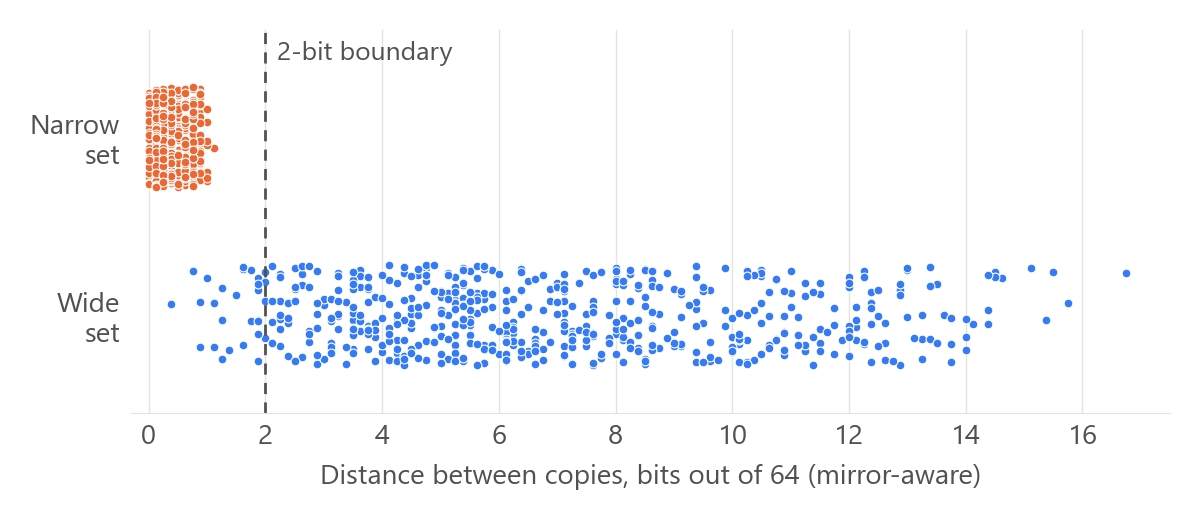
The key number is the distance of the closest pair. We tracked it as the set grew. The mirror-aware distance, in bits:
| Copies in the set | Samsung | iPhone | Huawei |
|---|---|---|---|
| 5 | 1.25 | 5.12 | 2.00 |
| 10 | 0.88 | 1.25 | 1.88 |
| 20 | 0.88 | 0.75 | 0.38 |
As the set grew, the distance of the closest pair shrank for all three videos. It cannot grow: new copies only add pairs. With twenty copies, every video had a pair closer than one bit. The closest pair of each video consists of mirror images of each other. By the plain hash they are 30.5-31.9 bits apart; mirror-aware, less than a bit. The Huawei video also has a second such pair closer than a bit: in it, both copies are mirrored.
How many copies stay different
Now for the answer to the question in the title. For each set we found the largest group of copies in which no pair is closer than the threshold. The distance is mirror-aware. Instagram does not publish its threshold, so the table has several thresholds. The wide set had 20 copies:
| Threshold, bits | Samsung | iPhone | Huawei |
|---|---|---|---|
| 1 | 19 | 19 | 18 |
| 2 | 16 | 16 | 13 |
| 3 | 10 | 13 | 9 |
| 4 | 8 | 10 | 6 |
| 6 | 4 | 6 | 4 |
The farthest copies of the narrow set were 1.12 bits apart. A threshold of two bits is almost twice as high. At a threshold of 1.5 bits, the narrow set leaves one copy per video. Some copies of the wide set will also have to go as too close. So a network of ten accounts needs a set of more than ten copies.
The platform’s threshold is unknown. With Meta’s open algorithm, the match threshold is chosen by whoever builds the system. According to Meta, with a 256-bit hash, thresholds of 30 bits, 20 bits and lower give good results 6. pHash has a different hash length and a different scale, so these numbers cannot be carried over to our measurement. The measurement also does not show how bits relate to reach on Instagram.
Sound and mirroring
Untouched sound matches completely
Advice from a Russian-language video on uniquification: “you can leave the sound alone” 10. The argument there is that social networks themselves allow using someone else’s audio. But if the sound is left alone, all copies have the same fingerprint. That is expected, and the measurement confirmed it. In the narrow set, the sound was not touched, and all 570 pairs had 100% of landmarks in common. By sound, twenty copies are one video. Whether Instagram compares sound when it looks for identical videos is unknown.
In the wide set, pitch and tempo changed, and the median share of common landmarks dropped to 7%. Per video: 10%, 2% and 6%. For copies of different videos, the share is 1.1% to 8.3%. The copies diverged strongly by sound. But for the Samsung video, any pair of copies has more landmarks in common than any two different videos. In the measurement, pitch and tempo changed together; we did not measure them separately.
Mirroring helps less than it seems
By the plain hash, a mirrored copy looks like a different image. In the study by McKeown and Buchanan, mirroring gave an average distance of 0.49 of the pHash length, that is, about 31 bits out of 64. This was tested on 250,000 images 5. Two unrelated images give the same 5.
But flip-aware matching takes mirroring into account: PDQ computes the hashes of the frame’s reflections in advance 6. In the pairs of our wide set where one copy of the two is mirrored, the mirror-aware comparison removed about four fifths of the distance.
How to build a set of copies for an account network
Four rules follow from the measurement.
First. You need edits of different kinds: color, frame geometry, timing and sound. Copies where only brightness, contrast and noise changed differed from one another by no more than 1.12 bits. In the study by McKeown and Buchanan, JPEG compression left the pHash unchanged for 83.9% of images 5. Cropping and a border shift the hash more 5. But cropping alone is not enough either. Researchers who study video copy detection still treat a video as a duplicate after changes to brightness, color, re-encoding, noise and cropping 8. That is why the recipe below adds timing and sound edits to them.
Second. Sound is changed together with the picture. In a 2014 paper, Six and Leman tested an open implementation of the Shazam scheme 19. The fingerprint survived time stretching. It did not survive a pitch shift of more than 3% or a simultaneous change of pitch and tempo. The authors’ own system, Panako, withstands pitch and tempo changes of up to ten percent. We covered this in more detail in the article on an ad creative uniquifier (in Russian). Our measurement did not separate pitch and tempo. It took frames at fractions of the length, so speed in it does not shift the picture.
Third. Mirroring is not the main edit. It works against a plain hash and does not work against flip-aware matching. Even against such matching, using it does no harm. But text in the frame reads backwards after a flip.
Fourth. Random values do not guarantee different copies. For the Huawei video, two copies got the same speed, pitch, mirroring and border. Their sound matched 100%, and their pictures were 1.88 bits apart. This was a single case: one pair out of 570. In our script the values were rounded to thousandths, which raised the chance of a match. That is why you make more copies than accounts and check the set in pairs after it is created.
How this works in Video Unique Booster
In Video Unique Booster, the number of copies is set by the “Number of unique copies of each video” setting. The default is 10. For each copy, the value of each edit is picked anew: a random number from the setting’s range. Mirroring in the “Randomly” mode is turned on for each copy with a probability of 50%. The random values themselves are not checked for closeness.
The “Similarity check” setting compares a new copy with the original and with each copy of the same video created before it. If the similarity to at least one of them exceeds the “Similarity threshold,” the program applies the action from the settings. The “Delete and recreate” action creates the copy again. The number of attempts is set by “Video re-creation attempts,” 10 by default. The check itself is off by default, and the default action is “Delete.”
We ran the code of this check on all 1,140 pairs of the measurement. The “Video indexing v2” method averages two comparisons: by the color of the frames and by the pHash of frames taken once per second. A frame counts as matching if the hashes differ by no more than 12 bits. The result is rounded up to the next multiple of 10%. Here is what came out at a threshold of 90%:
- Narrow set: 564 pairs out of 570 got 100%, the rest 90%. These copies have the same duration, and the check catches near-identical copies.
- Pairs where one copy of the two is mirrored got no more than 50%.
- The wide set has 24 pairs closer than two bits. The check caught one of them: the Huawei pair with the same speed and pitch. The other 18 pairs it caught are farther than two bits, up to 9.5 bits.
- The wide set has 7 pairs no farther than 1.12 bits apart, as in the narrow set. The check caught none of them, even though two of them have the same mirroring.
- Percentages and bits are only loosely related. A Huawei pair 0.88 bits apart got 80%, and a pair 9.5 bits apart got 100%. There are two reasons: the 12-bit tolerance per frame and frames taken once per second. When durations differ, those frames fall on different moments of the footage.
The check does not compare sound or mirroring. It catches near-identical copies only if their duration matches. In the recipe below, the duration changes for every copy. So for a network you can leave the check off: the selection is done by the script from the section “How to check a set yourself.”
Network settings, section by section
The numbers for the edits come from the article on an ad creative uniquifier (in Russian) and from the measurement. An arrow on a screenshot points to what needs to be changed. The numbers on a screenshot follow the same order as the settings in the text. Where there are no arrows, nothing needs to be changed.
First add the video to “Imported videos.” To do this, click “Import more videos” below the list or drag the file into the list. You can add all the videos for the network at once: the copies will be saved to one folder, and the script will sort them by video.

The other sections are opened with the icons on the left panel. The icons have no labels. Hover over an icon, and a card with a list of sections slides out to the right. Click the section you need. There are six icons, and their cards, from top to bottom, are: “MATERIAL,” “FRAME,” “STYLE,” “OVERLAYS,” “AUDIO,” “OUTPUT.” “Geometry and framing” and “Duration and transitions” are in the “FRAME” card. “Light and tone” and “Texture and detail” are in the “STYLE” card. “Video sound” is in the “AUDIO” card. “Export” is in the “OUTPUT” card of the bottom icon.

The “Export” section. Click the folder button to the right of the “Folder to save videos to” field and choose a folder for the copies. In “Number of unique copies of each video,” enter twice the number of accounts. For a network of ten, that is 20. In the “How to save” setting, choose “Into the results folder.” Then the copies of all the videos will be saved to one VUB_result_ folder with the date and time. A copy’s name is the video’s name plus the copy number. The VUB_result_ folder will appear inside the folder you chose. That is exactly the folder the script reads.

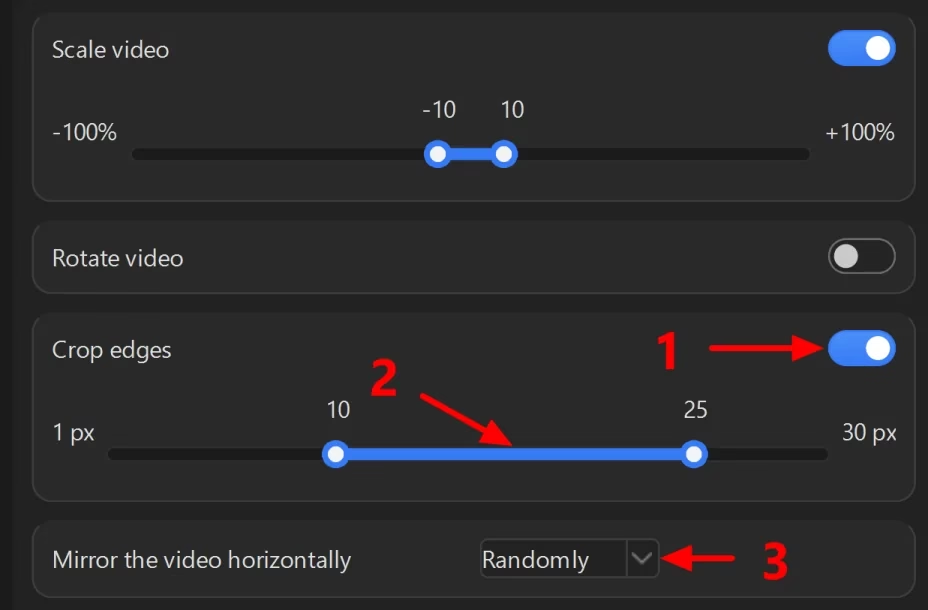
The “Geometry and framing” section. The “Scale video” setting is already on; leave it as it is. Turn on “Crop edges” and set it to 10 to 25 px. This is the cropping covered in the article on ad creatives. The default, 1-5 px, is weaker: the measurement cropped the edges by 19-96 px. Set “Mirror the video horizontally” to “Randomly” if there is no text in the frame. With text, choose “No”: mirrored text reads backwards. The script compares copies with mirroring taken into account.
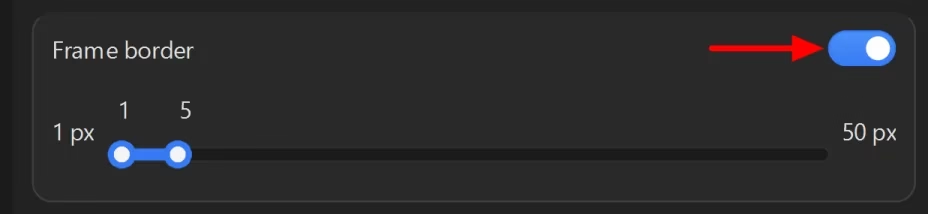
Further down in the same section, turn on “Frame border” and leave the slider as it is. That article shows a border of 2-6 px, but we have no measurement behind that number.
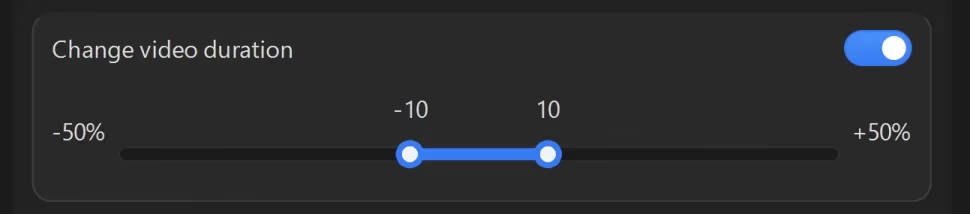
The “Duration and transitions” section is in the same card as geometry. The “Change video duration” setting is already on, from -10 to +10%. Leave it as it is. It stretches the picture together with the sound and does not change the pitch of a voice by itself. Together with “Change audio pitch,” both pitch and tempo change for each copy.
The “Light and tone” section. “Change brightness” and “Change contrast” are already on, from -10 to +10%. Leave them as they are. In the article on ad creatives the slider is set to 5-15%, but that is a spread of 10 points instead of 20. The narrower the spread, the closer the copies are to one another.

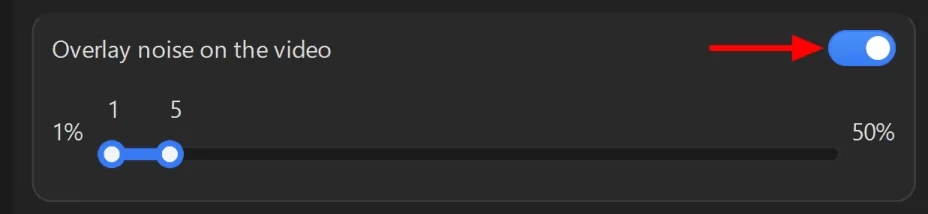
The “Texture and detail” section. Turn on “Overlay noise on the video.” We have no ready numbers for noise, so leave the slider as it is.
The “Video sound” section. Turn on “Change audio pitch” and leave the range of -5 to +5%. In the study 19, a pitch shift of more than 3% threw off the open implementation of the Shazam scheme, while the authors’ own system withstood up to 10%. But the value is picked at random. About three copies out of five will get a shift of less than 3%. The script does not check sound.

The program’s settings do not match the measurement’s edits in every respect. The program draws the border inside the frame, 1-5 px thick. The measurement added it outside, 12-36 px, and 46 copies out of 60 got a border. The program crops each edge by its own number of pixels, from 10 to 25, and stretches the frame back. The measurement cropped opposite edges equally. Noise in the program is 1 to 5; in the measurement it was 0 to 8. The program also has “Scale video,” ±10% by default, and the measurement had no such edit.
“Change sharpness” and “Change volume” are also on by default. You can leave them: in the program’s set below they were on in all 60 copies. Color correction is off in a new project. Until “Use color correction” is turned on in the “Color correction” section, only brightness and contrast affect the color of the copies.
When the settings are ready, click “Start” at the bottom of the window. The “Check before start” window opens. Click “Start” in it. If the window warns about the daily limit, you will get fewer copies than you set. In that case, check how many there are in the folder.
On September 24, we also built sets with the program’s own code, with exactly these settings. We did not turn on color correction; we did not measure a set with it. The videos were created by the same code that runs in Video Unique Booster. The same three videos, 20 copies of each: 60 copies and 570 pairs in total. The same measures. The distances are mirror-aware, in bits:
| The program’s set | Samsung | iPhone | Huawei |
|---|---|---|---|
| Median distance between copies | 6.62 | 8.12 | 5.44 |
| Closest pair | 1.75 | 1.75 | 1.0 |
| Copies at least 2 bits apart pairwise | 18 of 20 | 18 of 20 | 15 of 20 |
| Copies at least 4 bits apart pairwise | 8 of 20 | 8 of 20 | 7 of 20 |
| Sound, median share of common landmarks | 10% | 2% | 6% |
At a two-bit threshold, the program’s set kept 18, 18 and 15 copies, and the wide set from our script 16, 16 and 13. At four bits, 8, 8 and 7 versus 8, 10 and 6. We built one set per video, and with a different random draw of values the numbers could have come out differently. The program makes such copies for a whole folder of videos at once and without the command line.
There are pairs closer than two bits here too. For Huawei, the closest pair consists of mirror images of each other. We ran the code of the “Similarity check” on these sets: the “Video indexing v2” method, the default threshold of 90%, the “Delete” action. It would have removed 2, 1 and 5 copies. Among the remaining ones, the closest pair is 1.75, 1.75 and 1.25 bits apart. So check a set built by the program with the script from the section “How to check a set yourself” as well.
A set for a network of 50 accounts
On September 26, we built larger sets: 100 copies of each of the three videos. That is the “twice as many” margin for a network of 50 accounts. They were built by the same program code with the same settings. Each set has 4,950 pairs. The distances are mirror-aware, in bits:
| Set of 100 copies | Samsung | iPhone | Huawei |
|---|---|---|---|
| Median distance between copies | 6.5 | 8.25 | 6.12 |
| Closest pair | 0.75 | 0.62 | 0.75 |
| Copies at least 2 bits apart pairwise | 68 | 73 | 54 |
| Copies at least 4 bits apart pairwise | 16 | 25 | 10 |
| Closest pair among the 50 copies kept by the script’s selection | 2.25 | 2.5 | 1.88 |
With the best possible selection and a two-bit threshold, the “twice as many” margin was enough for all three videos: 54-73 suitable copies against the 50 needed. At four bits it was not enough for any of them: 10-25 suitable copies. The script’s selection is simpler than the best possible one. For the Huawei video, it kept 50 copies with a pair 1.88 bits apart, even though the set did have 54 copies at least two bits apart. By the rule below, the copies of this video are not ready yet: you need a new run of the program with more copies. We repeated this selection on the measured distances, not by running the script on the files.
How to check a set yourself
From each copy, 16 frames are taken at the same fractions of the length. For each frame and its mirror image, pHash is computed. For each frame of a pair of copies, the smaller of the direct and the mirrored distance is taken, then the average over the 16 frames. The pairs are sorted. What matters is the closest pair, not the average one.
Doing this by hand takes a long time, so below is a ready-made script. The steps for Windows:
- Install Python 12. During installation, check the option that adds Python to PATH.
- Download FFmpeg for Windows. The download page 13 links to ready-made builds, for example from gyan.dev 18. Unpack the archive and take the ffmpeg.exe file from the bin folder.
- Create a folder, for example D:\check. Put ffmpeg.exe in it.
- Save the script below to the same folder as check_pairs.py.
- Open the folder in File Explorer. Type cmd in the address bar and press Enter. A command prompt opens.
- Install the ImageHash 14 and Pillow 17 libraries with one command.
pip install ImageHash Pillow
The script:
import itertools, re, subprocess, sys, tempfile
from collections import defaultdict
from pathlib import Path
import imagehash
from PIL import Image, ImageOps

FRAMES = 16
HERE = Path(__file__).resolve().parent
FFMPEG = str(HERE / "ffmpeg.exe") if (HERE / "ffmpeg.exe").exists() else "ffmpeg"

def run(*args):
    return subprocess.run([FFMPEG, *args], capture_output=True, text=True, encoding="utf-8", errors="replace")

def hashes(video):
    h, m, s = re.search(r"Duration: (\d+):(\d+):([\d.]+)", run("-i", str(video)).stderr).groups()
    seconds = int(h) * 3600 + int(m) * 60 + float(s)
    plain, mirrored = [], []
    with tempfile.TemporaryDirectory() as tmp:
        for i in range(1, FRAMES + 1):
            frame = Path(tmp) / f"{i}.png"
            run("-v", "error", "-ss", str(seconds * i / (FRAMES + 1)), "-i", str(video), "-frames:v", "1", "-y", str(frame))
            image = Image.open(frame).convert("RGB")
            plain.append(imagehash.phash(image))
            mirrored.append(imagehash.phash(ImageOps.mirror(image)))
    return plain, mirrored

folder = Path(sys.argv[1])
accounts = int(sys.argv[2]) if len(sys.argv) > 2 else None
# A copy of "clip.mp4" is named "clip_7.mp4": the group is the name without the copy number.
groups = defaultdict(list)
for video in sorted(folder.iterdir()):
    if video.suffix.lower() in (".mp4", ".mov"):
        groups[re.sub(r"_\d+$", "", video.stem)].append(video)

for clip, videos in groups.items():
    print(f"== {clip}: {len(videos)} copies")
    if len(videos) < 2:
        continue
    data = {v.name: hashes(v) for v in videos}
    pairs = []
    for a, b in itertools.combinations(data, 2):
        (pa, ma), (pb, _) = data[a], data[b]
        distance = sum(min(x - y, xm - y) for x, xm, y in zip(pa, ma, pb)) / FRAMES
        pairs.append((distance, a, b))
    pairs.sort()
    for distance, a, b in pairs[:10]:
        print(f"{distance:5.2f}  {a}  {b}")
    if accounts:
        keep = set(data)
        while len(keep) > max(2, accounts):
            distance, a, b = next(p for p in pairs if p[1] in keep and p[2] in keep)
            keep.discard(b)
        closest = next(p for p in pairs if p[1] in keep and p[2] in keep)
        extra = folder.parent / (folder.name + "_extra")
        extra.mkdir(exist_ok=True)
        for name in sorted(set(data) - keep):
            (folder / name).rename(extra / name)
        print(f"Copies kept: {len(keep)}. Closest pair among them: {closest[0]:.2f} bits")
        print(f"Moved to {extra.name}: {len(data) - len(keep)}")
    print()
Run the script with the folder of copies and the number of accounts. The script splits the folder by video using the file name: a copy of “clip.mp4” is named “clip_7.mp4.” It does not read subfolders. If the path contains a space, put it in quotes:
python check_pairs.py "D:\VUB\Reels November\Done\VUB_result_24092026_153000" 10
The script takes .mp4 and .mov files. For each video it prints the ten closest pairs: the distance in bits and the names of the two files. Then it removes one copy at a time from the closest pair until the video has as many copies as accounts, but no fewer than two. It moves the removed copies to a neighboring folder with the same name and “_extra” at the end. Only the selected copies stay in the VUB_result_ folder; that is the folder to point your publishing software to.
Look at the “Copies kept” line: it shows the distance of the closest pair among the copies kept. If it is at least two bits, the copies of this video passed our boundary. This is a boundary of pair similarity, not of reach: we did not measure how bits relate to views. If it is under two bits, run the program on this video again with more copies and check the new VUB_result_ folder. We did not measure how many to add. But in the sets of 100 copies there were more suitable copies at two bits than needed: 54-73 for 50 accounts.
Two bits is a lower bound, not a guarantee. The script does not check sound. Its numbers differ from the measurement by up to 0.63 bits: the script and the measurement read the length of a video differently. Four bits is usually out of reach for a network: of 100 copies, only 10-25 stayed that far apart. If you do not give the number of accounts, the script only prints the pairs and moves nothing.
We ran it on a folder built by the program’s code with the settings from this article: two videos with 20 copies each, a network of 10 accounts. The copies are named the way the program names them. The output (for each video, the first three pairs out of ten):
== D01_V_indoor_panrot_0001: 20 copies
 1.00  D01_V_indoor_panrot_0001_13.mp4  D01_V_indoor_panrot_0001_16.mp4
 1.25  D01_V_indoor_panrot_0001_11.mp4  D01_V_indoor_panrot_0001_2.mp4
 1.25  D01_V_indoor_panrot_0001_12.mp4  D01_V_indoor_panrot_0001_14.mp4
Copies kept: 10. Closest pair among them: 3.00 bits
Moved to VUB_result_26092026_235740_extra: 10

== D03_V_indoor_panrot_0001: 20 copies
 1.38  D03_V_indoor_panrot_0001_14.mp4  D03_V_indoor_panrot_0001_19.mp4
 1.50  D03_V_indoor_panrot_0001_12.mp4  D03_V_indoor_panrot_0001_6.mp4
 1.62  D03_V_indoor_panrot_0001_15.mp4  D03_V_indoor_panrot_0001_16.mp4
Copies kept: 10. Closest pair among them: 2.50 bits
Moved to VUB_result_26092026_235740_extra: 10
Of the 40 copies in the folder, 20 remained, ten per video. The script moved the other 20 to the “_extra” folder. The closest pair among the copies kept is 3 bits apart for one video and 2.5 bits for the other, so both passed the two-bit boundary.

VUB_result_ folder, 10 per video, and the other 20 went to the neighboring “_extra” folderWhere this does not work
Besides the similarity of videos, the platform can link the accounts of a network by other signals. Instagram does not say which ones. People in the niche talk about the platform’s trust, which depends on how an account behaves. As a Russian-language affiliate marketing blog puts it: “It’s an invisible currency that decides whether your account lives for two hours or two months” 11.
The rule on unoriginal content applies to the account as a whole. The rules talk about substantial edits of other people’s material, such as meme templates 2. They call a border and a speed change, both of which are in our recipe, low-effort edits 2. This is a rule about other people’s material, not about matching identical videos. In 2025, our network published other people’s videos as unique copies, and these copies got views from recommendations. In April 2026, Instagram restated this rule 3. We have not checked how it affects such copies now.
We computed our own hashes, not Instagram’s. The measurement shows how similar the copies are for open algorithms. Reach on real accounts was not part of the measurement.
The measurement used sets of up to 100 copies, that is, a network of up to 50 accounts. With a hundred accounts, there are four times as many pairs. We have not checked whether the “twice as many” margin is enough there. In our network, a new video was first published on 30-50 accounts, and we do have a measurement for a group that size. This recipe has not been tested on our network either: we wrote the script for the measurement in September 2026, and the network ran in 2025.
Frequently asked questions
Where to start
Steps 1, 2 and 8 come from our network; the rest are the recipe from this article:
- Take accounts that are at least three months old. Do not add a bio with tags right away.
- Publish reach videos for five days, and only then videos with a link.
- Download Video Unique Booster from the home page.
- Turn on the edits section by section, as in “Network settings, section by section.” For mirroring, choose “Randomly” if there is no text in the frame. In the “How to save” setting, choose “Into the results folder.”
- Make twice as many copies of each video as there are accounts it will be published on.
- Check the
VUB_result_folder with the script, giving it the same number of accounts. It will move the extra copies to the “_extra” folder. If a video has a pair closer than two bits, create its copies again with a larger number. - Point your publishing software to the
VUB_result_folder: only the selected copies are left in it. - First publish a new video on 30-50 accounts. If there are no link clicks within a day or two, remove it.
Related reading:
- How to uniquify videos for Instagram (in Russian)
- Ad creative uniquifier: a hundred copies of one video for launching ads (in Russian)
- Video uniquifier for TikTok (in Russian)
- Video uniquifier for YouTube (in Russian)
Sources
- Malik A. Instagram is updating its ranking systems to surface more content from smaller, original creators. TechCrunch, 2024. ↩︎
- Instagram. Original content guidelines. Instagram for Creators. ↩︎
- Instagram. Rewarding original creators on Instagram. Instagram for Creators, 2026. ↩︎
- Instagram algorithm 2024 changes. Digital Music News, 2024. ↩︎
- McKeown S., Buchanan W. J. Hamming Distributions of Popular Perceptual Hashing Techniques. DFRWS EU 2023. ↩︎
- Meta. The TMK+PDQF video-hashing algorithm and the PDQ image-hashing algorithm. ThreatExchange, GitHub. ↩︎
- Wang A. L. An Industrial-Strength Audio Search Algorithm. ISMIR 2003. ↩︎
- Kordopatis-Zilos G., Papadopoulos S., Patras I., Kompatsiaris Y. FIVR: Fine-Grained Incident Video Retrieval. IEEE Transactions on Multimedia, 2019. ↩︎
- Discussion “Mass uploading of Reels to accounts”. Zismo.biz, 2023 (in Russian). ↩︎
- Markov D. Video uniquification for TikTok and Instagram: 5 methods. YouTube (in Russian). ↩︎
- Warming up accounts for different platforms. Pirate CPA, 2026 (in Russian). ↩︎
- Python: downloads page. Official project website. ↩︎
- FFmpeg: download page. Official project website. ↩︎
- ImageHash: a perceptual hashing library. GitHub. ↩︎
- Instagram. Add and switch between multiple accounts. Instagram Help Center. ↩︎
- Shullani D., Fontani M., Iuliani M., Al Shaya O., Piva A. VISION: a video and image dataset for source identification. EURASIP Journal on Information Security, 2017. ↩︎
- Pillow: installation. Project documentation. ↩︎
- FFmpeg: Windows builds. gyan.dev. ↩︎
- Six J., Leman M. Panako: A Scalable Acoustic Fingerprinting System Handling Time-Scale and Pitch Modification. ISMIR, 2014. ↩︎
- InstAccountsManager. Perfect.Studio. ↩︎
- Launching an Instagram account network. Teletype (in Russian). ↩︎
- KalininLive. How to upload Reels to 100+ accounts automatically. YouTube (in Russian). ↩︎
