
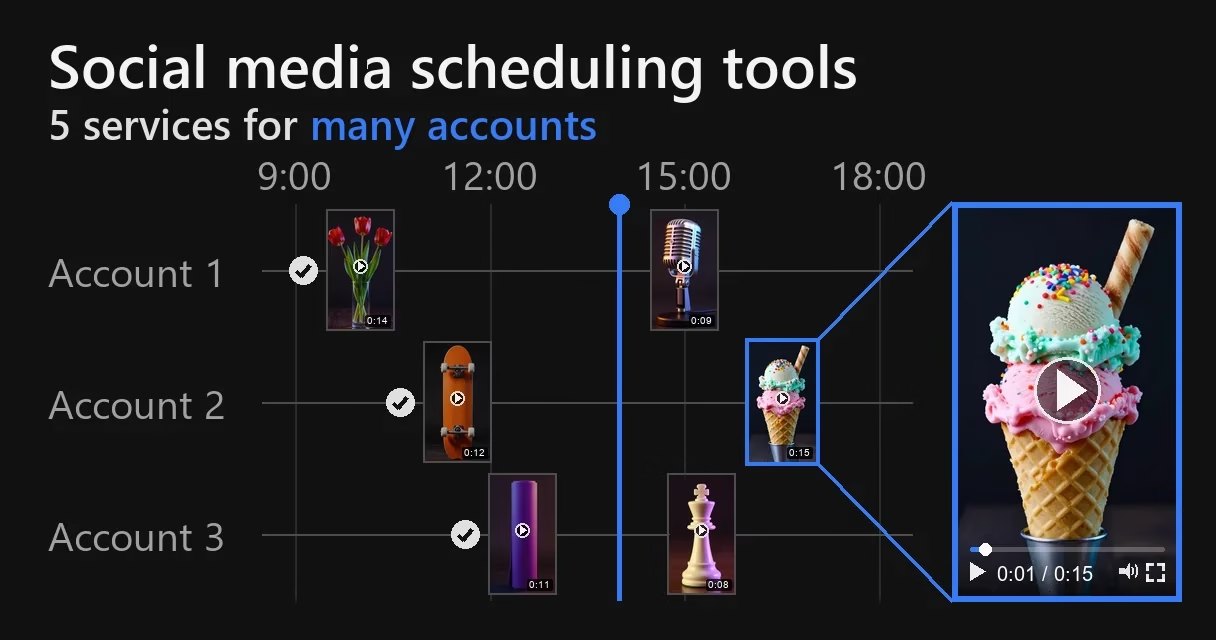
Twenty VK groups with new posts every day. Or thirty finished videos for ten accounts. Which social media scheduling tool should you pick? These services are also called autoposting, scheduled posting and cross-posting services. We read nine pages: six from the first page of Russian-language Google results for the Russian phrase for “best autoposting services” on September 25, 2026, and three from an additional search. None of them gives the video requirements of each platform for each service.
We are the Video Unique Booster team. Our program turns one video into many different copies. We have had to publish videos on a schedule to many accounts ourselves: in 2025, to an Instagram network of about 300 accounts. That experience is in the section “How we published”. Below are five social media scheduling tools, as described by their own pages and by user reviews, seven criteria for choosing, and our measurement: does re-encoding change a video’s frames when one video goes to ten accounts.
The short version. For dozens of VK groups and Telegram channels, of the prices we found, SmmBox is the cheapest per page: 15 pages for 1,000 ₽, 150 for 3,400 ₽. But it has no free trial, and on crmindex.ru, a Russian-language review site, it has 2.3 out of 5 from 12 reviews. If you need a trial before paying, four services out of five give a 7-day trial, and Onlypult and Postmypost give it without a bank card. If one video goes to dozens of accounts, the different copies have to be made before you upload them to the service. A post selected for all accounts is published by the service as one and the same file. We did not find a feature on the services’ pages that would make the copies different. For a network of hundreds of accounts with videos, we used account management software rather than a service.
Who this is for
People who run anywhere from five to a hundred accounts or groups. That is how SMM agencies, online sellers, affiliate media buyers and product owners with several profiles work.
And people who publish one post to several social networks at once. That is cross-posting.
If you have one account on one social network, you may not need a service: how to schedule a post with the platform’s own tools is covered in the FAQ.
Video Unique Booster for Windows: hundreds of unique copies in one goBy hand, you edit copy after copy. The program creates them in batches. Each copy gets its own image, sound, metadata and duration.
Video Unique Booster: video uniquification for WindowsYou add a video and set the setting ranges. The program creates hundreds of copies. Each has its own image, sound and duration.
Hundreds of unique copies from one original videoThe manual way runs into one problem. Each copy has to be edited separately. More copies take more time.
Unique video copies for TikTok, YouTube and InstagramYou set the setting ranges once. Then the Windows program creates copies in batches. Hundreds in one go.
Video uniquification for Windows – Video Unique BoosterYou add one video. The program creates hundreds of copies. Each has its own image, sound, metadata and duration.
Five scheduling services compared
We took the services that are named most often on these nine pages and publish to VK and Telegram. SMMplanner is named on seven, Postmypost on five, SmmBox on four. Onlypult is named on three, LiveDune on two. Eight services came up with two mentions. Of these, we took LiveDune: its pricing page lists VK, Telegram, Reels, TikTok and Shorts 10. All five publish both to VK and to Telegram 59102930.
| Service | Reels, TikTok, Shorts | Account sign-in | Many posts at once | 10 accounts a month | Free trial |
|---|---|---|---|---|---|
| SmmBox | all three 9 | official API only, according to the service 9 | a folder of up to 1,000 files, a CSV spreadsheet; per the documentation, folder upload starts at the EXPERT plan 923 | 1,000 ₽, the plan for 15 pages 9 | no; there is a money-back guarantee 9 |
| LiveDune | all three 10 | official API only, according to the service 41 | one video to Reels, TikTok, Shorts and VK Clips at once; no folder or spreadsheet upload 50 | 3,900 ₽ 10 | 7 days 10 |
| Onlypult | all three 2932 | a token issued by the social network; passwords are not stored 11 | a CSV spreadsheet of up to 100 posts 32 | $50: $25 for 5 profiles and 5 × $5 on top 11 | 7 days, no card 11 |
| Postmypost | Instagram, TikTok, YouTube in the list 30 | promises connection without sharing passwords 30 | one post to all selected accounts at once 52; we found no spreadsheet or folder upload | 1,559 ₽ for the Content module 21 | 7 days, no card 21 |
| SMMplanner | Reels; TikTok only as a source of reposts, YouTube not found as a publishing platform 27 | official API; for Instagram there is also sign-in with a login and password 27 | no bulk upload found; a 2020 review complains there is no “batch adding of posts” 46 | 1,350 ₽ 24 | 7 days: 5 accounts, 10 posts 28 |
We compiled the table from the services’ pages on September 26 and 27, 2026. For each one we opened several pages: the home page, pricing and, where we could open it, the help center. Postmypost’s price is computed by a calculator on its pricing page; we got it in a browser. “Not found” means it is not on the pages we read, not that the feature doesn’t exist.
We left out four services. Buffer and Hootsuite are named on five and four of the search result pages, but neither VK nor Telegram is in their plans 3536. NovaPress is named on three, but on September 26, 2026 its site showed neither pricing nor a list of platforms 39. Amplifr is also named on three, but it no longer exists as a separate service. Its site says: “Amplifr has moved to SMMplanner” 20.
Which one to choose depends on what you publish.
VK groups and Telegram channels with posts. All five services publish there, and it pays to compare them first of all by price per page. For dozens of groups SmmBox is the cheapest; the prices are in the section “What the tenth account costs”. For 4-5 groups, 5 pages at SMMplanner cost 675 ₽ on its pricing page or 990 ₽ according to its help center 728, and 5 accounts at Postmypost cost 949 ₽ for the Content module, that is, publishing 21. If 675 ₽ applies, SMMplanner is cheaper; if 990 ₽, Postmypost is.
Dozens of short videos for Reels, TikTok and Shorts. SmmBox, LiveDune and Onlypult have all three platforms 9102932. Two services describe uploading many files at once. SmmBox accepts a folder of up to 1,000 files 9. On its pricing page this upload is listed in all four plans 38, while the documentation says: “This tool is available only to EXPERT, BUSINESS and PERSONAL users” 23. EXPERT costs 1,700 ₽ for 50 pages (the English version of the site calls this plan VIP). One caveat. The author of a Russian-language YouTube review from January 2025 names a limit for folder upload in SmmBox: “no more than 20 MB” 26. The pricing page says “The maximum size of files you can upload to the server is 200 MB” 38 and says nothing separately about folders. If your videos are larger than 20 MB, check this on the very first day. Onlypult accepts a CSV spreadsheet where a video is given as a link to a file in the cloud 32.
You need a trial before paying. LiveDune, Onlypult, Postmypost and SMMplanner have a 7-day free trial 10112128. Of these, only Onlypult describes uploading many posts at once 32. The page doesn’t say whether the import works during the trial.
You don’t need VK or Telegram. Then look at Buffer as well: it has Instagram, TikTok and YouTube, 3 channels for free, and the paid Essentials plan costs $5 a month per channel when billed annually 35.
What users say
Reviews of all five services turned up on one site, crmindex.ru, in its section on scheduled posting services. We collected them on September 27, 2026 4243444546.
| Service | Average rating | Reviews | Years of reviews |
|---|---|---|---|
| Postmypost | 4.9 out of 5 | 50 | 2020-2026, 28 of them from 2026 |
| Onlypult | 3.8 out of 5 | 16 | 2020-2025 |
| LiveDune | 3.3 out of 5 | 29 | 2023-2026 |
| SmmBox | 2.3 out of 5 | 12 | 2020-2026 |
| SMMplanner | 5 out of 5 | 1 | 2020 |
Two kinds of complaints come up again and again. The first: money was charged without consent, after the trial or after the subscription was canceled. LiveDune has five such reviews, SmmBox two, the other three none. A 2026 review of SmmBox: “it starts charging money by autopayment without your consent!” 42. The second: posts did not go out or went out irregularly. Onlypult has four such reviews, SmmBox two, LiveDune one. A 2024 review of Onlypult: “When I tried to test this app on three accounts, the posts never went out” 43.
The same services are praised for other things. A 2024 review of Onlypult: “A wide choice of social networks, posts go out on time” 43. A 2023 review of SmmBox: “In about 4 years it hasn’t disappointed me at all” 42, although the same review complains about a charge.
The site is open: it doesn’t check who writes a review. So on this site it makes sense to compare repeated complaints rather than a single rating. Of the 50 reviews of Postmypost from 2020-2026, 28 were written in the first nine months of 2026. More than half of the reviews come from a single year, so we don’t treat this rating as evidence. SMMplanner has one review, and one review is not enough to judge a service.
The takeaway from the reviews is simple. When you start a trial, check in your account the same day whether auto-renewal is on, and turn it off if you haven’t decided to pay.
Each service in brief
SmmBox
It says so plainly: “SmmBox works only through the official APIs of social networks: you don’t give us your passwords, you connect pages through the social network’s own authorization” 9. Besides folder upload, there is CSV import and an “automatic time shift”: a post goes out with a random shift of up to 15 minutes 9. There is no free trial; instead there is a “100% money-back guarantee” 9. In a 2026 review on crmindex.ru, a user writes that the money taken by autopayment was not refunded 42. It suits those who have dozens of groups and videos and are ready to test the service during the first paid month.
Onlypult
Platforms in its list: Instagram, TikTok, YouTube, Telegram, VK and nine more 29. An account is connected with a token issued by the social network, and the service does not store the password 11. To add many posts at once, you use a CSV spreadsheet of up to 100 rows. In it, each video is given as a link to a file, for example in Dropbox or Google Drive 32. Complaints on crmindex.ru: in 2025, “big problems with posting to TikTok”; in December 2025, tokens “need to be renewed every 2 weeks” 43. It suits those who keep their files in the cloud and want to test the service before paying.
LiveDune
It lists Instagram with Reels, VK with Clips, Telegram, TikTok, and YouTube with Shorts 10. It doesn’t ask for logins and passwords and works through the official API 41. According to its help center, a post with a vertical video is published at once to Reels, TikTok, Shorts and VK Clips, and files are added to a post by dragging them in or choosing them on the computer: there is no folder or spreadsheet upload 50. For TikTok the same help center has a caveat: the service does not bypass the restrictions TikTok places on publishing in some countries 51. There is free autoposting: with the promo code “автопостинг” (Russian for “autoposting”), publishing to already connected accounts stays available after the trial, but you can’t add new accounts beyond your previous plan 47. A 2026 review praises its analytics, and five reviews complain about charges: money was taken without consent or after the subscription was canceled 44. It suits you if you have few videos but many platforms.
Postmypost
It promises to connect social networks without sharing passwords 30. A post is prepared in one window for all selected accounts at once, and you can make a separate version for a particular social network 52. We did not find uploading of many posts by spreadsheet or folder on its pages. The price is computed by a calculator from the number of accounts and modules: the Content module, that is, publishing, costs 949 ₽ a month for 5 accounts, 1,559 ₽ for 10 and 8,879 ₽ for 100 21. Videos up to 300 MB, up to 5 GB on the Advanced plan 21. A 2025 review on crmindex.ru names the price as a downside: “the price is somewhat higher than others, but on the annual plan it’s fine” 45. On Partnerkin, a Russian-language affiliate marketing site, it is also called more expensive than its alternatives 40. It suits those who need post approval and team access.
SMMplanner
For Instagram it has two ways of publishing. The first is the official Instagram API. The second is called the “extended API” on the site: posts are published “by emulating an Android mobile device”, and when connecting you enter your login and password 27. VK, Odnoklassniki and Telegram are connected through official APIs 27. TikTok is named only as a source of reposts, and we did not find YouTube as a publishing platform 27. The free trial gives 7 days, 5 accounts and 10 posts, video included 28. The free plan gives 100 posts with no limit on accounts, but without video and GIFs 28. It is a good fit for Instagram, VK, Telegram and the MAX messenger.
Seven criteria for choosing
How the service signs in to your account
There are two ways. The official one: you click “connect”, and the platform opens its own sign-in page. There it asks you for permission. The service doesn’t see your password. The second way: the service asks for your login and password in its own form and signs in on your behalf.
The second way is still in use in 2026. At SMMplanner it is called the “extended API” for Instagram, and the service’s home page has the question: “Is it safe to enter my login and password when connecting an Instagram account to the service through the SMMplanner extended API?” 27. A 2021 post on the SMMplanner blog says about the same method: “Users of such services have to trust the developers”, and adds that the social network may sometimes reset the password 25.
On password sign-in to many accounts at once, we found one discussion, from 2019 on Habr Q&A, a Russian-language Q&A site. A participant wrote there that he signs in to three accounts with a password, and got the reply: “with 100 you’ll get an instant ban on the accounts” 12. That is one person’s opinion. Our own experience with password sign-in is in the section “How we published”: across hundreds of accounts, platform checkpoints were frequent.
How to tell them apart: click “connect” and look at the address in the browser bar. If the address is on the Instagram, Facebook, TikTok or Google site, the connection is official. If the service asks for the password in its own window, it isn’t. This is also how it looks in someone else’s video: the author of a 2018 Russian-language review clicks “Connect account” in SmmBox and is redirected to Twitter, where he grants the service access 48.
How many posts a day the platform will let through
An official connection goes through the platform’s interface for programs, the API. It has its own limits. The service’s plan doesn’t lift them.
| Platform | Limit | Source |
|---|---|---|
| 100 API-published posts per account within a moving 24-hour period; a carousel counts as one post | Meta 1 | |
| 400 containers created per account in 24 hours | Meta 2 | |
| TikTok | typically about 15 posts a day per creator account | TikTok 3 |
| TikTok | an unaudited app publishes only in private viewing mode (“Only you”) and for no more than 5 users in 24 hours | TikTok 3 |
| YouTube | 100 video uploads a day per developer project by default | Google 4 |
Two rows here matter more than the rest.
The first is TikTok. Until TikTok has audited a service’s app, posts published through it are visible only to the author 3. No more than 5 users a day can publish through such an app 3. So a large service can’t work without the audit, while a new or small one may not have it.
The second is YouTube. The limit of 100 uploads is counted per developer project 4. If a service uploads the videos of all its clients through one project, those 100 uploads are shared by everyone. Whether Google has raised the quota for a particular service can’t be seen from the outside. Ask about it before paying.
The services’ help centers also give numbers lower than Meta’s current one. SMMplanner’s help center: “No more than 50 posts can be published to an account via the API within 24 hours” 5. SmmBox’s help center gives 25 posts a day for Instagram 8. LiveDune’s help center gives the same 50 for Instagram and 250 posts a day per group admin for VK, and for TikTok and YouTube the service advises no more than five a day 51. Meta’s documentation says 100 1. Until support gives you a different number, plan by the lower one. Our network needed three videos a day per account; we never came close to these numbers.
Will the service accept your file
For Reels published via the API, Instagram’s requirements are 2:
- MP4 or MOV container.
- H.264 or HEVC video, AAC audio.
- Frame rate from 23 to 60 frames per second.
- Frame width up to 1920 pixels, recommended aspect ratio 9:16.
- Duration from 3 seconds to 15 minutes.
- File size up to 300 MB.
For publishing via the API, TikTok specifies MP4 with H.264 22.
The services have their own size limits:
- SmmBox: Reels, TikTok and Shorts, 200 MB; VK, 200 MB; Telegram, 49 MB 8.
- SMMplanner: VK, up to 15 minutes and 300 MB; Telegram, up to 50 MB for all the files of a post 5.
- Onlypult: up to 100 MB on the entry plan, up to 300 and 400 MB on the higher ones 11; for spreadsheet import, from 100 to 500 MB per file 32.
- Postmypost: 300 MB on the Standard and Premium plans, 5 GB on Advanced 21.
- LiveDune: Reels, 500 MB; TikTok and Shorts, 200 MB; Telegram, 45 MB 51.
Check the size of your files before you upload them.
Where a video ends up can also be decided by a rule of the service. At SMMplanner, for VK, “all vertical and square videos up to 1 minute long are uploaded as clips” 5.
What the tenth account costs
Services call connected accounts different things: “pages”, “accounts”, “profiles”. For dozens of accounts, what matters is what each account beyond the entry plan costs.
| Service | Entry plan | Accounts included | If you need more |
|---|---|---|---|
| SMMplanner | Beginner: 990 ₽ a month according to the help center, 675 ₽ on the pricing page | 5 pages | Pro, 1,350 ₽ for 10 pages |
| SmmBox | START, 500 ₽ a month | 3 pages | PRO, 1,000 ₽ for 15; EXPERT, 1,700 ₽ for 50; BUSINESS, 3,400 ₽ for 150 |
| LiveDune | Blogger, 2,300 ₽ a month | 5, no more on this plan | Business, 3,900 ₽ for 10 plus 300 ₽ for each extra one; Agency, 14,900 ₽ for 50 plus 50 ₽ for each extra one |
| Onlypult | start, $25 a month, $17.50 when billed annually | 5 profiles | an extra profile: $5 a month |
| Postmypost | Standard, Content module: 949 ₽ a month | 5 accounts | 10 for 1,559 ₽, 100 for 8,879 ₽; the price is computed by a calculator |
The prices are taken from the services’ pages on September 26 and 27, 2026 791011212428. Two SMMplanner pages disagree on the price of Beginner. Which one applies when you pay can’t be seen from the outside. If you pay SMMplanner for 12 months, you pay for 8 7. LiveDune also has two numbers on one page: the Agency card says 100 accounts, the pricing table says 50 plus 50 ₽ for each extra one 10.
A hundred accounts a month at the prices we found:
- SmmBox: 3,400 ₽ for the plan with 150 pages 9.
- Postmypost: 8,879 ₽ for the Content module 21.
- LiveDune: 14,900 ₽ if the Agency card is right, or 17,400 ₽ by the pricing table 10.
- Onlypult: $500 if you add profiles to the start plan: $25 for 5 profiles and 95 × $5 on top 11. We did not find the prices of its higher plans on its page.
But one SmmBox project, where a post is published to all pages with one button, holds 30 pages on the 150-page plan 38. A hundred accounts will have to be split into several projects. We did not find SMMplanner’s prices for this volume.
Can you upload many posts at once and spread them over a schedule
A hundred videos one at a time means clicking “add file” a hundred times. So for dozens of videos this is the biggest convenience factor.
With folder upload in SmmBox, each file becomes a separate post 23. There you also set the interval between posts and a schedule: time slots for each day of the week. For a new post the service itself suggests a time and date from this schedule 23. Posts from a folder can be shuffled “randomly so that the upload order is different” 23. Onlypult takes a different route: a CSV spreadsheet with links to files 32. The other three describe their publishing calendar on their public pages only in general terms.
Separately, check how one post is published to several accounts at once. In SmmBox it is enough to “check the boxes of the groups you need” 23. For text this is convenient, for video it isn’t; the section on our measurement explains why.
Can you work as a team and see analytics
An agency needs access for its staff and reports on its accounts. The pages of all five services list both; the limits differ.
| Service | Team | Analytics |
|---|---|---|
| SmmBox | up to 2 editors on EXPERT, up to 10 on BUSINESS; an editor sees only their own groups 9 | likes, reposts, comments and reach by group 9 |
| LiveDune | 1 user on Blogger, 2 on Business, 5 on Agency; each extra teammate costs 500 ₽ 10 | export to PDF, XLS or Google Sheets 41 |
| Onlypult | from 2 to 100 people, roles and post approval 11 | a separate Analytics product 11 |
| Postmypost | Team module: access and post approval 21 | Analytics module: reach, audience, posts 21 |
| SMMplanner | teams and roles 27 | analytics on all plans 27 |
At Postmypost, the team and analytics are separate modules in the calculator 21; at LiveDune you pay extra for staff beyond the plan 10.
How to test a service at your volume
The services restate the platforms’ limits, but on the pages we read, none of the five names its own limit (how many posts a day the service itself can handle across all its clients). Yet there are reviews about posts that never went out: on crmindex.ru, Onlypult has four, SmmBox two, LiveDune one 424344. A person who runs “about 40 accounts at the same time” writes about SMMplanner: “Posts sometimes not only fail to go out but disappear from the planner completely” 13.
So it is worth spending the trial on a test:
- Connect as many accounts as the trial allows. At SMMplanner that is 5 28.
- Schedule several posts for each account over the next 24 hours, including your largest video.
- The next day, open each account and check whether all the posts went out. On TikTok, check that the video is visible to more than just you.
- You will connect the full number of accounts in the first paid month. Keep checking that the posts go out during that month too.
How we published
We ran an Instagram network of about 300 accounts from March to August 2025. We published only Reels, three a day per account: at 7 a.m., noon and 6 p.m. The videos were published by the account management software InstAccountsManager 49, with no manual uploads. In it we specified the folder to take the videos from. Video Unique Booster saved the finished copies to that same folder.
A snapshot of part of the network exported from the software has 217 accounts and 6,690 published Reels, a median of 21 videos per account. All of them went out without manual uploads. The network paid off: in the month described in our case study, it brought in $4,046 in revenue, $3,750 of it net.
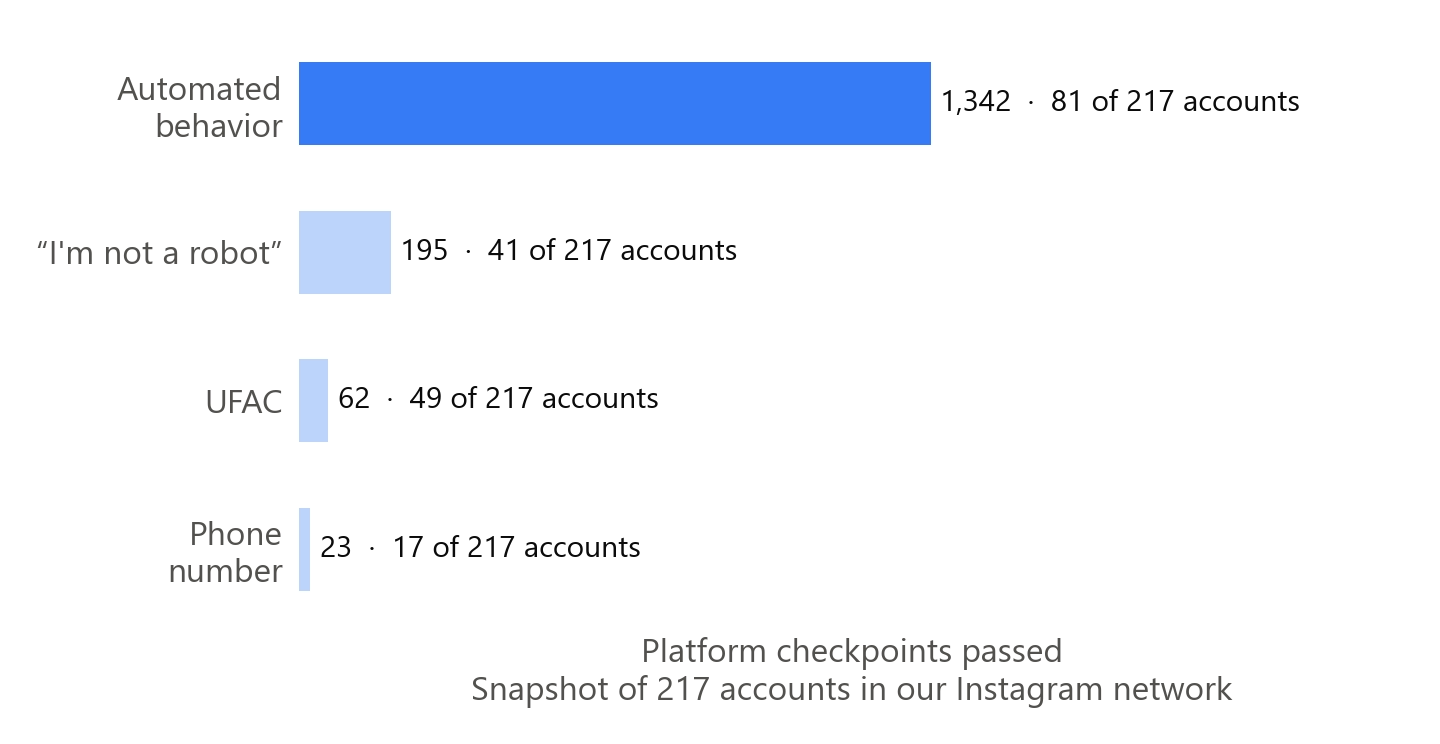
InstAccountsManager is a desktop program for Instagram. Its page lists tasks with their own schedules and proxy support; the price is $99 a month, with “Completely unlimited!” written next to it 49. The program signs in to accounts with a login and password: in the same snapshot, one account out of 217 has the status “Incorrect login and/or password” (translated from the program’s Russian interface). There is no official connection here. Platform checkpoints were frequent for us: by our estimate, the platform sent about 60% of the accounts that published Reels through various checkpoints, and the accounts had to be recovered. In the snapshot, which covers only part of the network, 84 accounts out of 217 passed at least one checkpoint. Most often it was the automated behavior checkpoint: according to the snapshot, 1,342 checkpoints passed across 81 accounts out of 217.
Copies of one video did not go into the network back to back. We made copies of about 50 videos at once, and they went out mixed together. If you lay out copies on a service’s schedule, do the same: don’t put all the copies of one video at the same hour.
That sets the limit of this comparison. We judge how the five services work by their pages, platform documentation and user reviews, not by our own publishing. More about our Instagram network is in the article about an Instagram account network (in Russian).
Make copies different before uploading them: our measurement
When one post is published to all accounts, each selected account gets the same video. We did not find a feature on the five services’ pages that would make copies different. During upload and publishing, the file may be re-encoded by the service or by the platform. Could that by itself make the copies different? We checked how much the frames change along the way.
How we measured
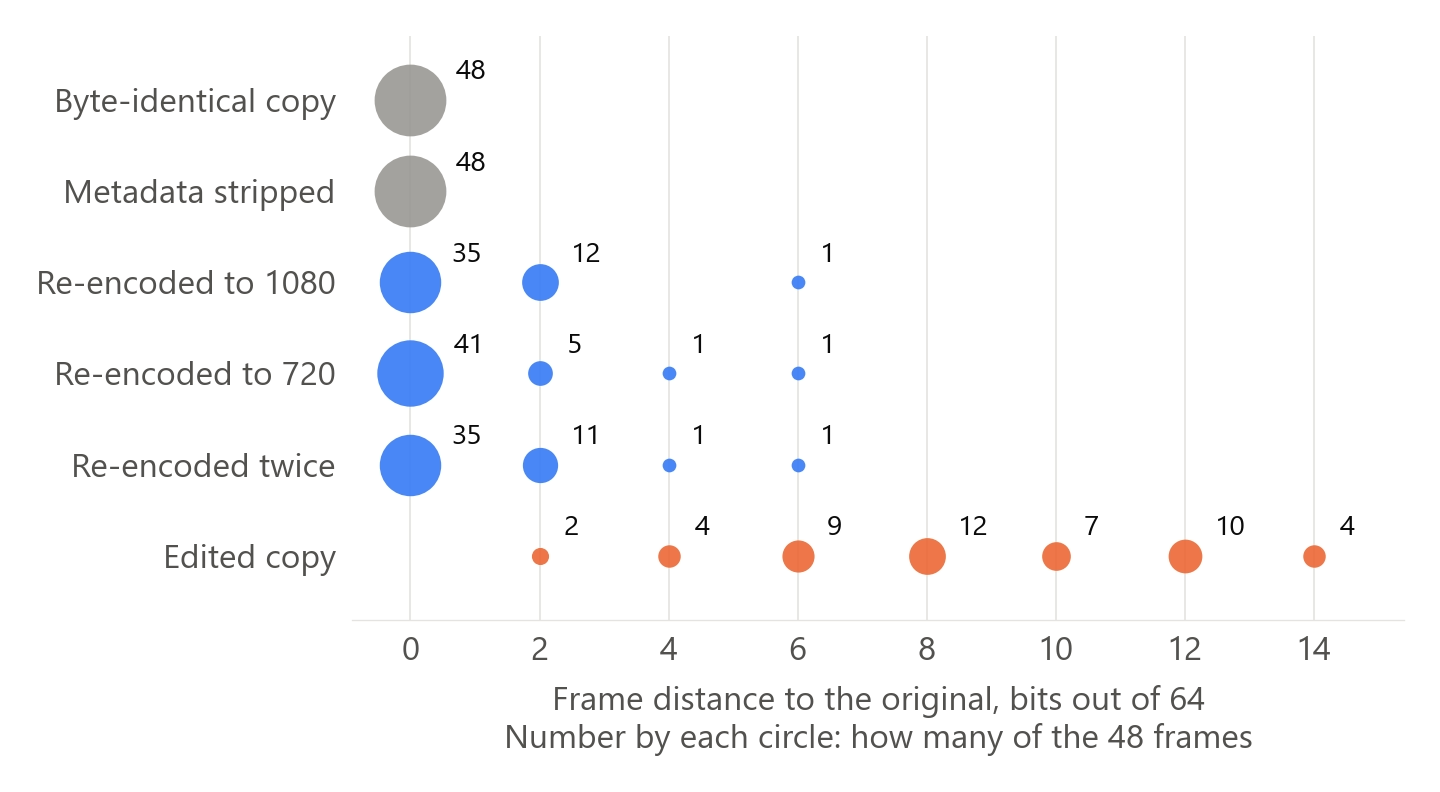
We did the measurement on September 26, 2026. We did not connect the services, so we re-encoded the videos ourselves with FFmpeg 37. We took three phone videos from the open VISION video dataset 18, 12 seconds each. These are horizontal shots with a camera pan, not vertical videos. We compared each copy with its own original, and the re-encoded copies of one video also with each other. We made three re-encoded copies with the H.264 codec: one to a width of 1080 at crf 28 and one to a width of 720 at 1.5 Mbps. The third was re-encoded twice in a row: first to 1080, then to 720. For comparison we made an edited copy: a 6% edge crop, a border, speed 1.04, brightness +0.03 on FFmpeg’s scale from -1 to 1. We measured similarity with the pHash perceptual hash 19, a 64-bit fingerprint of a frame. The fewer bits differ, the closer the frames are. We took 16 frames per video and averaged the distances.
What we found
| Variant | Mean distance to the original, bits out of 64, range across videos | Farthest frame, bits |
|---|---|---|
| Byte-identical copy | 0 | 0 |
| Metadata stripped | 0 | 0 |
| Re-encoded to 1080 | 0.38-1.12 | up to 6 |
| Re-encoded to 720 | 0.12-0.62 | up to 6 |
| Re-encoded twice | 0.50-0.75 | up to 6 |
| Edited copy | 7.62-9.38 | up to 14 |
A copy with stripped metadata is a different file, but the frames are the same. Re-encoding shifted the fingerprint by no more than 1.12 bits on average. The edited copy shifted it by 7.62-9.38 bits. So after re-encoding, the frames of a copy hardly differ from the original. Re-encoded copies of one video differed from each other even less: 0.12-0.88 bits on average, 4 bits at the farthest frame. This measurement doesn’t show what threshold a platform uses to treat videos as different.
Our earlier measurement in the article on checking a video for uniqueness (in Russian) led to the same conclusion. There, after re-encoding with the same codec, the picture’s fingerprint shifted by 0.25 bits. And removing metadata (in Russian) doesn’t change the frames at all. In an independent test, Meta’s open-source video matching algorithm also recognized every video after a bitrate change 14.
What the rules say
Since 2024, out of several identical posts Instagram recommends only the original 15. Meta calls repetitive content a sign of spam, even at a low posting frequency 16. YouTube counts as spam large numbers of similar, automatically made videos with minimal changes 17.
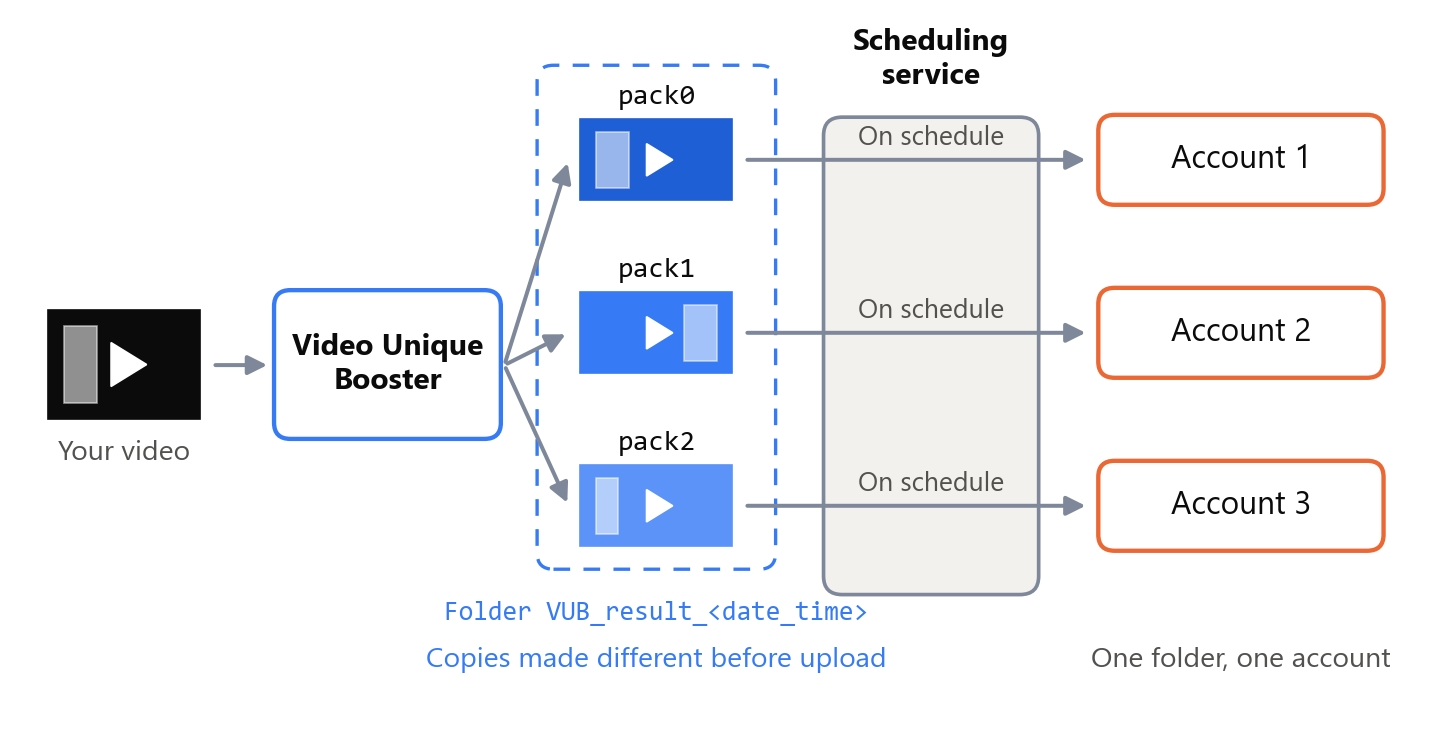
These rules lead to one conclusion: the same video is not published to ten accounts. If the accounts share material, you make copies, and you will have to make them before uploading: one folder, one account. But edited copies can also fall under YouTube’s rule on automatically produced similar videos if the edits are minimal 17.
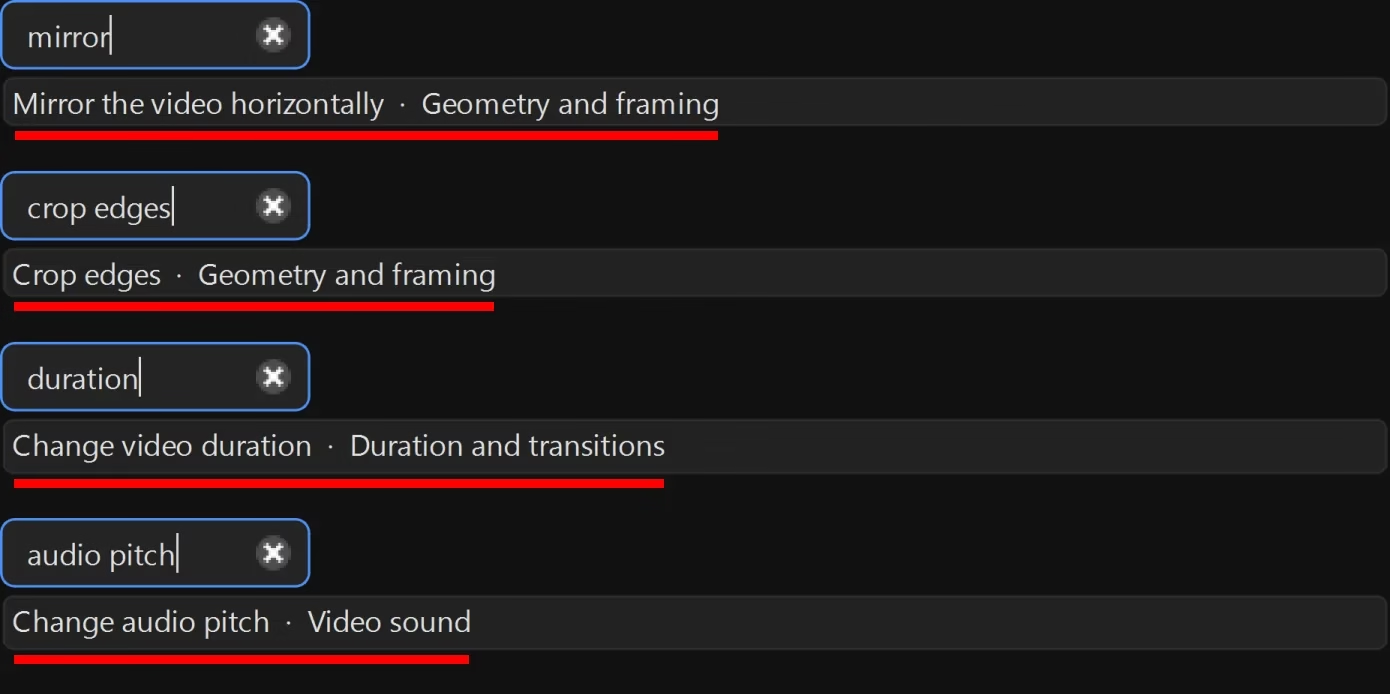
In Video Unique Booster, for most edits you set a range, and the program picks a random value for each copy. What matters is which edits you turn on. In the article about an Instagram account network (in Russian) we measured 120 copies. Copies where only brightness, contrast and noise changed differed from each other by no more than 1.12 bits. That is as much as re-encoding shifts a video’s fingerprint away from the original. Copies with mirroring, edge cropping, speed, audio pitch, a border and color differed more: the median distance between them was 6.38 bits, even when a mirrored copy is counted as the same picture. So turn on edits of different kinds: color, frame geometry, duration and sound. In the program these are, for example, “Mirror the video horizontally”, “Crop edges”, “Change video duration” and “Change audio pitch”.
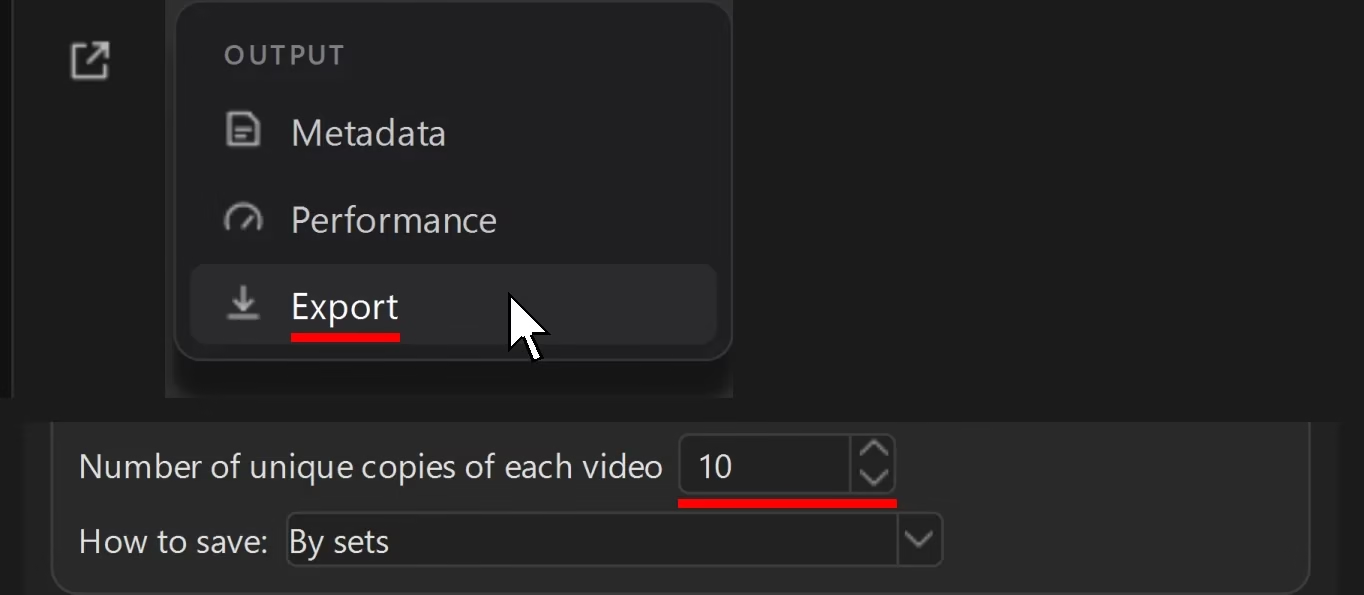
How many copies to make of each video is set by the “Number of unique copies of each video” field. The “How to save” setting with the value “By sets” puts the copies into folders: pack0, pack1 and so on. In a new project it is selected by default. You upload the pack0 folder to the service for the first account, pack1 for the second. In SmmBox, with folder upload you first choose the account, then the files 26. In Onlypult you choose the social network before importing the spreadsheet 32.
The platforms don’t say how much a copy has to differ. As an example of a significant change, Instagram gives a meme and a parody 15.
What we did not test
We did not connect the services from this comparison to our accounts and did not use their trials: we published to our network with account management software. The tables are compiled from the services’ own pages and platform documentation as of September 26 and 27, 2026. Limits and prices change.
The reviews come from one open site. We did not verify whether they are genuine.
We could not open VK’s official documentation on video upload. So VK’s limits are given only from the services’ help centers.
We did not compare the reach of videos published through a service and published manually. The measurement compares frame fingerprints and says nothing about impressions.
Frequently asked questions
Where to start
Here is the order:
- Use the comparison to pick a service that has all your platforms.
- During the trial, check where the connect button leads, and right away check whether auto-renewal is on.
- Schedule posts to all the trial accounts, including your largest video, and the next day check whether everything went out.
- Ask support about the TikTok audit, the YouTube quota and the service’s own daily limit.
- If one video goes to different accounts, prepare different copies before uploading them to the service. In Video Unique Booster that is “Number of unique copies of each video” and “How to save” set to “By sets”: one folder per account.
Further reading:
- Instagram account network: how many copies of a video stay different (in Russian)
- Batch video processing software (in Russian)
- Making videos unique for TikTok (in Russian)
- How to make videos unique for Instagram (in Russian)
Sources
- Meta for Developers. Content Publishing – Instagram Platform. ↩︎
- Meta for Developers. IG User Media – Instagram Graph API. ↩︎
- TikTok for Developers. Content Sharing Guidelines. ↩︎
- Google for Developers. YouTube Data API – Quota Calculator. ↩︎
- SMMplanner. SMMplanner service features. Knowledge base (in Russian). ↩︎
- SMMplanner. Connecting an Instagram account (official API). Knowledge base (in Russian). ↩︎
- SMMplanner. The Beginner plan. Knowledge base, 2025 (in Russian). ↩︎
- SmmBox. Social network limits (in Russian). ↩︎
- SmmBox. Home page and pricing (in Russian). ↩︎
- LiveDune. Pricing (in Russian). ↩︎
- Onlypult. Pricing and payment (in Russian). ↩︎
- How do I set up autoposting of content to Instagram for users on a website? Habr Q&A, 2019 (in Russian). ↩︎
- SMMplanner reviews. Partnerkin (in Russian). ↩︎
- Dalins J., Wilson C., Boudry D. PDQ & TMK + PDQF – A Test Drive of Facebook’s Perceptual Hashing Algorithms. arXiv, 2019. ↩︎
- Malik A. Instagram is updating its ranking systems to surface more content from smaller, original creators. TechCrunch, 2024. ↩︎
- Meta. Spam – Community Standards. Transparency Center. ↩︎
- YouTube. Spam, deceptive practices and scams policies. YouTube Help. ↩︎
- Shullani D., Fontani M., Iuliani M., Al Shaya O., Piva A. VISION: a video and image dataset for source identification. EURASIP Journal on Information Security, 2017. ↩︎
- ImageHash: a perceptual hashing library. GitHub. ↩︎
- Amplifr. Payment (in Russian). ↩︎
- Postmypost. Pricing (in Russian). ↩︎
- TikTok for Developers. Content Posting API – Get Started. ↩︎
- SmmBox. Documentation (in Russian). ↩︎
- SMMplanner. The Pro plan. Knowledge base, 2025 (in Russian). ↩︎
- Slyusarev I. A service asks for your account login and password: is that OK? OK! SMMplanner blog, 2021 (in Russian). ↩︎
- A full breakdown of autoposting to ALL social networks in 5 minutes a day. YouTube, Onlayn monetizatsiya channel (in Russian). ↩︎
- SMMplanner. Home page (in Russian). ↩︎
- SMMplanner. Autoposting: plans, trial and free plan (in Russian). ↩︎
- Onlypult. Home page. ↩︎
- Postmypost. Home page. ↩︎
- SMMplanner on the App Store. Apple (in Russian). ↩︎
- Onlypult. Import posts in Onlypult. ↩︎
- Southern M. G. Instagram Lets Users Schedule Posts & Reels In The App. Search Engine Journal, 2022. ↩︎
- Telegram. Scheduled Messages, Reminders, Custom Cloud Themes and More. Telegram blog, 2019. ↩︎
- Buffer. Pricing. ↩︎
- Hootsuite. Plans. ↩︎
- FFmpeg. Official website. ↩︎
- SmmBox. All plan features (in Russian). ↩︎
- NovaPress. Home page. ↩︎
- Postmypost reviews. Partnerkin (in Russian). ↩︎
- LiveDune. Autoposting to Instagram (in Russian). ↩︎
- SmmBox: service reviews. crmindex.ru (in Russian). ↩︎
- Onlypult: service reviews. crmindex.ru (in Russian). ↩︎
- LiveDune: service reviews. crmindex.ru (in Russian). ↩︎
- Postmypost: service reviews. crmindex.ru (in Russian). ↩︎
- SMMplanner: service reviews. crmindex.ru (in Russian). ↩︎
- LiveDune. Free autoposting (in Russian). ↩︎
- SMMBox: autoposting and scheduled posting to VK, Instagram, Telegram and Facebook. YouTube, Dmitry Tatarinov channel, 2018 (in Russian). ↩︎
- InstAccountsManager. Perfect.Studio (in Russian). ↩︎
- LiveDune. How to create a post in Autoposting. LiveDune Wiki (in Russian). ↩︎
- LiveDune. Limits in Autoposting. LiveDune Wiki (in Russian). ↩︎
- Postmypost. How to schedule posts to several accounts (in Russian). ↩︎
