
Anyone who re-uploads videos knows this scenario. The video is published a second time. It gets no reach. The metadata has been cleaned, the file re-saved, the file size is different. Still no result.
On a Russian-language forum, the question goes like this: “will the channel lose monetization if I start re-uploading my videos from another channel of my own?” 1. The person asking was planning to re-upload their own videos to their second channel. They wanted to know in advance how it would end.
There is no third-party service that will compare your file with a platform’s fingerprint and tell you “it will pass” or “it won’t.” We looked. How we searched is described below. Only the platform itself can match a video against its database before publishing. In YouTube Studio, a draft is checked for copyright matches.
You can check the file’s bytes and the image fingerprint on your own computer. A short Python script is enough. It calculates the distance between fingerprints for a whole folder of copies. The recipe is in the “Where to start” section. Our free Windows program Unique Rate can also compare two videos. But we did not use it in this measurement. Other ways to check a video are in the “How to check a video before publishing” section.
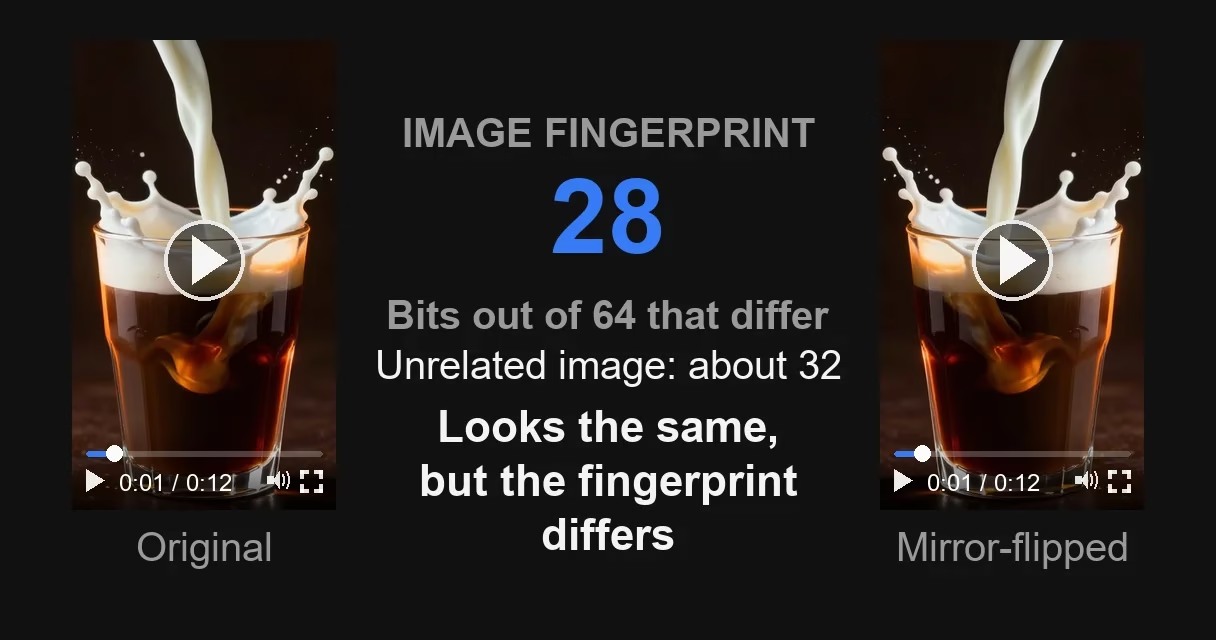
The main result of the measurement is this. Cleaning metadata, re-encoding, light noise and a slight brightness tweak make the file new at the byte level. On average, they move the image fingerprint by less than one bit out of 64. A caption over the frame moves it by 3 bits. Cropping and a border move it by 6-10 bits. A mirror flip moves it by 31 bits. A pitch shift and a speed-up reduce the number of landmarks in our audio fingerprint the most. We measured on four videos of real footage.
A word about “we” right away. We make Video Unique Booster, a program for bulk video processing. In other words, we are the seller. That is why you won’t find promises on the platforms’ behalf below. What you will find is our own measurement, other people’s published research, and the limits of both, stated plainly.
Who this is for
People who publish videos by the dozen on TikTok, Reels or Shorts. People who re-upload their own videos or other people’s. People who paid for uniquification and did not understand what exactly they paid for.
You don’t need this if you film your own videos and publish one a week. Checking won’t add anything for you.
And separately, people choosing a uniquification service. You will see which of a seller’s promises can be checked at all.
Video Unique Booster for Windows: hundreds of unique copies in one goBy hand, you edit copy after copy. The program creates them in batches. Each copy gets its own image, sound, metadata and duration.
Video Unique Booster: video uniquification for WindowsYou add a video and set the setting ranges. The program creates hundreds of copies. Each has its own image, sound and duration.
Hundreds of unique copies from one original videoThe manual way runs into one problem. Each copy has to be edited separately. More copies take more time.
Unique video copies for TikTok, YouTube and InstagramYou set the setting ranges once. Then the Windows program creates copies in batches. Hundreds in one go.
Video uniquification for Windows – Video Unique BoosterYou add one video. The program creates hundreds of copies. Each has its own image, sound, metadata and duration.
What you’ll need
Your own video. The Windows command prompt. The free program FFmpeg 2. For the image fingerprint, Python with the imagehash library.
From the FFmpeg archive, you need the ffmpeg.exe file from the bin folder. The simplest way is to put it in the folder with your video and run the commands from there. The command prompt also looks for programs in the current folder. Python is installed with the Windows installer. During installation, check the option to add it to PATH, otherwise the python command won’t be found.
The file’s bytes and the image fingerprint are checked on your own file. The commands for this are printed below.
Audio is harder. We calculated the audio fingerprint with our own code, about sixty lines of Python. The steps: mix the track down to mono, build a spectrogram, find the loud points, record the distances between them. Open systems of this kind exist, for example Dan Ellis’s Audfprint 3, which the Panako paper 4 uses for comparison. But that is a separate project with its own installation. It doesn’t fit into this article’s recipe. The same goes for forensic programs that determine which device a video was shot on.
Trace 1: the file’s bytes
A file hash is calculated from its bytes. Change a single byte, and the hash changes completely. This is the very “digital fingerprint” that Russian-language roundups on video uniquification write about.
This trace finds only exact copies. Download a video, upload it to a platform without a single edit, and the match is exact.
People draw the wrong conclusion from this: since any edit changes the hash, an edit can turn the video into a different one. It doesn’t work that way. According to YouTube Help, Content ID matches audio and video against a database of copyright owners’ files 5. File bytes are not mentioned there at all.
Metadata belongs to the same trace. These are service records inside the file: the shooting date, the device model, the program name. They are usually the first thing people clean. What they can contain and how to remove them is covered in detail in the article “How to remove metadata from a video” (in Russian).
The trace is left not only by metadata but also by the structure of the MP4 container itself: the order and set of its service blocks. From these, the authors of a paper 6 identify the make and model of the device on a set of 578 videos. They can also see whether the file was rebuilt.
Check it on your own file. The command ffmpeg -i video.mp4 -map_metadata -1 -c copy clean.mp4 removes the metadata. It does not touch the image. The file will become different at the byte level.
Trace 2: how the image is recognized
A perceptual hash is the simplest kind of video fingerprint: it is calculated not from the bytes but from the image.
Here is how it works. The frame is shrunk to a tiny size, the color is removed, the result is broken down into frequencies, and the low ones are kept: they describe the large patches of the frame. Each of them is compared with the median. A value above the median becomes a one, below it a zero. The result is a short code. Similar images have similar codes.
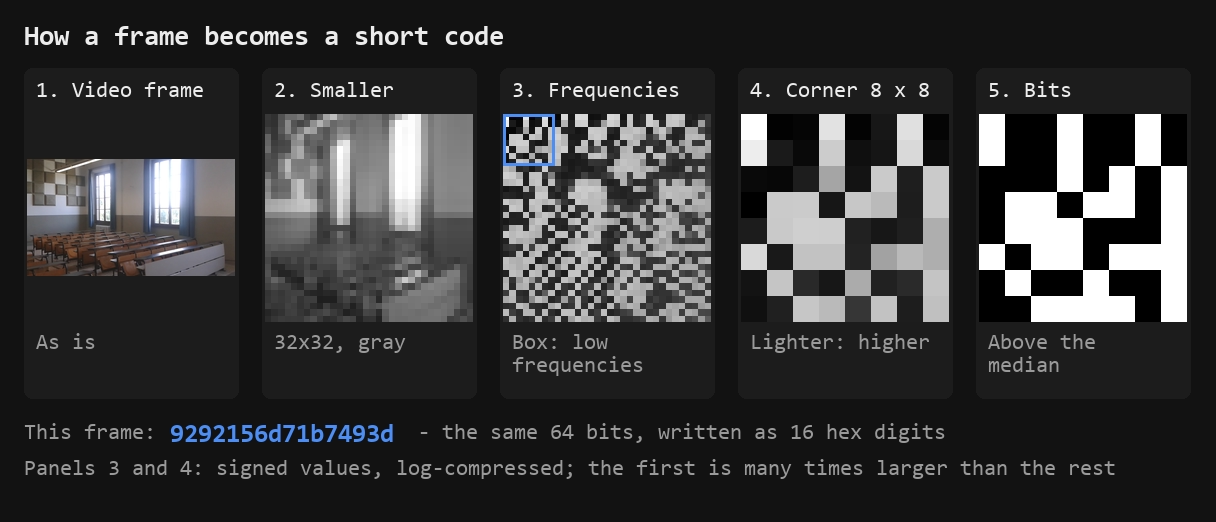
The difference between two codes is expressed as a number. We use the Hamming distance: how many of the 64 bits differ. Zero means that to the algorithm the images are indistinguishable.
The authors of a paper 7 measured how robust such codes are on a quarter of a million images, a random sample from a corpus of a million pictures. They used harsh re-encoding: quality was lowered to 30 percent. The distance still stayed almost zero. For all five algorithms in their final table, the normalized distance came out at 0.003 to 0.010 7. Re-encoding changes the file’s bytes, and the file hash no longer matches. The perceptual hash barely changes.
Such codes handle rotation poorly. In one study 9, the best of four algorithms was the one that computes the average brightness of blocks. At a threshold of 0.3, it recognized an image rotated by up to three degrees. The test there was small, on three pictures.
Trace 3: how the audio is recognized
Audio fingerprints are calculated separately from the image. How this is done is described in open papers on music recognition.
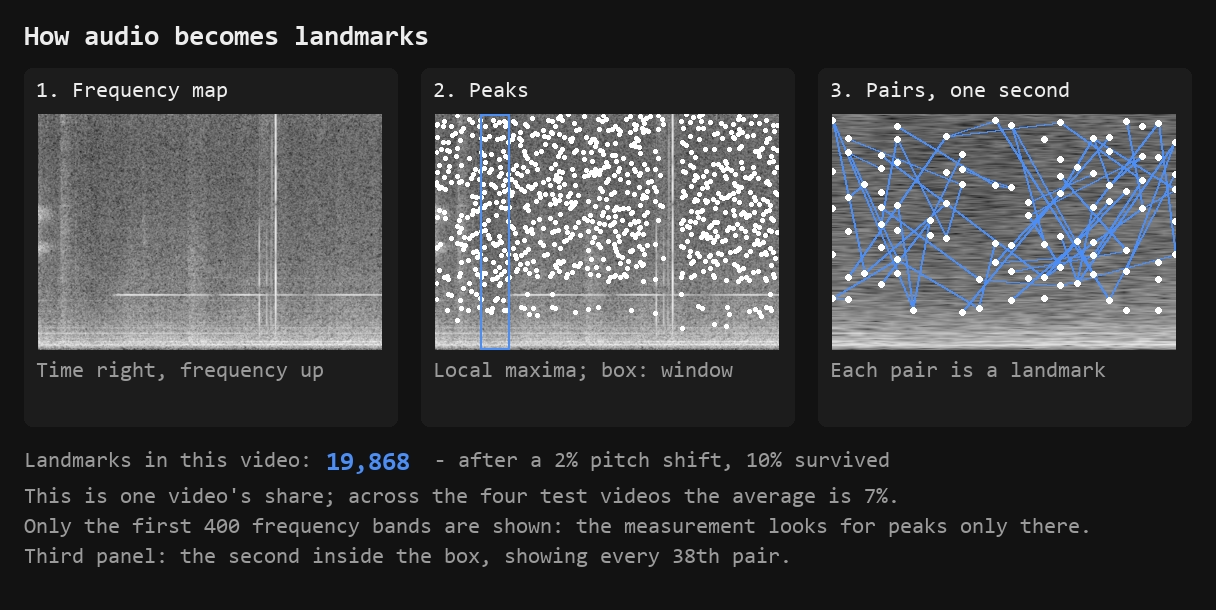
First, a spectrogram is built: a map of frequencies over time. On it, the system finds points that are louder than their neighbors. Then it remembers how these points are positioned relative to each other in time. In our measurement they are taken in pairs, as in Audfprint. The Panako system takes them in threes. It is also designed to handle pitch shifts 4.
Compression barely affects such fingerprints. In one of the early published systems, three seconds of audio were enough for identification. A track in MP3 at 128 kbps was recognized reliably 11.
With speed, what matters is what exactly was sped up. A recording can be played faster as a whole, pitch included. In that case, after a 4% speed-up, the same system lost all four tracks in its test, although it lost one of them only barely 11. If only the tempo was changed and the pitch was left alone, the tracks were recognized 11. A system based on pairs of points, like ours, also handled time stretching 4.
In our measurement, it was the tempo that changed, with the pitch left alone. After a 5% speed-up, our fingerprint kept 13% of its landmarks. We measured the share of surviving landmarks, not recognition. Our code has no recognition threshold. And published systems recognize a recording from part of its landmarks, as long as there are enough of them. So 13% does not mean the video won’t be recognized. What can be said is something else. A speed-up and a pitch shift reduce the number of landmarks more than any other edit in the measurement. Audfprint could no longer handle a pitch shift of more than three percent 4. The source has no data on a 2% shift.
Trace 4: the device itself
Every camera sensor has its own noise. This noise identifies not the video but the device that shot it. The VISION dataset was shot on 35 phones and tablets. On this dataset, such identification weakens noticeably after uploading to YouTube. And after a messaging app, it drops almost to the level of guessing 16. As far as we know, this trace is not used to search for copies. It is a forensic tool.
Here are all four traces at once.
| Trace | What measures it | What moves it | What it doesn’t see |
|---|---|---|---|
| 1. File bytes | File hash; the structure of the MP4 container 6 | Any edit inside the file; renaming does not | The content: the hash recognizes only an exact copy, and the container 6 reveals the device and rebuilding, but not what is in the frame |
| 2. Image fingerprint | Distance out of 64 bits | Mirror flip most of all; noticeably: border, cropping, caption; hardly at all: re-encoding, noise, brightness, speed-up | A copy after a mirror flip: the distance is like that of an unrelated image, about 32 bits 7 |
| 3. Audio fingerprint | Share of surviving landmarks | Pitch shift and speed-up most of all; volume less | Recognition as a whole: the measurement counted the share of surviving landmarks, not whether a system would find the video |
| 4. The device itself | Area under the identification curve; 0.50 is the level of guessing | Re-encoding on upload: 0.94 without it, 0.77 after YouTube, 0.54 after a messaging app (footage without stabilization) 16 | The video itself: it identifies the device, not the video; as far as we know, it is not used to search for copies |
The numbers for each edit for traces 2 and 3 are in the “Our measurement” section below.
Content ID: what is known about matching on YouTube
The copyright owner puts a reference file into the database. New uploads are matched against it. When there is a match, a claim is created. The copyright owner chooses one of three options: block the video, monetize it, or track its viewership statistics 5. The system looks for matches against a database of audio and video files. But the help page discloses neither the algorithm nor the match threshold 5.
The second tool is the Copyright Match Tool. It finds full and near-full copies of your videos on other channels. It compares both the image and the audio, and it also finds copies where the audio was replaced or dubbed 23. Its limitations are stated plainly. Only public videos are scanned. Part of a track does not count as a match. A copy may not be found if you weren’t the first to upload the video 23.
Because of its name, the Likeness detection feature is sometimes taken for a copy search. But what it does is protect a creator’s face from AI-generated fakes 25.
Our measurement: what is left of the fingerprints
We took four videos from four different devices, twelve seconds each. This is real phone footage from the open VISION dataset 16. The reference is not the camera’s original file but its shortened copy, re-encoded once. All edits are compared with it. That is why the “Re-encoded with the same codec” row shows the encoder’s second pass, not its first.
We applied thirteen edits to each video. Most of them are techniques from uniquification roundups. We added three as reference points: renaming, re-encoding with the same codec and a volume boost. After each edit we calculated three numbers. The first is the file hash. The second is the perceptual hash over sixteen frames taken evenly across the length of the copy itself. The third is the share of surviving landmarks in the audio fingerprint.
All edits were made with FFmpeg, using the same settings. The image was re-encoded with the H.264 codec at CRF 23. The audio, with AAC at 128 kbps. Noise: the noise=alls=8:allf=t filter. Brightness: eq=brightness=0.05:contrast=1.05. Speed-up: setpts=PTS/1.05 and atempo=1.05. Pitch: rubberband=pitch=1.02. Mirror flip: hflip. Cropping: crop to 95% of the width and height. After that, the frame was scaled back up to its original size. Border: pad, 30 black pixels on each side. The caption takes up a tenth of the frame height.
| What we did to the video | File hash | Image fingerprint | Audio landmarks surviving |
|---|---|---|---|
| Renamed the file | Same | 0.00 | 100% |
| Erased and rewrote the metadata | Different | 0.00 | 100% |
| Re-encoded with the same codec | Different | 0.25 | 70% |
| Added light noise | Different | 0.28 | 70% |
| Sped up by 5% | Different | 0.69 | 13% |
| Brightened the frame and raised contrast by 5% | Different | 0.88 | 70% |
| Added a caption in the corner of the frame | Different | 2.97 | 70% |
| Cropped 2.5% off each edge | Different | 5.53 | 70% |
| Added a 30-pixel black border | Different | 9.88 | 70% |
| Mirror-flipped | Different | 31.34 | 70% |
| Made six edits at once with the same settings | Different | 31.53 | 7% |
| Raised the volume by 2 dB | Different | Image not touched | 61% |
| Raised the pitch by 2% without changing the tempo | Different | Image not touched | 7% |
The six-edits row combines the mirror flip, cropping, brightness, noise, volume and the pitch shift. There is no speed-up in it. So the 7% of landmarks in the last column is the result of the pitch shift alone, not of all the edits together.
The image fingerprint column shows the distance averaged over the four videos, out of 64 possible bits. Zero means that to the algorithm the image is exactly the same. The image stays bit-for-bit identical when the file is copied under another name, when the metadata is changed, and with the two audio edits. In these cases, zero says nothing about how robust the fingerprint is. The frame is the same. That is why for the audio edits we write “Image not touched.” For renaming and metadata, the zero is kept as a number. These techniques are passed off as uniquification, and the zero answers whether they moved the fingerprint.
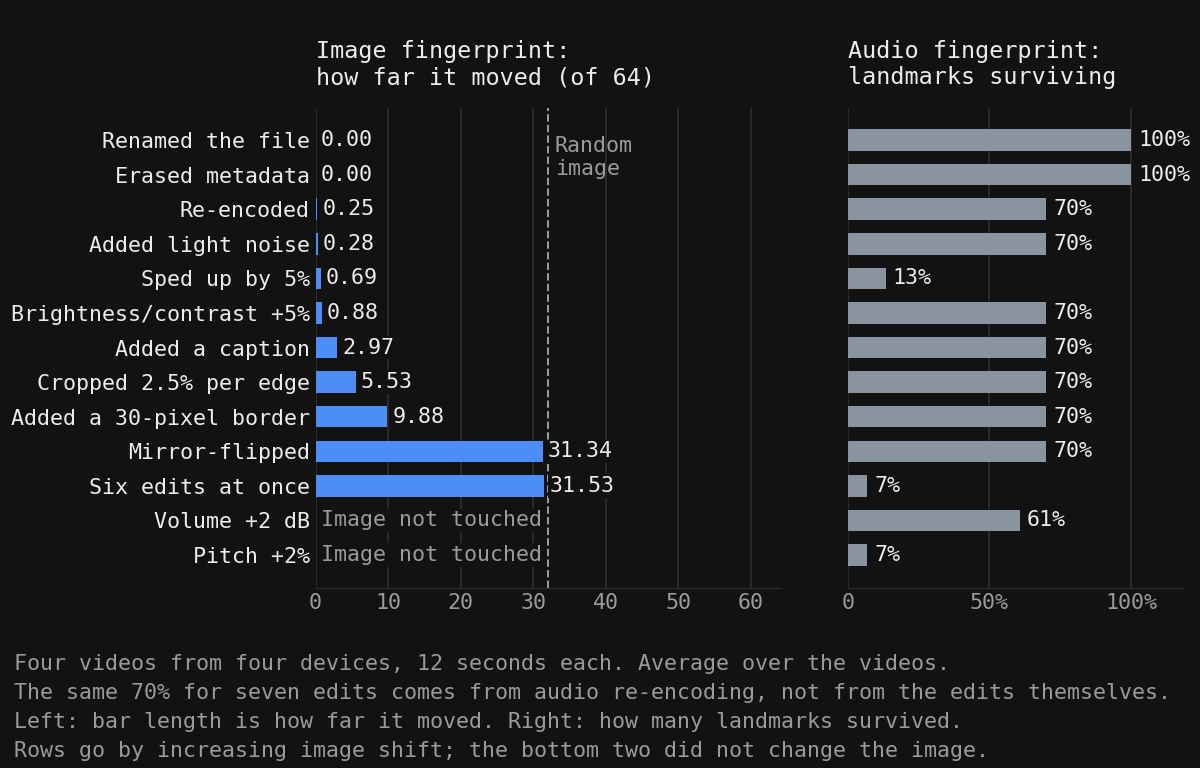
One caveat about the audio column. About 70% appears for all the edits that did not touch the audio: re-encoding, noise, brightness, caption, cropping, border and mirror flip. This is a consequence of re-encoding the audio track, not an effect of the edit. The surviving share per video ranges from 42% to 94%. Volume takes away another 9 points on average on top of that, but on two of the four videos it took away 15 and 21.
Hence the conclusion the measurement was made for. The image fingerprint is moved by whatever changes the large-scale structure of the frame: the arrangement of the content and whatever lies on top of it. A mirror flip rearranges the entire content and moves the fingerprint by 31.34 bits. A border widens the frame, cropping narrows it, and the content shifts relative to the edges: the border moves the fingerprint by 9.88 bits, cropping by 5.53. A caption covers part of the image and moves the fingerprint by 2.97 bits. Light noise, re-encoding and a slight brightness tweak don’t touch the structure. On average, they move the fingerprint by less than a bit. Noise gives 0.28, re-encoding 0.25, brightness 0.88. On individual videos it was sometimes more, up to 1.25 bits. A speed-up doesn’t change the frames themselves. It shifts them in time, hence 0.69.
This follows from how the algorithm works. The frame is shrunk to 32 by 32 pixels, which means small details are thrown away. Then the low frequencies, that is, the large patches, are kept, and each one is compared with the median. Noise and re-encoding change small details, and by this point those are already gone. A brightness shift changes only the first number, the overall brightness of the frame. Raising the contrast multiplies all the numbers by the same factor. Which numbers are above the median and which are below hardly changes. But a caption, a border and a mirror flip change the arrangement of the large patches. That is exactly what the algorithm compares.
At first, the measurement had no caption or border. The first eleven edits led to a different conclusion: that only the frame geometry moves the fingerprint. The paper 7, using the same library and the same 64 bits, tests a watermark. It moves the fingerprint by 7.85 bits, although it doesn’t move the frame at all. We added a caption and a border and repeated the measurement. The caption gave 2.97. The geometry was unchanged, yet the fingerprint moved. We had to rewrite the conclusion.
In the paper’s results 7, a border moved the fingerprint more than cropping did: 17.0 versus 10.8. The same happened for us: 9.88 versus 5.53. But their cropping took 5% off each edge, and ours 2.5%. So the numbers themselves can’t be compared directly.
This rule doesn’t carry over to audio. A pitch shift doesn’t touch the image, yet only 7% of the audio landmarks remain after it. A speed-up barely moves the image, 0.69 out of 64, yet it leaves 13% of our audio fingerprint, with the caveat from the audio section.
Metadata is part of neither the image fingerprint nor the audio fingerprint. So for these two traces, cleaning it changes nothing. There is one caveat. The command above rebuilds the container. And the container’s structure is exactly what the authors of the paper 6 use to tell that a file was rebuilt. We did not measure this trace.
Russian-language roundups on TikTok say the same thing, just without numbers. “Simply changing the file’s checksum (for example, MD5 or SHA-256) does not protect a video from detection, because ByteDance’s algorithms analyze the image itself” 30. “Changing the hash alone won’t make a video original” 31. Our measurement agrees with this, and it gives a number: less than one bit out of 64. What TikTok’s rules say about repeats in the feed is covered in our article on the TikTok algorithm (in Russian).
Where this measurement doesn’t apply
The measurement was made on September 23, 2026. We calculated the image fingerprint with one open algorithm: pHash, 64 bits, from the imagehash library 32. We calculated audio with our own code, which takes spectrogram peaks in pairs, as in Audfprint 4. Platforms do not disclose their algorithms. Our result does not carry over to them.
We did not use our program’s settings in the measurement. All edits were made with the FFmpeg filters listed above. In the section on processing, we link the program’s settings to the measurement’s edits by name.
Be careful with the mirror flip. After a mirror flip, our perceptual hash gives an almost random distance. The authors of the paper 7 got the same result on a quarter of a million images. For two popular algorithms, the normalized distance to the mirrored copy is 0.49 and 0.50, where random is 0.5. But it doesn’t follow that a platform won’t recognize a mirrored video. It may compare the sequence of frames and the audio, not a single frame. There is no open data on how its matching works.
Only the platform knows the threshold at which audio counts as the same. Our landmarks column shows how much of the fingerprint is left, not “match or no match.”
And most importantly, the measurement answers the question “what is left of the fingerprint.” It does not answer “will I get banned or not.” We did not measure the platforms’ behavior.
Four twelve-second videos are too few for statistics. You can reproduce the image column on your own file with the script from the “Where to start” section. It takes frames evenly across the length of each copy, as in the measurement. On our first video, it reproduces the measurement’s numbers: border 12.00, mirror flip 30.25, speed-up 1.25. The table above shows averages over four videos. The filters for the edits are listed in the description of the measurement. The audio column can’t be reproduced with the script.
How to check a video before publishing
We did not find a third-party service that would compare your video fingerprint with a platform’s database. We searched on September 23, 2026. We looked at Russian-language search results for queries about how a platform recognizes a copy of a video. Separately, we searched seven Russian-language queries, such as the Russian for “check a video for uniqueness online” and “video plagiarism check.” We found only services that compare versions of a video with each other or uniquify the file. They have no access to a platform’s database. Other things can be checked, and there are five ways to do it.
The check in YouTube Studio. It is the only way to match a video against the real Content ID database before publishing. You upload the video without publishing it, go to the Checks step and wait for the result. In a Russian-language video 35, it looks like this: “Copyright: No issues found.” The check looks for someone else’s content inside your video, not for your video among other people’s. If you are not a copyright owner in Content ID, your video is not in the database. And a result like this does not mean a copy won’t be recognized.
Unique Rate. This is our free program for Windows. It compares two videos, for example the original and a copy after edits, and shows a similarity score. We did not use it in this measurement. The numbers in the table were calculated with a perceptual hash. Neither this program nor any other service can show what the platform will say.
Your own perceptual hash. The same thing done by hand: an open library and the script from the “Where to start” section. It gives a number you can compare with our table.
Reverse image search on frames. Run a couple of distinctive frames through Google Images or Yandex Images. The method is manual. The search runs over the search engine’s index, not the platform’s database. A match there is not the same as a match in Content ID.
Search by a phrase from the video. You type a phrase spoken in the video into the platform’s search. This method is manual too. It works only when the video has intelligible speech.
The Copyright Match Tool from the Content ID section doesn’t belong here. It looks for copies of your videos among those other people have already published 23.
There are no open descriptions of how TikTok and Reels do their matching. We did not measure matching on these platforms. For them, the measurement means the same as for YouTube: it shows what is left of the file’s fingerprint. It does not show how the platform does its matching.
Our experience on TikTok is narrow. In September 2026 we published uniquified copies on one account of our own. The account wasn’t used to drive traffic anywhere: we only wanted to see whether such videos got through. Of the seven copies, six had between 123 and 202 views, and one stayed at zero. This doesn’t show how the matching works, only the outcome on one account.
Each method answers its own question. Studio shows whether there is someone else’s content inside your video. Unique Rate and a perceptual hash show how much a copy differs from the original. A reverse image search on frames and a search by phrase show whether the video is already out there somewhere. Online metadata viewers and checksum checkers look only at the file’s bytes. And the bytes are not part of the image and audio fingerprints.
Hence the answer about sellers’ promises. Roundups mention percentages: the share of ad creatives that passed review and one hundred percent originality. The pass rate can be calculated only from your own ad campaigns. Originality in percent can’t be checked against anything, since the platform has no public threshold. What you can check is what you measure yourself. Did the image fingerprint change? Do the bytes match? For audio landmarks you need your own code, as we did. A promise that a video “will pass the platform’s check” can’t be confirmed in advance by anyone except the platform itself.
What to use when you have many videos
There are three ways, and they differ in cost.
The command line. Free and fully under your control. Each edit is set by hand. Recipes are covered in the article “Video uniquification with FFmpeg” (in Russian).
A video editor. A clear interface and a job queue that you assemble by hand. With a hundred videos, that means hours of work.
A program with bulk processing. You configure the settings once for the whole list of selected files. After that, the work runs without you. We covered how such programs work in the article on batch video processing (in Russian). Our program of this kind is Video Unique Booster. It has a “Number of unique copies of each video” setting. One video yields as many copies as you need. Each copy gets its own random setting values.
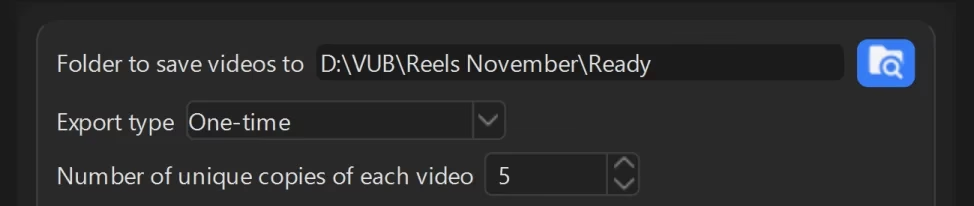
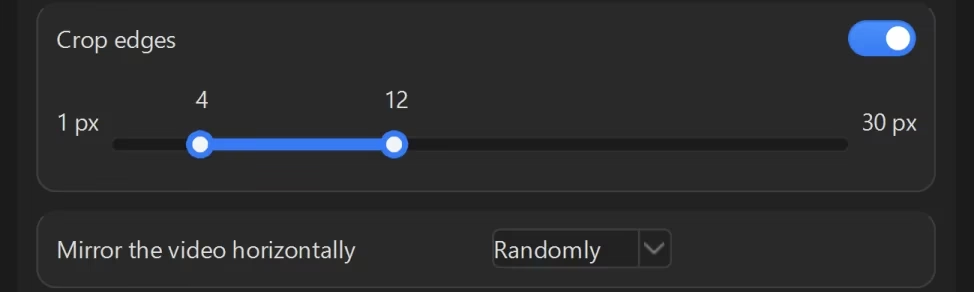
The edits from our measurement are there too. Their effects differ:
- “Mirror the video horizontally” is the same edit as in the measurement. It gave 31.34 out of 64, more than any other single image edit.
- “Crop edges” is noticeably weaker. In the measurement, cropping 2.5% off each edge gave 5.53.
- “Change audio pitch” does not touch the image. With a 2% shift, 7% of the audio landmarks remained in the measurement.
- “Change video duration” speeds the video up or slows it down. The tempo changes, the pitch stays. A 5% speed-up barely moves the image. It leaves 13% of our audio fingerprint, with the caveat from the audio section.
- “Add metadata”, with presets such as “iPhone”, doesn’t move a single fingerprint. It changes the service records inside the file, that is, only the first trace.
“Crop edges” and “Change audio pitch” are set as a range. A random value is taken from within it, and for cropping, separately for each edge. So the measurement’s numbers refer to one point in the range, not to the whole setting. “Mirror the video horizontally” and “Add metadata” are set with a list of values.
Cropping in the program is counted in pixels, not as a share of the frame, so compare it with our measurement carefully. The scale runs from 1 to 30 pixels. Each edge gets its own number, so there are four of them, not one. For a 1920 by 1080 frame, our two and a half percent means 48 pixels on the left and right, but only 27 at the top and bottom. So across the width, the top of the scale (30 pixels) is 1.6 times smaller than the 48 pixels measured above. Across the height, on the contrary, it is slightly more.
The choice is between your time and your money. The program’s prices are on the “Pricing” page. No method cancels out what the measurement showed. The fingerprint is moved by edits that change the large-scale structure of the frame or the audio itself.
Frequently asked questions
Where to start
Take your video and make four files from it in the kopii folder. The first is a copy under a different name, nothing more. For the second, clean the metadata. For the third, crop the edges. The command below keeps 95% of the frame, that is, it removes 2.5% from each side. In the measurement, the frame was then also scaled back up to its original size. On the first video in the measurement, that gave 4.25 bits with scaling and 4.50 without. For the fourth, mirror-flip the video.
mkdir kopii
copy video.mp4 kopii\kopiya.mp4
ffmpeg -i video.mp4 -map_metadata -1 -c copy kopii\clean.mp4
ffmpeg -i video.mp4 -vf "crop=iw*0.95:ih*0.95" -c:a copy kopii\crop.mp4
ffmpeg -i video.mp4 -vf hflip -c:a copy kopii\mirror.mp4
Look at the file hash of each one. Substitute your own file name:
certutil -hashfile video.mp4 MD5
The copy under a different name will have the same hash as the original, and the others will differ. This is the first trace. It shows nothing more.
Now the image fingerprint. Install the library once:
pip install imagehash
Save the file sravnit.py next to the video. It takes 16 frames from each video, evenly across its length. Then it calculates the perceptual hash of each frame and prints the average distance to the original. Frames are taken across the length of the copy itself, as in the measurement. Otherwise, a sped-up copy would be compared at different moments of the footage.
import os, re, subprocess, sys, tempfile

import imagehash
from PIL import Image

FRAMES = 16


def hashes(video):
    info = subprocess.run(["ffmpeg", "-i", video, "-f", "null", "-"], capture_output=True, text=True, errors="replace").stderr
    hours, minutes, seconds = re.findall(r"time=(\d+):(\d+):([\d.]+)", info)[-1]
    length = int(hours) * 3600 + int(minutes) * 60 + float(seconds)
    result = []
    with tempfile.TemporaryDirectory() as folder:
        for index in range(1, FRAMES + 1):
            name = os.path.join(folder, f"kadr-{index:02d}.png")
            subprocess.run(["ffmpeg", "-loglevel", "error", "-ss", str(length * index / (FRAMES + 1)),
                            "-i", video, "-frames:v", "1", name], check=True)
            with Image.open(name) as frame:
                result.append(imagehash.phash(frame.convert("RGB")))
    return result


original = hashes(sys.argv[1])
for name in sorted(os.listdir(sys.argv[2])):
    if name.endswith(".mp4"):
        copy = hashes(os.path.join(sys.argv[2], name))
        distance = sum(a - b for a, b in zip(original, copy)) / FRAMES
        print(f"{name}: {distance:.2f} of 64")
Run it, specifying the original and the folder with the copies:
python sravnit.py video.mp4 kopii
The script compares every video in the folder with the original. That makes it suitable for bulk checks as well. Put as many copies as you like into kopii, even a hundred. If you pass one of the copies first instead of the original, it will compare the copies with each other. Here is what we got on the first video in the measurement:
| File | File hash | Image fingerprint, average over 16 frames |
|---|---|---|
| Copy under a different name | c99186ae…, same as the original | 0.00 |
| Metadata erased | cb4549eb… | 0.00 |
| Edges cropped | a47b0645… | 4.50 |
| Mirror-flipped | Different | 30.25 |
Cleaning the metadata made the file different at the byte level. It did not move the image fingerprint by a single bit. Cropping moved it, and the mirror flip moved it most of all. The file hash differed for all of them except the copy under a different name. But it tells you nothing about how similar the videos are.
What to do next depends on your task.
- You are re-uploading your own video to a second channel. Cleaning metadata and re-encoding barely change the image fingerprint. You can see this in the table in the “Our measurement” section. For your video, Studio will show only someone else’s music or someone else’s footage inside it. It won’t show whether the copy will be recognized. If you crop for the sake of the fingerprint, do it with caution: viewers see it. And no measurement will tell you what the platform will decide.
- You upload your ad creatives by the dozen. Of the edits available in Video Unique Booster, the mirror flip moves the image fingerprint the most. Cropping moves it less, and across the width the program’s cropping limit is smaller than in the measurement. A pitch shift reduces the number of landmarks in our audio fingerprint the most. The program will turn one video into as many copies as you need, with different values of these settings. And the script above will show how much each copy differs from the original. We did not use the program’s own settings in the measurement. The numbers refer to the same edits made with FFmpeg.
- The video belongs to someone else. You can move the fingerprint. But the system creates a Content ID claim based on the copyright owner’s reference file in the database. And what to do with a match is up to the owner 5.
Related reading
- How to remove metadata from a video and what stays in the file (in Russian)
- Batch video processing software (in Russian)
- Video uniquification for TikTok (in Russian)
- How to uniquify a video for YouTube (in Russian)
- How to uniquify a video for Instagram (in Russian)
- Video uniquification with FFmpeg (in Russian)
- Video uniquification: online services (in Russian)
- Ad creative uniquifier: a hundred copies of one video (in Russian)
Sources
- Thread “Re-uploading your own videos to another channel” (in Russian). Searchengines.guru, 2023. ↩︎
- FFmpeg: download page. The project’s official website. ↩︎
- Ellis D. P. W. audfprint: Landmark-based audio fingerprinting. GitHub. ↩︎
- Six J., Leman M. Panako: A Scalable Acoustic Fingerprinting System Handling Time-Scale and Pitch Modification. ISMIR 2014. ↩︎
- How Content ID works. YouTube Help. ↩︎
- Iuliani M., Shullani D., Fontani M., Meucci S., Piva A. A Video Forensic Framework for the Unsupervised Analysis of MP4-Like File Container. IEEE Transactions on Information Forensics and Security, 2018. ↩︎
- McKeown S., Buchanan W. J. Hamming Distributions of Popular Perceptual Hashing Techniques. Forensic Science International: Digital Investigation, vol. 44, 2023. ↩︎
- McKeown S., Buchanan W. J. Hamming Distributions of Popular Perceptual Hashing Techniques. Forensic Science International: Digital Investigation, vol. 44, 2023. ↩︎
- Zauner C. Implementation and Benchmarking of Perceptual Image Hash Functions. University of Applied Sciences Upper Austria, 2010. ↩︎
- Six J., Leman M. Panako: A Scalable Acoustic Fingerprinting System Handling Time-Scale and Pitch Modification. ISMIR 2014. ↩︎
- Haitsma J., Kalker T. A Highly Robust Audio Fingerprinting System. ISMIR 2002, Paris. ↩︎
- Haitsma J., Kalker T. A Highly Robust Audio Fingerprinting System. ISMIR 2002, Paris. ↩︎
- Haitsma J., Kalker T. A Highly Robust Audio Fingerprinting System. ISMIR 2002, Paris. ↩︎
- Six J., Leman M. Panako: A Scalable Acoustic Fingerprinting System Handling Time-Scale and Pitch Modification. ISMIR 2014. ↩︎
- Six J., Leman M. Panako: A Scalable Acoustic Fingerprinting System Handling Time-Scale and Pitch Modification. ISMIR 2014. ↩︎
- Shullani D., Fontani M., Iuliani M., Al Shaya O., Piva A. VISION: a Video and Image Dataset for Source Identification. EURASIP Journal on Information Security, 2017:15. ↩︎
- Iuliani M., Shullani D., Fontani M., Meucci S., Piva A. A Video Forensic Framework for the Unsupervised Analysis of MP4-Like File Container. IEEE Transactions on Information Forensics and Security, 2018. ↩︎
- Iuliani M., Shullani D., Fontani M., Meucci S., Piva A. A Video Forensic Framework for the Unsupervised Analysis of MP4-Like File Container. IEEE Transactions on Information Forensics and Security, 2018. ↩︎
- McKeown S., Buchanan W. J. Hamming Distributions of Popular Perceptual Hashing Techniques. Forensic Science International: Digital Investigation, vol. 44, 2023. ↩︎
- Shullani D., Fontani M., Iuliani M., Al Shaya O., Piva A. VISION: a Video and Image Dataset for Source Identification. EURASIP Journal on Information Security, 2017:15. ↩︎
- How Content ID works. YouTube Help. ↩︎
- How Content ID works. YouTube Help. ↩︎
- Use the Copyright Match Tool. YouTube Help. ↩︎
- Use the Copyright Match Tool. YouTube Help. ↩︎
- Likeness detection on YouTube. YouTube Help. ↩︎
- Shullani D., Fontani M., Iuliani M., Al Shaya O., Piva A. VISION: a Video and Image Dataset for Source Identification. EURASIP Journal on Information Security, 2017:15. ↩︎
- McKeown S., Buchanan W. J. Hamming Distributions of Popular Perceptual Hashing Techniques. Forensic Science International: Digital Investigation, vol. 44, 2023. ↩︎
- McKeown S., Buchanan W. J. Hamming Distributions of Popular Perceptual Hashing Techniques. Forensic Science International: Digital Investigation, vol. 44, 2023. ↩︎
- Iuliani M., Shullani D., Fontani M., Meucci S., Piva A. A Video Forensic Framework for the Unsupervised Analysis of MP4-Like File Container. IEEE Transactions on Information Forensics and Security, 2018. ↩︎
- How to get around Video Frame Hash Deduplication algorithms on TikTok (in Russian). PR Motion. ↩︎
- Uniquification of photos and videos (in Russian). Partnerkin. ↩︎
- imagehash: a perceptual hashing library. PyPI. ↩︎
- Six J., Leman M. Panako: A Scalable Acoustic Fingerprinting System Handling Time-Scale and Pitch Modification. ISMIR 2014. ↩︎
- McKeown S., Buchanan W. J. Hamming Distributions of Popular Perceptual Hashing Techniques. Forensic Science International: Digital Investigation, vol. 44, 2023. ↩︎
- How to check a video for copyright. Checking a video for uniqueness (in Russian). Captain computer, YouTube. ↩︎
- Use the Copyright Match Tool. YouTube Help. ↩︎
- How Content ID works. YouTube Help. ↩︎
