

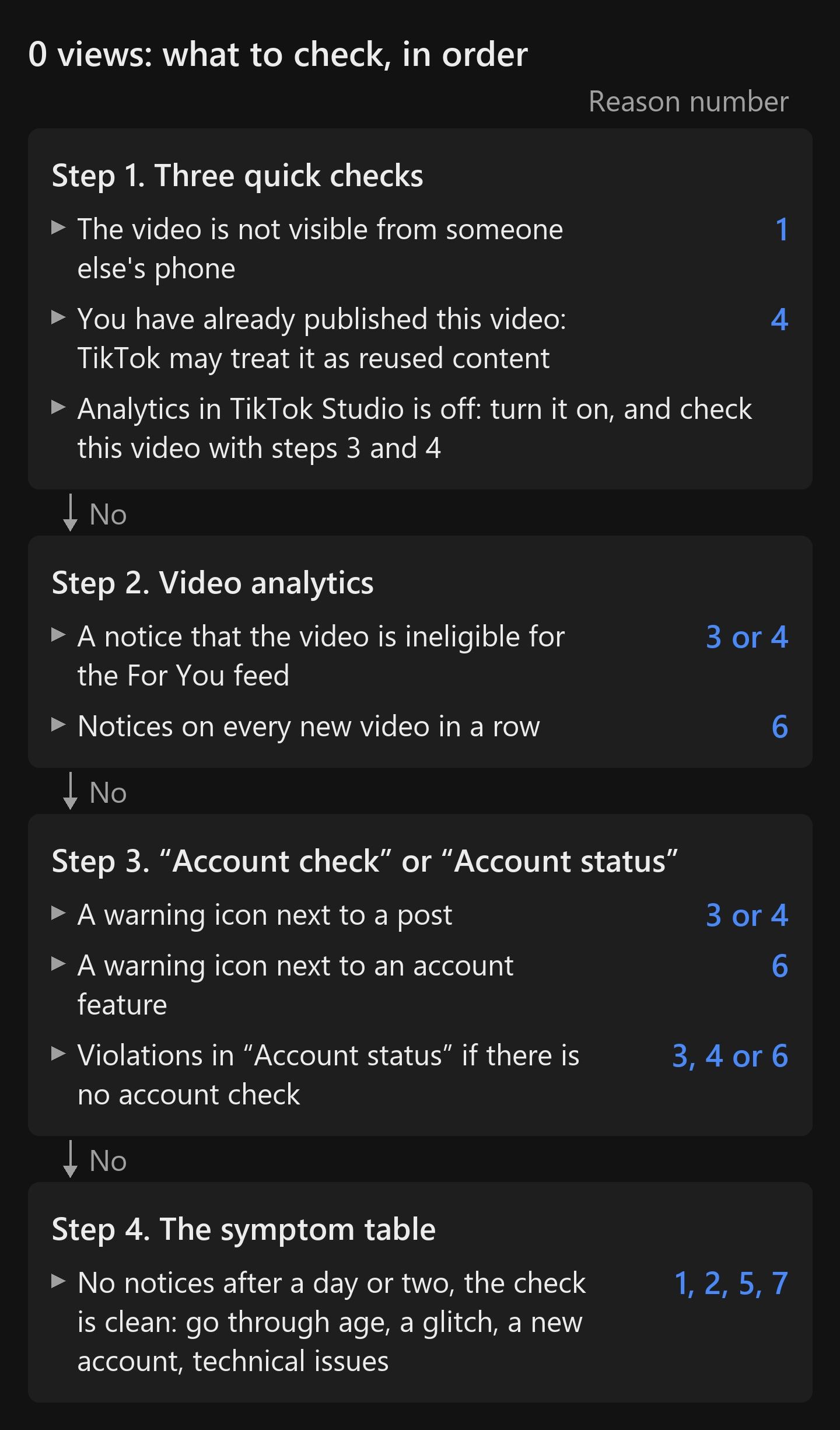
The video is published. It is there on your profile. But it has 0 views on TikTok after an hour, two hours, a whole day.
Here is the short version of what to do. Start with three quick checks. If the video can’t be seen from someone else’s phone, that is reason 1, restricted access. If you have published this video before, start with reason 4, reused content. If analytics is turned off in TikTok Studio, turn it on: without it you won’t get the notice that the video is ineligible for the For You feed 15. But analytics is collected only for videos published after you turn it on 17. So analytics can no longer tell you whether the current video was kept out of the feed. You can still find that out with “Account check”, if your app has it: it checks your 30 most recent posts, including whether they are ineligible for the feed 22. The path to it is in the next paragraph.
If analytics was on, open the video’s analytics. An ineligibility notice means reason 3 or 4: the rules or reused content 15. If every new video in a row gets such a notice, it is also reason 6, an account restriction. Then run “Account check”: your profile, the ☰ menu, TikTok Studio, the “More tools” section 16. It shows restrictions on the account, on its features and on your 30 most recent posts 22. We read a warning icon next to a post as reason 3 or 4, and one next to an account feature as reason 6. If analytics was on, there is no notice a day or two after publishing, and the check is clean, go through the table below: what remains is age, a glitch, a new account and technical issues.
In the TikTok app on our phone, in September 2026, there was no “More tools” section. If you don’t have it either, open “Account status”: your profile, the ☰ menu, “Settings and privacy”, “Support” (in the Russian-language app on our phone this item is labeled “Support Center”), “Safety Center”. We read violations in “Account status” as reason 3, 4 or 6.
We are the team behind Video Unique Booster, a program that makes copies of a video for several accounts. We have seen zero views ourselves, most of all in our Instagram Reels network of about 300 accounts. On TikTok we only ran a test in September 2026 on one account of our own. What exactly we saw is described in the section “What we saw on our own accounts”. The paths in the app follow TikTok’s Russian-language help center, and the path to “Account status” follows our phone. The path to TikTok Studio from a computer, the ineligibility notice, a private video at zero and the “Private account” switch are shown in screenshots from our accounts. “Safety Center” and “Account status” were captured on our phone, and “Account check” is shown in screenshots from TikTok’s Creator Academy page. The symptoms were collected from TikTok’s rules, ten Russian-language articles from search results and breakdown videos on YouTube.
If you publish one video to several accounts, check for reused content, reason 4, first. After the reasons, there are sections for you: “Zero views across an account network” and “If the reason is reused content”.
Why your TikTok has 0 views: the symptom table
Go through the table from top to bottom and compare your last few videos against it. Several rows can match at once.
| What you see | Most likely | Where to check |
|---|---|---|
| No one but you can see the video, or only your followers can | 1. Restricted access | your profile, the video’s settings |
| The creator is under 16 | 1. Age: this is a rule, not a glitch | the date of birth on the account |
| Zero from the first minutes, and the link to the video can’t be copied (a sign from a Russian-language 2022 breakdown video) | 2. Moderation | the video’s menu |
| No notices, the account check is clean, but new videos are stuck at zero | 2. Possibly a glitch | notices and “Account check” after a day or two |
| The video’s analytics shows an ineligibility notice, or the account check shows a warning icon | 3. Rules, 4. Reused content or 6. Account restricted | the video’s analytics, “Account check” |
| Zero on a video you have already published or took from another creator | 4. Reused content | your Downloads folder, the video’s analytics |
| Another platform’s watermark, someone else’s music; according to articles from search results, also a blurry picture and poor sound | 4. Reused content, quality, rights | the video itself |
| Zero on the first videos of a brand-new account | 5. New account | the registration date |
| The account sends out similar videos using automation, or views and engagement are artificially inflated | 6. Spam and artificial inflation | how you publish |
| Videos used to get views, and now every new one is at zero | 6. Account restricted | analytics, “Account check” |
| The video was published through a VPN, or it got stuck while uploading | 7. Technical issues | how the publishing went |
| Views were coming in, then stopped, and the traffic sources include “For You” | not zero: the video didn’t interest viewers | the video itself |
Don’t judge by a single video. The author of one of the Russian-language YouTube breakdowns advises looking at 20-30 videos, not one 9.
Every viewer has their own feed 19. In 2021, researchers set up twin accounts: they scrolled the feed without liking anything or following anyone. Even so, the videos, creators, hashtags and sounds in their feeds differed by 59-70% 5. The researchers themselves note that the algorithm changes, so their measurement may hold only for a short period of time. For your check, this difference means one thing: if a friend doesn’t see the video in their feed, that doesn’t mean TikTok isn’t showing it to other people. We covered how the algorithm itself works in a separate article on the TikTok algorithm (in Russian).
Video Unique Booster for Windows: hundreds of unique copies in one goBy hand, you edit copy after copy. The program creates them in batches. Each copy gets its own image, sound, metadata and duration.
Video Unique Booster: video uniquification for WindowsYou add a video and set the setting ranges. The program creates hundreds of copies. Each has its own image, sound and duration.
Hundreds of unique copies from one original videoThe manual way runs into one problem. Each copy has to be edited separately. More copies take more time.
Unique video copies for TikTok, YouTube and InstagramYou set the setting ranges once. Then the Windows program creates copies in batches. Hundreds in one go.
Video uniquification for Windows – Video Unique BoosterYou add one video. The program creates hundreds of copies. Each has its own image, sound, metadata and duration.
What TikTok itself says
We didn’t find the words “shadow ban” in TikTok’s rules. We downloaded every section of the rules this article relies on and searched them for “shadow ban”: zero matches 1 2 3 4 11 12 13. The platform has its own term: a video is “ineligible for the FYF”. FYF is the For You feed. In the Russian-language app and the Russian version of TikTok’s help center it goes by the Russian word for “Recommendations”, and the help center says TikTok may determine that a video “does not meet the criteria for the Recommendations feed” 15. We put it more simply: the video is “kept out of the For You feed”.
The rules state four things about this directly.
First. The feed is meant for everyone, from teenagers to great-grandparents. So anything that may not be suitable for a broad audience is not allowed into it 1.
Second. A video kept out of the feed is not deleted. People can still find it through search and on the creator’s profile 1.
Third. Few views do not by themselves mean a violation. In TikTok’s words: “If a video isn’t getting many views, it also doesn’t necessarily mean it broke a rule” 1.
Fourth. If a video is ineligible for the feed or restricted, this information will show up in TikTok’s analytics. In TikTok’s words: “this information will appear in the TikTok analytics tool” 4. The rules don’t say whether a notice appears when a video is kept out of the feed because of the creator’s age (reason 1).
Where to find this notice is explained in TikTok’s Russian-language help center 15. First turn on analytics: your profile, the ☰ menu, TikTok Studio, the “Get started” button in the “Analytics” section, then “Turn on”. Then open the video and tap “More insights” at the bottom. Or tap the “More options” (…) button on the side of the video and choose “Analytics”. The ineligibility notice is there; tap it. At the top of the notice there is also an “Appeal” button, if you disagree.
On our account, the notice looks like this: a banner at the top of the “Overview” tab that reads (translated from the Russian interface) “Your video won’t appear in the For You feed. If you disagree with this restriction, you can appeal it.”

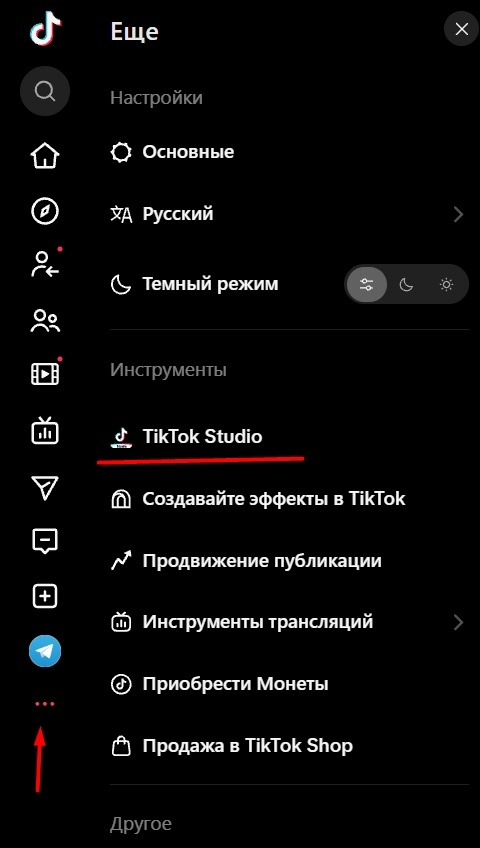
On a computer, TikTok Studio opens in the browser: the three dots at the bottom of the left panel, then the “Tools” section of the “More” menu, and the “TikTok Studio” item. We didn’t find “Account check” in the browser version, either in TikTok Studio or in the site settings, so look for it in the app. If it isn’t there either, open “Account status”; the path is given at the start of the article.
Checking through the video’s analytics comes with two caveats, and both are in TikTok’s help center. Analytics is collected only for videos published after you turn it on 17. And the data can take 1-2 days to update 17. So the conclusion “there is no notice” holds for a video published while analytics was on, and it is better to draw it after a day or two. If there is still no notice under these conditions, reasons 3, 4 and 6 are unlikely.
If you have only just turned analytics on, you can’t check older videos this way. What remains is “Account check” 16: it puts a checkmark next to features and posts, and a warning icon (a red exclamation mark) when there is a problem 22. The help page on account status doesn’t list a video being kept out of the feed among the restrictions 16. But TikTok’s Creator Academy page says it plainly: the tool checks your 30 most recent posts for any problems, including ineligibility for the feed 22. Tap a problem, and TikTok will show which videos it affects 22.
What “Account check” looks like where it exists is shown in screenshots from TikTok’s Creator Academy page 22. The interface in them is in English: the “More tools” section and the “Account check” button.

If the problem is with your posts, the check shows a “Posts restricted” row. Tap it, and a list of videos opens: the ones kept out of the feed carry the “Ineligible for recommendation” label. We haven’t seen what this label says in the Russian-language app.

In the TikTok app on our phone, in September 2026, there was no “Account check”. TikTok Studio had no “More tools” section, and in the settings, instead of the “Support” item from the help center 16, there was an item that translates from Russian as “Support Center”. Further on, in “Safety Center”, the “Safety tools” block had only “Account status” and “Report history” (translated from the Russian interface). We didn’t find the check in the browser version either.
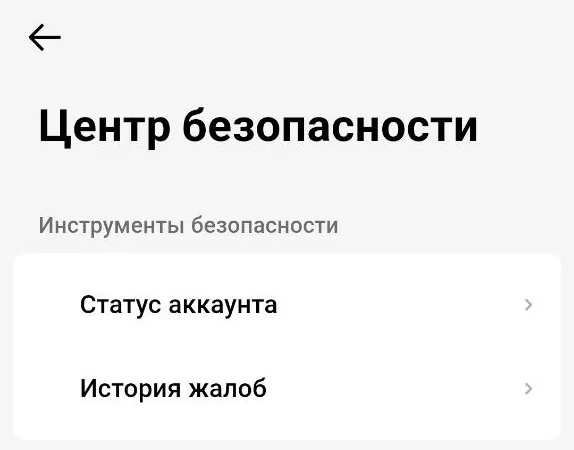
“Account status” shows rule violations 15. Ours reads “No violations found on your account” (translated from the Russian interface), with the tabs “Current violations” and “Restored…” below it (the name is cut off on the screen). Whether it flags a single video being kept out of the feed, our screen doesn’t show: we have no violations.

The author of a 2022 breakdown video said you won’t find out that a video was kept out of the feed 7. The current rules and help center promise a notice in analytics 4 15. We go by them.
Reason 1. Restricted access or age
Not everyone you published the video for can see it.
What it looks like. If the video was visible only to you from the start, it has no views at all. Views it has already gained don’t disappear when you make it private: our private video has 186 of them. If the account is private, only followers see the video. An example from our account: a video set to “Only you” is at zero, while the one next to it, set to “Everyone” and created a minute earlier, got 180 views. In the analytics of a private video, TikTok Studio shows not an ineligibility notice but a different message: “To see analytics, switch the post’s status to public” (translated from the Russian interface).
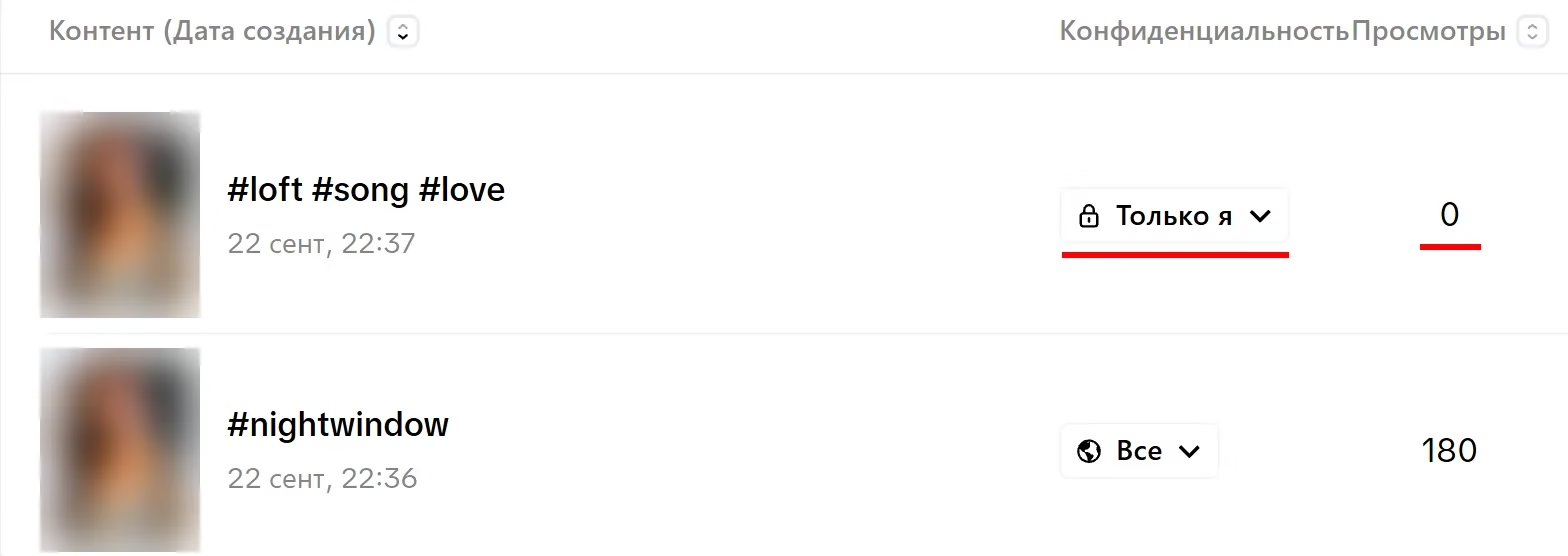
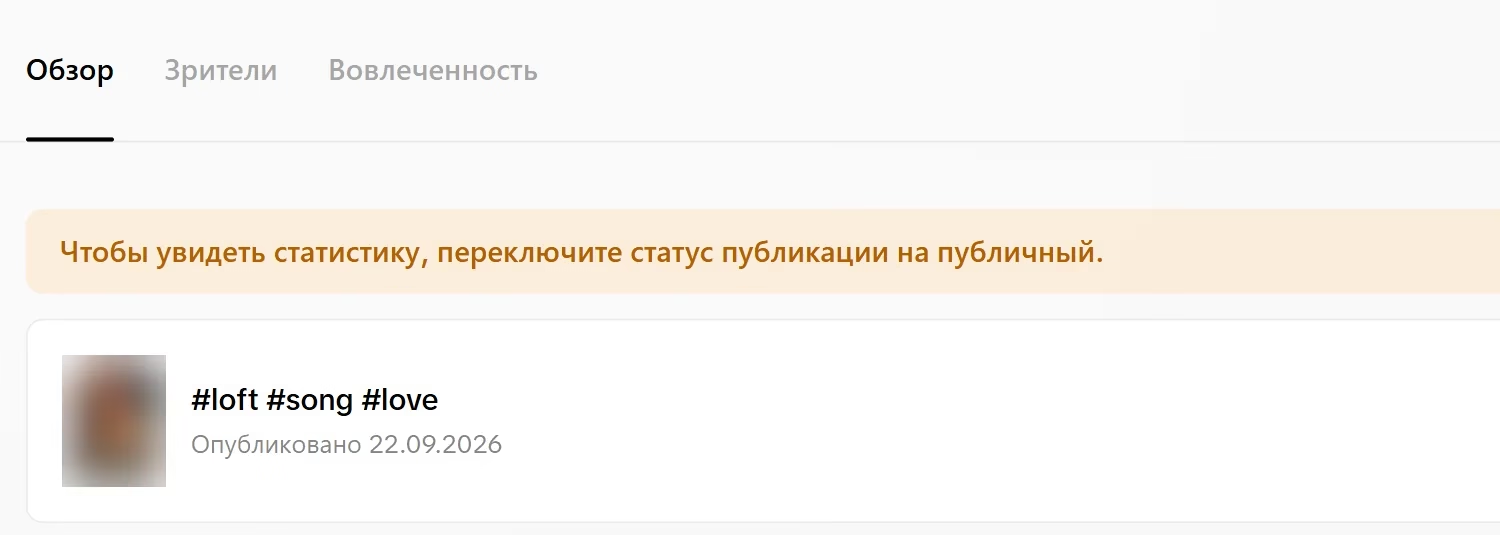
How to check. Open your profile from someone else’s phone and see whether the video is visible. Check whether the account is public: your profile, the ☰ menu, “Settings and privacy” 16, then “Privacy” and the private account switch. The Russian version of the help center doesn’t give these last two names in Russian, so we take them from the English help center 18 and from the 2022 breakdown video 7. In the settings on the TikTok website we found this switch ourselves: “Privacy”, “Discoverability”, “Private account”. Also check the settings of the video itself: everyone should be allowed to watch it 18. On a computer you can see this in TikTok Studio, in the “Posts” section, in the “Privacy” column, for example “Everyone” or “Only you”.

Age is a separate matter. You can create an account from age 13; in some countries the threshold is different 3. But videos get into the For You feed only if the creator is 16 or older. In TikTok’s words: “needing to be 16+ for your videos to appear in the FYF” 11. So if the creator is 13-15, zero in the For You feed can happen even on a public account. This is a rule, not a glitch. Don’t give a false age to get into the feed. If TikTok believes a user is younger than the age required for a feature, it takes away their access to that feature 11. An account is removed if TikTok believes the user is younger than the minimum age for having an account at all 11.
What to do: make the video (or the account) public. You don’t need to upload it again.
Reason 2. The video is under review, or the platform has a glitch
Every video first goes through an automated review 4.
What it looks like: zero in the first minutes or hours after publishing.
How to check. The method is shown in a 2022 breakdown video on YouTube 7. The author opens the video’s menu and copies the link. If the link is copied, the review is done. If a “Video is processing” message appears, the video is still being reviewed. We give the message as the author put it; in the current app it may read differently. For the author, the review took up to an hour. We didn’t find an official time frame from TikTok.
What to do: wait.
It also happens that the review is done but the zero stays. The author of another breakdown video says TikTok may take 24-48 hours to gather the first test audience of about 200 people 6. He links getting stuck at zero to three things: reused content, rights violations and low quality. He adds: “Sometimes it’s just a glitch” 6. Among our sources, he is the only one who names a glitch as a reason for zero views. He describes two glitches. In the first, all new videos in the US were at zero for 24-36 hours. The second was smaller: for some of his clients posts went through, for others they didn’t 6.
His routine for a glitch goes like this. Wait until the end of the day. Then run the account check in TikTok Studio. If it’s clean, publish a new video. His new video got views, while the old ones stayed at zero. He deleted them and uploaded them again with small edits, and they got views. According to him, the same worked for all his clients with the same problem 6. This is one creator’s experience during a glitch. TikTok’s rule keeps reused material without creative edits out of the feed 2, so it is safer to upload again with noticeable edits; they are covered in the section “If the reason is reused content”. He advises deleting only if you still have the original file 6.
Reason 3. The rules keep the video out of the For You feed
The video passed moderation but fell under one of the feed rules. This is not a ban. The video stays on your profile, but it isn’t shown in the For You feed.
What it looks like: zero or a handful of views, while the video is visible on your profile and, according to the rules, people can still find it through search 1.
The main reason is that the feed serves a broad audience 1. The examples in the sections of the rules are these: revealing footage or sexually suggestive behavior by adults, violent and shocking footage 12, milder forms of bullying and humiliation 13. The rules separately name tricks for getting reactions. A video that deceptively baits people into likes, follows or gifts is kept out of the feed 2. The example from the rules is a “like for like” promise. Advertising without an ad disclosure is also at risk: TikTok may add the label itself or remove the video from the feed 3. Unverified information about crises and elections falls under the rules too 2.
How to check. There are two places. The first is the video’s analytics: the ineligibility notice is there, and the path is given in the section “What TikTok itself says” 15. The second is “Account check”: the path through TikTok Studio is given at the start of the article 16. If TikTok Studio doesn’t have it, open “Account status”: “Settings and privacy”, “Support”, “Safety Center”. “Account check” puts a checkmark next to a feature or post if there are no problems, and a warning icon if there are 16. If the notice is about reused content, someone else’s rights or quality, go to reason 4. Everything else belongs here.
What to do: see which rule the video ran into, and don’t run into it in your next videos. If the decision looks like a mistake, tap “Appeal” at the top of the notice 15. If the appeal is approved, the video will again be considered eligible for the For You feed 15.
Reason 4. Reused content, low quality, someone else’s material, rights
TikTok’s rule has two parts 2. The first is about rights. You may publish only what you created yourself or have the right to show. A video that infringes someone else’s rights is removed by TikTok if it learns about it. The second part is about the feed. In TikTok’s words: “Content is also ineligible for the FYF if it includes unoriginal or reused material without anything new”. In other words, unoriginal or reused material with nothing new in it is kept out of the feed.
The examples are in the same place 2. Reused material “without creative edits”. A video with someone else’s watermark or logo. A low-quality or minimally edited video.
The rule doesn’t split reused material into your own and someone else’s: “unoriginal or reused material” 2. So we read it this way: it also covers your own video uploaded a second time. The rule doesn’t say how much time has to pass or how many edits are needed. YouTube breakdown videos disagree on two points: whether there were edits and how much time had passed. The author of the 2022 breakdown video says that a video uploaded a second time exactly as it was, yours or someone else’s, may get nothing 7. The author of a Russian-language 2020 breakdown video says the same about re-uploading someone else’s video 8. The author of a Russian-language 2026 breakdown video believes a successful video can be published again after six months 9. But he, too, notices that his old successful videos perform differently when published again 9. One more author, during a glitch, deleted videos and uploaded them again with small edits so they wouldn’t be treated as duplicates, and the videos got views 6. He doesn’t talk about uploading without edits.
What it looks like: zero or a handful of views where a similar video has already been posted. On the same account, on a neighboring one, or by another creator.
How to check. Think back to whether this video has been on TikTok before: the same file, the same cut, the same video with one filter on top. If it has, TikTok may treat it as reused content. If it does, an ineligibility notice will appear in the video’s analytics 4 15. Our free Windows program Unique Rate shows how much a copy differs from the original. It compares two videos and gives a similarity score. Unique Rate won’t tell you what the platform will decide.
What to do. Don’t upload the same video exactly as it was. If the video is someone else’s, add something of your own: your own footage, voice, captions. The rule talks about “creative edits”, not about changing the file 2. If the video has someone else’s copyrighted music, replace it. The rule names someone else’s watermark directly 2. It can end up on your own video too, if you downloaded it from another platform or exported it from a video editor that adds its logo. Such a video is worth exporting again from the source file, without anyone else’s marks. Low quality is on the same list, but by low quality the rule means minimally edited content, for example short videos made of nothing but GIFs 2. A blurry picture is still better exported again from the source file in good quality. If you need one video on many accounts, Video Unique Booster makes copies with different edits. More on this in the section “If the reason is reused content”.
Reason 5. A new account
Nearly all the Russian-language articles about zero views that we analyzed name this reason: six out of seven. Most say that a new account’s first posts get few views. One article, on the contrary, writes about a “newcomer boost” and blames an empty profile with no activity instead.
What it looks like: zero or a handful of views on the first videos, while access is public and the videos are your own.
How to check: by the account’s age. We didn’t find a threshold like “an account younger than so many days” in our sources.
What to do. Turn on analytics before your first video 17. Fill in your profile: name, photo, bio. Don’t judge by the first videos. If the zero persists, go through the other rows of the table: a new account is easy to confuse with reused content and with being kept out of the feed by the rules. This case is covered in detail in the article about zero views on a new account (in Russian).
Three articles from search results advise warming up the account. We found no tests of this advice. The closest to the topic is a 2025 study. In it, bots liked videos and followed accounts, but the researchers measured the bots’ own feeds, not the views creators got 14.
Reason 6. Spam, artificial inflation or a restriction on the whole account
This is what people usually call a shadow ban. TikTok’s rules do have such a measure. Sometimes an account breaks no rules but publishes many videos that are ineligible for the feed. Then TikTok may make the whole account ineligible for the For You feed and make it harder to find 3. For violations, the rules name other measures; they are covered below.
For those who run an account network, several places in the rules matter 2. The first allows having several accounts, for example for fan content or creative work, but not for deception or violations. The rest are prohibitions. TikTok defines spam as “Using automation to run many accounts or send repetitive content”. In other words, running many accounts or sending out repetitive content with the help of automation. Automation tools, scripts and other tricks to get around TikTok’s systems are prohibited. TikTok also counts spreading violating content across several accounts as evading the rules.
For deceptive account behavior, the rules name three measures 2. Banning the account. Banning additional or new accounts you create. Restricting the account: its posting, its visibility at the top of search results and in the For You feed. For a serious violation or for evading enforcement, the platform may close all of a person’s accounts, including linked ones 3.
The rules count artificial inflation as spam too: buying followers and engagement, bots and scripts for likes and shares 2. According to TikTok’s help center, you may create several accounts. But TikTok may permanently ban an account created to get around restrictions on another one. The help center also counts violating the rules across several accounts as grounds for such a ban. The prohibition on creating an account to get around restrictions applies as long as the other account has restrictions or a ban 15. We found nothing in the rules or the help center about tying accounts to a single device. The author of a breakdown video 6 advises creating a second account for watching on the same phone and believes this does no harm.
What it looks like. Videos used to get views, and now every new one is at zero. The videos are different, your own, and all of them passed moderation.
How to check. Run “Account check” in TikTok Studio 16, and if you don’t have it, open “Account status” in “Safety Center”. “Account check” shows whether posting, comments and other features are restricted 16, and “Account status” shows violations 15. Look at the analytics of your new videos: every video kept out of the feed will have an ineligibility notice 4 15. Violation notices go to your “Inbox”: “System notifications”, then “Account updates” 15. Compare the new videos with the older ones that got views. If the check is clean and the new videos have no notices, this doesn’t look like an account restriction. Then look at the glitch under reason 2.
What to do. Run the account check and see which features and posts have a warning icon 16. Appeal decisions that look wrong: under the rules, both a decision about a video and a decision about an account can be appealed 4. Stop inflating views and engagement. Don’t create a second account to get around a restriction: that is a separate violation 2 15. Violations expire after 90 days 15. According to the help center, account status can be “Healthy”, “Fair”, “Severe” or “Banned” 15. You can see it in the “Account status” section 15. In our Instagram Reels network, by our estimate, about a fifth of the accounts with restricted reach started getting views again after a month. So we didn’t give up on such accounts but set them aside. We haven’t tested this on TikTok.
For violations, the rules provide for a warning, a temporary restriction of features or of the account, and a permanent ban 3. In some cases you can complete training on the rules and get full access back 3. The rules give no time frame for keeping a whole account out of the feed. More on this in the article about the TikTok shadow ban (in Russian).
If an appeal didn’t help, support is what remains. The path according to the help center: your profile, the ☰ menu, “Settings and privacy”, “Report a problem”, then a topic or “Chat with us” 21.
Reason 7. Technical issues
Three cases: a dropped connection during upload, publishing through a VPN, and an outdated version of the app. Three articles from search results write about VPNs. Two advise doing without one: one of them says a paid VPN is acceptable, the other links a VPN to the region the video is shown in. The third advises buying a VPN subscription. The help center gives a basis for linking a VPN to the region the video is shown in: TikTok takes the country of publishing into account when it puts together the feed 19. With a VPN, TikTok may get the country wrong. This is our conclusion; we found no tests of it.
What it looks like: the video got stuck while uploading, or it is at zero and was published through a VPN.
How to check. Think back to how the publishing went. Was the connection stable, was a VPN on, was the app up to date?
What to do. Publish without a VPN. Update the app. If the video got stuck while uploading and was never published, you can delete it and upload it again. Most likely this is not reused content: the video never went live on TikTok.
Why zero views on a temporary account proves nothing
In the results for a related Russian query about the shadow ban, we found a detailed checklist on a Russian-language page with this step: “Create a temporary account for testing”. Then: “Upload the video to the newly created account and wait for a response”. If the video gets no views, the page concludes that the algorithm is blocking it. And it advises deleting such a video from the main account.
Let’s check this step against the table. The video has already been on TikTok, on the main account. So on the temporary account it is reused: that is reason 4. The account was just created: that is reason 5. Zero on a temporary account can be explained by two reasons at once, and neither of them is about breaking the rules. It is too early to delete the video from the main account because of such a zero.
The search results have other tests too. They are done with a new video on the main account, so there is no reused content there. The first test is to publish a video without hashtags and wait a few hours. But one video over a few hours proves little. Showing a video to its first viewers can take up to two days 6. That’s why, even with a glitch, we rely not on a single new video but on notices and “Account check”. The second test is to search for your video by hashtag. According to the rules, a video kept out of the feed can still be found through search 1, while a restricted account is harder to find 3. So this test says more about the account, and even then only indirectly. A direct answer comes from the notice and the check.
Zero views across an account network
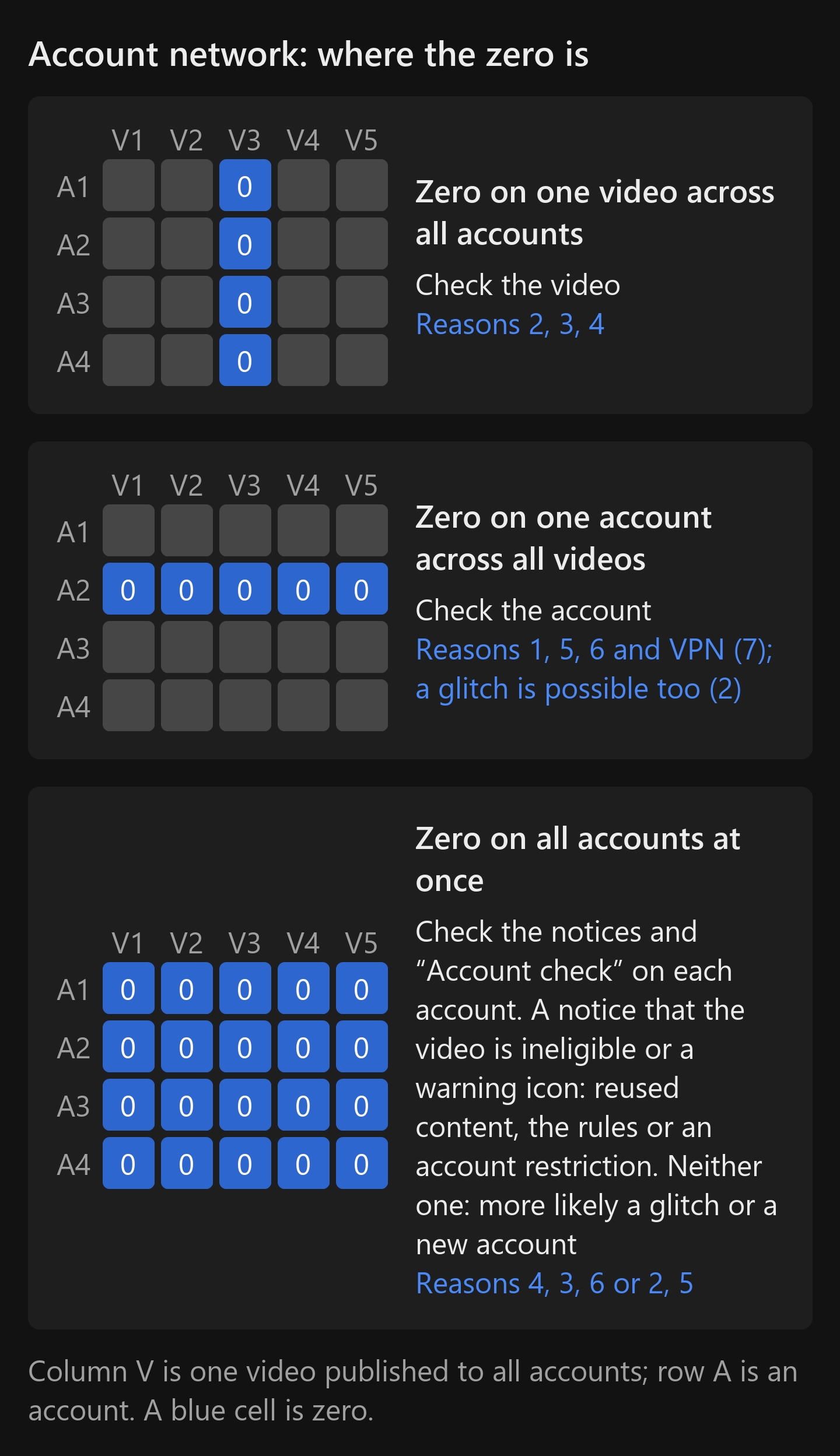
If you have several accounts, compare the zeros across them. This is our own line of reasoning; TikTok’s rules don’t contain it. Zero on one video across all accounts: look at the video, reasons 2, 3, 4. Zero on one account across all videos: look at the account, reasons 1, 5, 6 and the VPN from reason 7. A glitch can also hit a single account.
Zero on all accounts at once happens during a glitch. It also happens when the very same video has been uploaded to every account (reason 4). So it’s too early to blame such a zero on a glitch.
Notices in analytics and the check on each account help tell these cases apart. An ineligibility notice or a warning icon means reused content, the rules keeping the video out of the feed, or an account restriction. If there is a notice and the very same video was uploaded to every account, see the section “If the reason is reused content”. No notices and clean checks mean a glitch is more likely, and if the accounts were created recently, reason 5, a new account, as well. The caveats about analytics are the same as in the section “What TikTok itself says”. The rules don’t say anything about notices caused by the creator’s age or a VPN, so check those separately: reasons 1 and 7.
In our Instagram Reels network, copies of the same video sat at zero on some accounts, while on others they got views and brought in clicks. We never had copies sitting at zero en masse on all accounts at once. We haven’t tested this on TikTok.
What we saw on our own accounts
We didn’t create any accounts specifically for this article. But we have run into zeros and reused content ourselves. These are our observations, not TikTok’s rules.
TikTok. In September 2026 we published uniquified copies of videos on one account of our own. In the copies, an additional video played on top of the original: we set up the overlay on the “Template” page in Video Unique Booster. We didn’t send viewers anywhere from this account: we only checked whether the platform lets such copies through. Most copies got views: of the seven copies published on September 22, by September 27 six had between 123 and 202 views, and one stayed at zero. An example of the overlay is in the article about additional videos for the template (in Russian).
Instagram. From March to August 2025 we ran a Reels network of about 300 accounts, three videos a day per account. Each account got its own copy of a video made in Video Unique Booster. The videos were someone else’s: mostly from YouTube channels in our niche, and also from Telegram channels with video compilations. We only took videos without watermarks. We bought the accounts ready-made. The videos were published on them on a schedule by an account management program, with no manual uploading: Video Unique Booster put the finished copies into a folder that program picked them up from.
We still have an export for part of the network: 217 accounts, 6,690 videos. The export is incomplete: it includes the videos of the creatives we chose to run, not all the videos on those accounts. At the time of the export, 1,736 videos were at zero, about 26%. The zeros were spread unevenly: half the accounts had zeros on no more than 9.5% of their videos, while a quarter had 29% or more. In other words, zero on some of the videos was normal for the network, and some accounts had a lot of zeros.

What else we saw there:
- a video could get nothing on the first day and then tens of thousands of views over the next five days (this is from memory);
- we did not publish videos without uniquification in the network; before it, on one account of our own, other people’s videos from other social networks, unedited, soon started getting zero (also from memory, without counting);
- revealing videos produced many zeros and reach restrictions (this is recorded in our test log).
These numbers can’t be carried over to TikTok directly: the platforms are different. But our Instagram network shows that some videos get zero even on accounts where other videos get views. Under other conditions, for example with a single account and videos uploaded to it by hand, the picture may be different.
If the reason is reused content
Say you need one video on twenty accounts. TikTok’s rule keeps reused material with nothing new in it out of the feed: “anything new”, “creative edits” 2. The rule doesn’t define what counts as new.
Making copies with edits for each account by hand takes a long time. Each copy needs its own set of edits, and the copies must not match. The manual method is covered in the article about a video uniquifier for TikTok (in Russian). For other platforms, there are articles about a video uniquifier for Instagram (in Russian) and about how to make a video unique for YouTube (in Russian). How the program differs from browser-based services is covered in the article about an online video uniquifier (in Russian).
For many copies at once, there is Video Unique Booster. The program makes the number of copies you need from one video. You choose which edits to apply, and for each copy the program picks random values from the ranges you set. The frame, length, color and sound change.
The program’s edits come in two kinds, and they don’t fit TikTok’s rule equally well. The ones viewers notice: a different text on each copy, a clip from another video of yours, additional audio. In the program, these are the “Text” and “Template” pages in the “OVERLAYS” section and the “Additional audio” page in the “AUDIO” section. On the “Text” page, turn on “Add text” and type the caption into the “Your text:” field. Options in curly braces separated by a vertical bar give a different text on each copy: “{Link|More} in {bio|profile}” makes four different captions. On the “Template” page, the folder button selects the additional videos, and for each copy the program takes a random clip from them. On the “Additional audio” page, turn on the “Add additional audio” switch and add files: each copy gets a random one of them. For the viewer, this is something new.
Whether TikTok counts such edits as “creative edits” is up to TikTok 2. The rule keeps reused material without creative edits out of the feed 2. A single caption on a copy may not pass as such an edit.
The other edits change the file without spoiling the video. Some of them, metadata for example, change only the file. For TikTok, add noticeable edits on top of them.
Random choice on its own doesn’t rule out matches. That’s why the program has a similarity check 10. It compares a finished copy with the original and with the other copies of the same video. You set the similarity threshold yourself, from 1 to 100%. What to do with a copy above the threshold is also your choice: “Delete and recreate”, “Delete” or “Do nothing”. The check is off by default. You can turn it on on the “Export” page.

You can add videos to the program as a whole folder, and copies of each of them are created in a single run. More on this in the article about batch video processing (in Russian). For ad videos, see the article on the ad creative uniquifier (in Russian).
That’s how we worked in our Instagram Reels network. On TikTok, in September 2026, we also published uniquified copies on one account of our own. They had an overlay: an additional video on top of the original, set up on the “Template” page. Of the seven copies from September 22, six had between 123 and 202 views, and one stayed at zero. The test only checked whether the platform lets the copies through, not whether TikTok counts the overlay as a creative edit. This is our experience, not a promise.
What stays up to you. Copies don’t override the rules on spam and automation 2. How and where to publish them is your decision.
The program runs only on Windows. It is shareware: you can download it from the site’s home page and try all the features for free.
Questions and answers
Where to start
Take your last few videos with zero views and compare them against the table. If the reason is reused content and you need one video on many accounts, download Video Unique Booster and make your first copies. You can try the program for free. If the whole account is restricted, read the article on the TikTok shadow ban (in Russian).
How we gathered the material
We analyzed ten pages from the search results for three Russian-language queries about zero views and from two follow-up searches. For one page, we didn’t record which query it came from. We collected the search results with a web search tool set to the US, in September 2026. This is a sample of pages, not exact Google rankings, and the results someone sees from another country may differ. Three of the ten pages are about the shadow ban rather than zero views.
We counted the reasons across the pages ourselves, using the saved texts, and checked every match by hand. Two pages were not saved in full, so our numbers are a lower bound. Seven pages are about zero views. Most often they name reused or unoriginal videos and a new account, six out of seven each. Next comes spam with artificial inflation, five out of seven.
TikTok’s rules are cited in the version in effect since September 24, 2026. The paths in the app are taken from TikTok’s Russian-language help center, opened on September 26, 2026 15 16 17 21, and the path to “Account status” from our phone. Where a help page has no Russian version, this is noted next to the path. The YouTube breakdown videos are three in Russian and one in English. We quote them from the automatic subtitles. The measurement 14 was made in the summer of 2024 with bots that liked videos and followed accounts.
The TikTok screenshots were taken on our accounts: the ineligibility notice, the browser version’s menu, the private video at zero and the “Private account” switch. “Safety Center” and “Account status” were captured in the TikTok app on our phone on September 27, 2026. We didn’t find “Account check” in either the app or the browser version, so it is shown in screenshots from TikTok’s Creator Academy page 22. We opened that page on September 27, 2026. The other TikTok screens are described from the help center, and where it fell short, from a YouTube breakdown video; this is noted where it applies. The Instagram numbers were calculated from an export from the account management program we used to run the network: 217 accounts, part of the network, and not all of their videos.
Sources
The numbers in square brackets in the text refer here. TikTok’s rules are cited in the version in effect since September 24, 2026.
- TikTok. Community Guidelines: For You feed standards. Guidelines page ↩︎
- TikTok. Community Guidelines: Integrity and Authenticity. Guidelines page ↩︎
- TikTok. Community Guidelines: Accounts and Features. Guidelines page ↩︎
- TikTok. Community Guidelines: Enforcement. Guidelines page ↩︎
- Boeker M., Urman A. An Empirical Investigation of Personalization Factors on TikTok. The ACM Web Conference (WWW ’22), 2022. arXiv preprint, conference proceedings paper ↩︎
- Mike Yanda. If your TikToks get stuck at 0 views… Do THIS. YouTube video, 2026, in English. Video ↩︎
- Rabota ne work. Why You Get 0 Views on TikTok. Why there are no views on TikTok. YouTube video, 2022 (in Russian). Video ↩︎
- Prosto kanal. My video gets 0 views \ A shadow ban on TikTok? YouTube video, 2020 (in Russian). Video ↩︎
- Vladislav. Why do you have 0 views? TikTok, YouTube and Instagram algorithms in 2026. YouTube video, 2026 (in Russian). Video ↩︎
- Video Unique Booster. Video similarity check: what threshold to set, help page (in Russian). Help page ↩︎
- TikTok. Community Guidelines: Youth Safety and Well-Being. Guidelines page ↩︎
- TikTok. Community Guidelines: Sensitive and Mature Themes. Guidelines page ↩︎
- TikTok. Community Guidelines: Safety and Civility. Guidelines page ↩︎
- Baumann F., Arora N., Rahwan I., Czaplicka A. Dynamics of Algorithmic Content Amplification on TikTok. Preprint, 2025. arXiv preprint ↩︎
- TikTok. Help Center: “Content violations and bans” (in Russian). Help page ↩︎
- TikTok. Help Center: “Account status” (in Russian). Help page ↩︎
- TikTok. Help Center: “My posts are getting few views” (in Russian). Help page ↩︎
- TikTok. Help Center: Choosing between a private or public account, in English; there is no Russian version. Help page ↩︎
- TikTok. Help Center: “How TikTok recommends content” (in Russian). Help page ↩︎
- TikTok. Help Center: Editing, posting, and deleting, in English; there is no Russian version. Help page ↩︎
- TikTok. Help Center: “How to report a problem” (in Russian). Help page ↩︎
- TikTok. Creator Academy: “Troubleshooting issues with Account check”, updated June 16, 2026 (in Russian). Page ↩︎
