
A new account. The first videos are published. They are on the profile, and the link opens. But the videos have 0 views. There are no followers yet and no earlier videos with views, so there is nothing to compare with.
A new account can get zero views for several reasons. We found no data on how often each one occurs. The video is still under review. It wasn’t allowed into the For You feed. The account itself is restricted. The video or the account is private. By the date of birth on the account, its owner is under 16. The same video is published on several accounts: by our reading of the rules, that is reused content. Or you publish from a country where TikTok has restricted posting. In the threads we reviewed on two Russian-language forums, the device or the network gets the blame most often, but the TikTok documents we opened name no such reason. Most of this can be seen in the app itself, and you don’t need a second account for it. A few things can’t be seen: how long the video will stay under review, whether TikTok penalizes reused content without notifying you, and whether the country, the device or the network is getting in the way. A video kept out of the feed under the rules, including as reused content, shows up in a notice about that video.
What to do, in short.
- Open “Account check” in TikTok Studio. A warning sign next to posts or next to For You feed eligibility means you have found the reason.
- Turn on analytics and open the analytics of the video with zero views. See whether there is a notice that the video is ineligible for the For You feed.
- Check that the profile and the video are public.
- If you run several accounts, check whether the same file is published on them. If it is, by our reading of the rules that is reused content: don’t publish that file again, and give each account its own file (see the section on account networks below).
- Check whether a VPN is on and which country you publish from. If you publish from a country where TikTok has restricted posting, read step 5 of the order of checks: the checks in this article don’t detect this case.
- If you publish through a third-party scheduling tool, publish your next video directly from the app.
- Give the video 24 hours before you judge it.
- If you have an account that works, compare a video of the same type on both accounts, not the same file. If videos like that get views there but have had none here for a week, the problem is the account, the phone or the network.
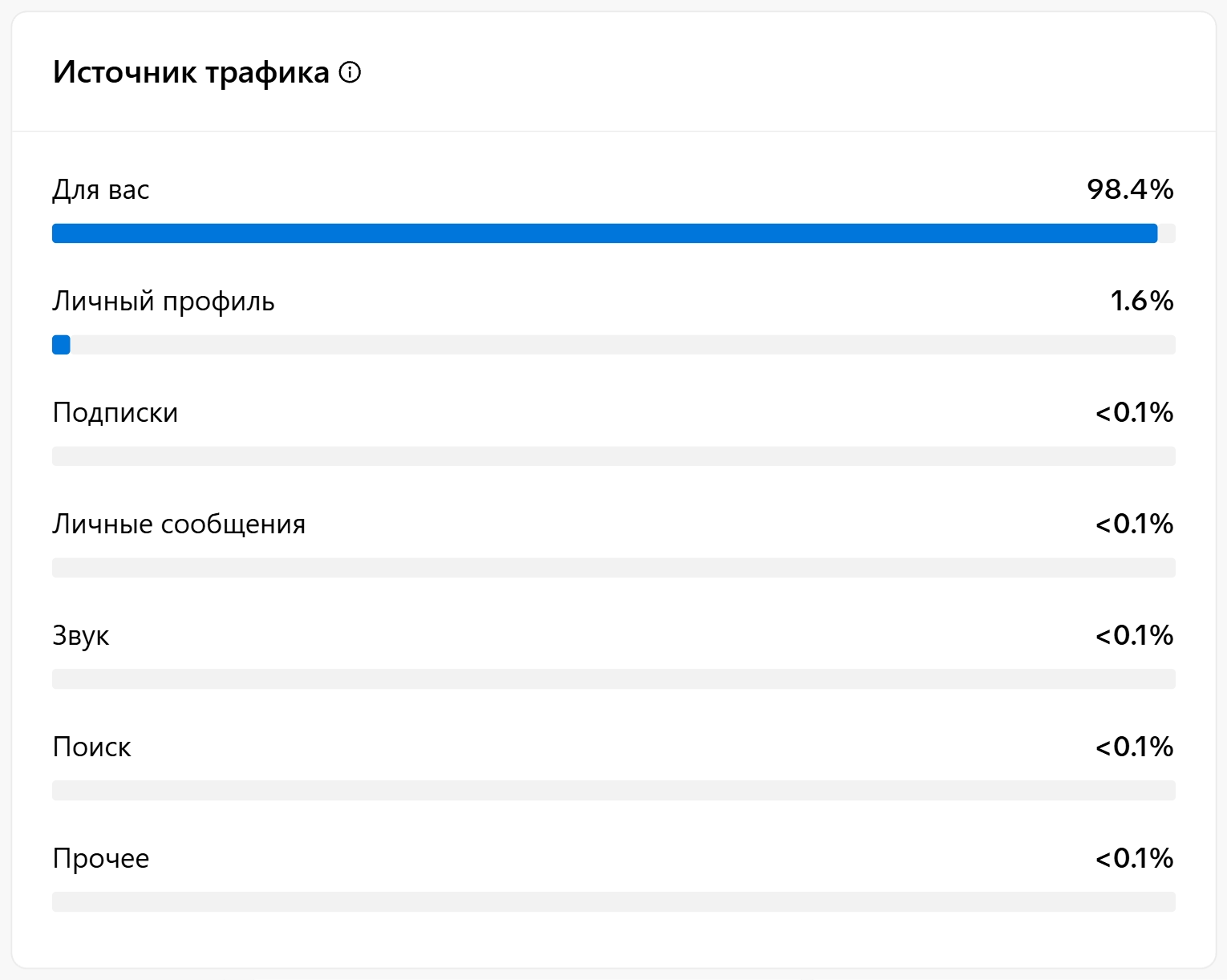
The menu paths below come from TikTok’s Russian-language help center and Creator Academy 5 15 16, and the path to a single video’s traffic sources comes from the English Creator Academy page 24. We are the team behind Video Unique Booster, a program that prepares copies of a video for several accounts. We don’t run TikTok account networks at the moment. We checked the analytics section on September 27, 2026 in the web version of TikTok Studio, on an account with 14 videos published on September 22: the traffic source screenshot below was taken there. Besides the help center, the article relies on TikTok’s rules, research papers on recommendations, nineteen pages in English, Russian and other languages from the search results for the topic’s queries (a snapshot from September 24, 2026, with a US location), Russian-language forums and YouTube videos.
We have done little work on TikTok ourselves: in September 2026 we ran a test on one account of our own, with no links and without directing viewers to other pages. We published uniquified videos there to see whether they get views. We registered the account in 2025, so it can’t be called new. Of the seven copies published on September 22, by September 27 six had between 123 and 202 views, and one stayed at zero.
Who this article is for
Who needs it. People with a new account: created recently, with the first videos stuck at zero for more than a day. People who run several accounts and post the same videos across them. People deciding whether to keep running an account or create another one.
Who doesn’t. If views disappeared on an older account where everything used to work, read our breakdown 0 views on TikTok (in Russian). If you are looking for a way around TikTok’s rules, there isn’t one here.
Video Unique Booster for Windows: hundreds of unique copies in one goBy hand, you edit copy after copy. The program creates them in batches. Each copy gets its own image, sound, metadata and duration.
Video Unique Booster: video uniquification for WindowsYou add a video and set the setting ranges. The program creates hundreds of copies. Each has its own image, sound and duration.
Hundreds of unique copies from one original videoThe manual way runs into one problem. Each copy has to be edited separately. More copies take more time.
Unique video copies for TikTok, YouTube and InstagramYou set the setting ranges once. Then the Windows program creates copies in batches. Hundreds in one go.
Video uniquification for Windows – Video Unique BoosterYou add one video. The program creates hundreds of copies. Each has its own image, sound, metadata and duration.
What you’ll need
- Account analytics. You turn it on once in TikTok Studio.
- 24 hours: we advise against drawing conclusions about a single video any earlier.
- If you have them: a second account that doesn’t follow you, and an account that works, where videos get views.
No impressions or no views: three states
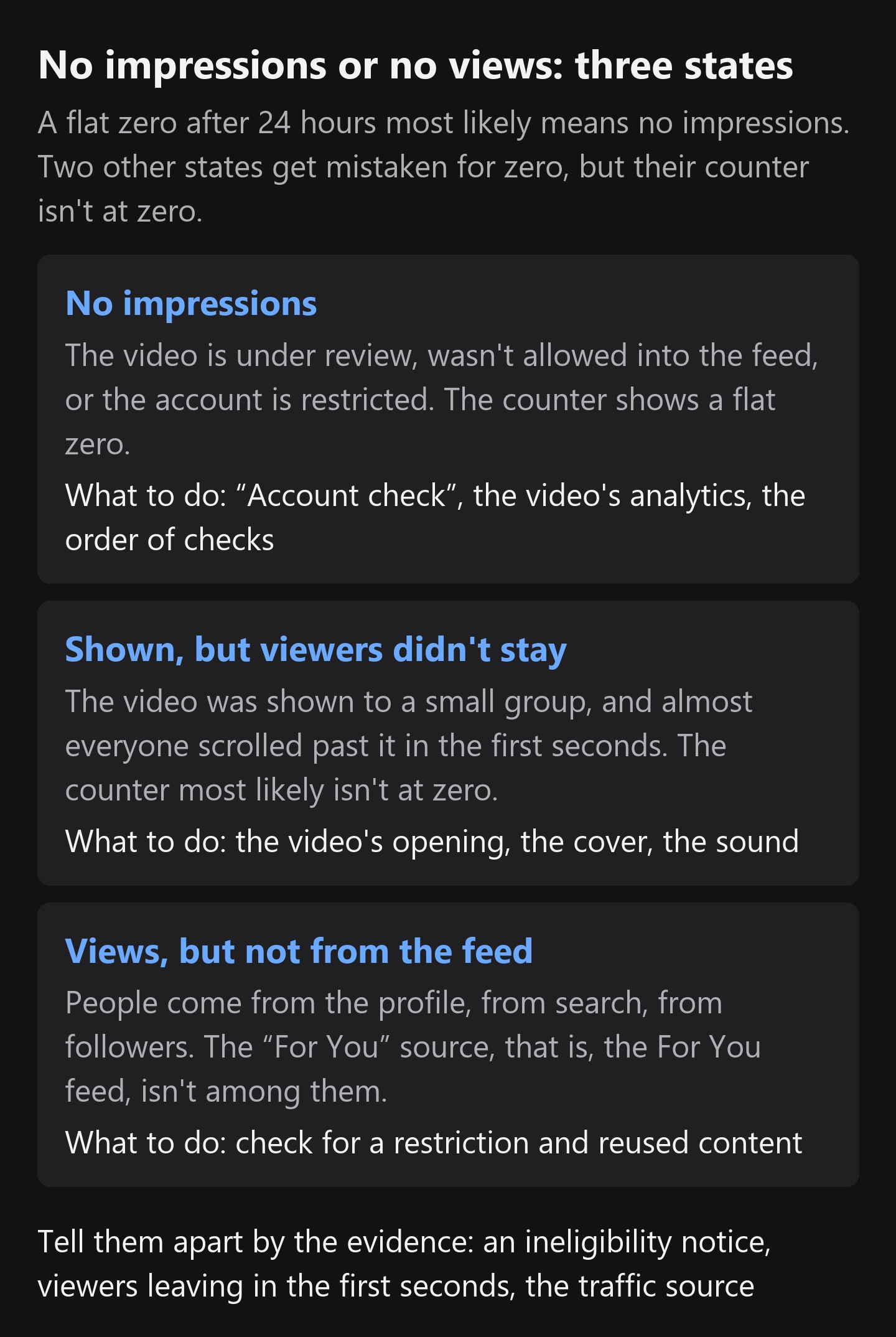
In short: if the counter shows a flat zero after 24 hours, the video most likely got no impressions, and there is no point in redoing its opening yet: the problem is more likely distribution. Two other states get mistaken for zero, but their counter isn’t at zero. Each of the three calls for different actions.
No impressions. The video didn’t reach viewers. Either it is still under review, or it wasn’t allowed into the For You feed, or the whole account is restricted. There are no views because there was no one to show it to.
Shown, but viewers didn’t stay. The video was shown to a small group, and almost everyone scrolled past it in the first seconds. In that case the counter most likely isn’t at zero: according to a third-party breakdown, a view is counted when the video starts playing or after about a second, and the breakdown itself gives both versions 23. TikTok’s documents don’t say how many people are in the first group. Here the problem is the first seconds, the cover and the sound.
Views, but not from the For You feed. This is no longer about zero. People come from the profile, from search, from followers. The “For You” source, that is, the For You feed, isn’t among them. This case is here because a small number of views from the profile is easy to mistake for a failure.
Each state has its own actions. No impressions: look into the video’s eligibility, the settings and the account. Shown, but viewers didn’t stay: redo the video’s opening. Views don’t come from the feed: check whether the account is restricted and whether the content is reused.
How to tell the first state from the second. In TikTok’s help center for advertisers, a view is the start of playback: “Video views – Number of times your video started to play” 2. That definition is for ads. For regular videos, the blog of AdManage, a service for launching ads, says something close: a view counts as soon as the video starts playing, after about a second 23. So if the video was shown to anyone at all, the counter will most likely not be at zero. The counter can also lag: a Russian-language forum thread mentions a few minutes 3. Judging after 24 hours is our checkpoint, with a margin. In the sections of the help center and TikTok’s Creator Academy that we opened, there is no separate impression count for the creator of a regular account 15 16. So the states are told apart by the evidence:
- an ineligibility notice in the video’s analytics or a warning sign next to posts in “Account check”: the video wasn’t allowed into the For You feed, and the problem is distribution 5 15. People can still find it through search and the profile 21;
- after 24 hours there are views, but almost all viewers leave in the first seconds: the video was shown, but viewers didn’t stay. The Creator Academy puts it this way: “High drop-off in first 3 seconds → Hook isn’t landing” 16;
- there are no notices, and after 24 hours it’s still a flat zero: most likely there were no impressions, but the reason isn’t named. Go through the order of checks below.
You look at drop-offs in the first seconds once there are views: “TikTok Studio” → “Analytics” → “Content” 16. In the web version, a single video has a “Retention rate” block for this: it says at which second most viewers stopped watching the video.
Why a new TikTok account gets 0 views
In short, with the mechanism behind each reason. The video is under review: it hasn’t reached the feed yet 18. The video was kept out under the rules, for example as reused content 1. The account is restricted: the restriction applies to its posts, comments, profile or messages 5. The video is hidden from other people, or the owner is under 16: such videos don’t go into the feed 16 17. Several of the pages we reviewed name a private account as a reason for zero views 26. The country: the feed is put together with the viewer’s region in mind 17. The link between a country mismatch and zero views is a theory from forums and the pages we reviewed. TikTok’s documents don’t contain it.
Next, what lies behind this, in TikTok’s own words.
Every uploaded video first goes through the moderation system, where both automation and people are at work. Only videos that pass it get into the pool from which the For You feed is put together 17. Back in 2020, TikTok wrote that videos that have just been uploaded or are under review may not be recommended to anyone 18. That is where the first zero comes from: the video hasn’t reached the feed yet.
The same post says that follower count and past high-performing videos aren’t direct factors in recommendations 18. An account with a large follower base will likely get more views because of that base 18. So a new account isn’t doomed. But it has no starting base either. We covered how the TikTok algorithm chooses videos for the feed in a separate article (in Russian).
Research papers on recommender systems and other short-video platforms describe the same thing: a new video with no viewer ratings gives the system nothing to rely on, and dedicated cold-start mechanisms are built for new videos and creators 9 10 11 12. These papers say nothing about how TikTok works.
What to do: the order of checks on a new account
The order matters: from the check that takes a minute to the one that takes a week. TikTok itself advises a similar order when views drop for an established creator. In the Creator Academy, the first item is “Step 1: Check your account and video status”, followed by what has changed, traffic sources and video metrics 16. It also says: “Each step rules out one cause so you’re not fixing the wrong thing” 16. Our order starts the same way, but it is designed for a new account with zero views. On an older account, zero is compared with what came before. On a new one there is nothing to compare with: there are no followers and no past videos. So here the publishing method, the country, the control video and the decision point after a week matter more than what has changed.

- Account check. The path: “Profile” → “Menu” (☰) → “TikTok Studio” → “Account check” in the “More tools” section 5. The same item is in “Settings and privacy” → “Support” → “Safety Center” 5. It shows account restrictions: on logging in, posting, comments, the profile and messages 5. According to the Creator Academy, it also shows your last 30 posts and whether they are eligible for the feed 16. A checkmark means no problems. A warning sign next to posts or next to feed eligibility means you have found the reason for the zero. A warning next to comments or messages doesn’t explain zero views. While you’re at it, open “Inbox” → “System notifications” → “Account updates”: notices about violations arrive there 15.
- Is there an ineligibility notice? First turn on analytics: without it, TikTok’s decision isn’t visible 15. The path: “Profile” → “Menu” (☰) → “TikTok Studio” → “Get started” in the “Analytics” section → “Turn on” 15. Then open the video with zero views. Tap “More insights” at the bottom, or “More options” (…) on the side and choose “Analytics”. Tap the notice about the video 15. It gives the reason. If you disagree, the same notice has an “Appeal” button at the top 15. If you agree, remove whatever the rule points to from your next videos. Deleting the video for this reason is useless: according to TikTok’s help center, deleting it doesn’t remove the violation 15.
- Is the video public? Check whether the account is private and who can see the video itself. The Creator Academy says it plainly: “Private videos disappear from the For You feed” 16. In the web version of TikTok Studio, a private video’s analytics carry this line at the top: “To see analytics, switch the post’s status to public” (translated from the Russian interface). Also check the age on the account. Videos from accounts whose owner is under 16 aren’t allowed into the For You feed 17.
- Is the video reused content? Your own video published again, and someone else’s video without changes, are reused content. The rules say: “Content is also ineligible for the FYF if it includes unoriginal or reused material without anything new” 1. The rule sits in the “Unoriginal Content and Intellectual Property Rights” section, that is, it is about unoriginal material and other people’s rights. For someone else’s video it applies directly. For your own videos we read it more broadly: material with nothing new isn’t allowed into the For You feed. This is our reading, not a direct quote. The closest thing to it is TikTok’s 2020 post about the viewer’s feed: “We also don’t recommend duplicated content” 18. If you find reused content, keep it out of your next posts: publish your own video on another account as a separate file with its own changes, as covered in the section on account networks and in the article on video uniquification for TikTok (in Russian).
- Do the countries match? The region matters to TikTok: it writes that the feed’s rules make sure it includes videos from creators in the viewer’s region 17. Check whether a VPN is on, which region is set on the phone and which country you connect to the internet from. This is a check, not a workaround. Posting restrictions in some countries are a separate case: in March 2022, TikTok announced that it was suspending the posting of new content in one country 19. We found no reversal or extension of this decision in TikTok’s newsroom or help center, which we opened on September 26, 2026. We don’t know whether it is still in effect. If you publish from a country where TikTok has restricted posting, zero views may be explained by this decision rather than by the video or the account. The help pages we opened don’t say how such a restriction looks in a video’s analytics. So the checks in this article won’t reveal this case: “Account check” and the video’s analytics may be clean, and the zero will stay. There is one thing you can check: ask someone in another country to find the video by its title. If they can’t see it, the problem isn’t the first seconds or the cover, and redoing the video is pointless. This article gives no ways around this restriction, including the modified versions of the app that forums write about.
- How was the video published? Through the app or through a third-party scheduling tool. OneUp, itself a scheduling service, warns in its help center: if a new account starts publishing through such a tool right away, without normal activity in the app, its videos may get zero views. For the first seven days, the service advises publishing directly from the app 22. We haven’t tested this. If you publish through a third-party tool, publish your next video directly from the app and compare.
- Give the video 24 hours and look from outside. A video that has just been uploaded or is under review may not be recommended yet 18. TikTok’s documents don’t say how long a review takes. The pages we reviewed give different answers on how long to wait before deciding there will be no impressions: from one or two hours to a day 26. Likes with zero views happen too: in a Russian-language forum thread, the answer was that the counter sometimes lags 3. After 24 hours, open your profile from another account that doesn’t follow you, and find the video by its title and hashtag. One of the pages we reviewed advises searching for the video by hashtag after just an hour 26. We advise 24 hours: the video may still be under review.
- Where did the views come from? As soon as views appear, open “TikTok Studio” → “Analytics” → “Overview” → “Traffic source” 16. A single video’s sources are in its own analytics: tap the video, and you will see retention and traffic sources there 24. In this list, the For You feed is the “For You” source. We saw this list in the Russian-language web version of TikTok Studio on September 27, 2026. Next to it are “Personal profile”, “Following”, “Direct messages”, “Sound”, “Search” and “Other”. If a video has no “For You” share, it didn’t get into the feed, even if people watch it from the profile and search.
- A control video. If you have an account that works, publish, from the new account, a video of the same type as the ones that get views on the working account. If it gets views there but not here, the difference is in the account, the phone or the network. For a new account this is expected in the first days; it’s worrying if it lasts a week. If it gets views nowhere, the problem is the video. If you have no working account, use videos you filmed entirely yourself as your control, with no links and no calls to go anywhere. One such video at zero in its first 24 hours doesn’t mean anything yet. If videos like these stay at zero for a week while “Account check” is clean, the problem isn’t the particular videos. What to do next is described below.
When zero is normal and when it isn’t. A single zero on the first videos in the first 24 hours is normal for a new account. TikTok itself can also have a glitch: one of the pages we reviewed writes that such a glitch lasts a day or two 26. We suggest judging the account after a week. That is our checkpoint, not a number from data. TikTok’s documents don’t name a time frame. The time frames on the pages we reviewed and on forums vary widely. Over a week, at the pace the pages we reviewed advise, the account accumulates several videos.
If every video is still at zero after a week, you are at a decision point:
- “Account check” shows a restriction. Read the reason and file an appeal 15. The rules prohibit creating a new account to replace this one: “Using another account to avoid restrictions” 1. What else to do about a restriction is covered in the article on the TikTok shadow ban (in Russian).
- The check is clean, but every video is at zero. There is no restriction that TikTok tells you about. Could there be reduced distribution that the check doesn’t show? Research does describe such a phenomenon: researchers who study TikTok call managing reach without removing a video “visibility moderation” 25. The paper is from 2022 and says nothing about today’s “Account check”. We found no measurements of such reduced distribution for new accounts. TikTok writes: “If a video isn’t getting many views, it also doesn’t necessarily mean it broke a rule” 21.
Before you create a new account, separate the device from the network on this same account. Publish a video of the same type from it, from the same phone over a different network (mobile data instead of Wi-Fi), and then from a different phone over the original network. Wherever views appear, that’s where the difference is. A Russian-language forum describes exactly this kind of case: “When I publish a video from my own phone, 0 views; when I publish from another phone or a PC, everything’s fine” 13. We haven’t tested this approach. It doesn’t get around the rules: in this scenario there is no restriction. Step 5 checks the country.
If nothing changed, a new account is what’s left. The rules allow running several accounts 1, and if TikTok hasn’t told you about any restriction, a new account isn’t getting around a restriction you know about. One forum member writes that a new account on the same device and the same IP “will get shadowbanned or banned” 13, so create it after the check above.
A new account’s first days: common advice and what not to trust
The pages we reviewed advise “warming up” a new account: at least eight of the nineteen do 26. For a few days, behave like an ordinary viewer. Publish a little, or not at all.
The numbers vary widely. Warm-up: from three days to fourteen. Posting pace: from three videos a week to two or three a day. There are no measurements or studies behind these numbers.
What this means in practice. A warm-up replaces neither content nor finding the cause. If the account is already restricted, a warm-up, as we understand it, won’t help: you need an appeal 15.
We do have our own log of a warm-up test, but the test ran on Instagram in 2025 and measured account blocks, not views. The warm-up was regular videos with no call to go anywhere, followed by videos with a link. After five days of this warm-up, uploads went through without problems on 26 accounts out of 30; after one to four days, there were many account blocks. These numbers don’t carry over to TikTok.
What actually to do in the first days:
- fill in the profile before the first post: name, photo, bio;
- publish the first videos without links or calls to go anywhere (the author of a Russian-language YouTube video on warming up advises this 4, and our Instagram warm-up was set up the same way);
- at first, publish from the app, not through a third-party tool;
- publish a little at a time: one or two videos a day per account (these are practitioners’ reports, not a measurement, and they refer to each account, not to the whole network) 26;
- watch videos in your niche from this same account;
- don’t do anything that looks like spam: two of the pages we reviewed name spam activity as a reason for zero views. One lists hundreds of follows in an hour, many videos in a short time and repetitive comments; the other, many videos in a short time 26. The pages give no source for this list;
- don’t delete a video with zero views within the same hour.
A separate word on deleting. A Russian-language forum thread 3 describes this case. One member’s first video wasn’t original. He deleted it and immediately uploaded another one, which didn’t get views either. Then he filmed his own video, and it also got zero. He supposed the algorithm might have taken him for a bot. Next, he created a new account and published his own videos first. After that he re-uploaded the ones that had been stuck at zero, and on the new account they got into the For You feed 3. This is someone else’s experience.
There is also the opposite view of warming up, and it hasn’t been tested either. One of the Russian-language YouTube videos we reviewed says it directly: a long feed warm-up has no effect on impressions, “it’s all a waste of time” 8. Instead, the author suggests letting the account sit for 24 hours after sign-up. Then upload one test video and see whether it gets views 8. If there are still no views after the pause, the author names two things to look at: the device you publish from and the IP address you connect from 8.
A network of new accounts: identical videos
People who publish videos at scale create new accounts for the same videos. Here is what the rules say about this and what we conclude from it.
Multiple accounts are allowed. Word for word: “You can have multiple accounts – for example, for fan content or creative expression – but not to deceive others or break the rules” 1. Several accounts for creative work are fine. For deception, they are not.
Automation that bypasses TikTok’s systems is prohibited. “We strictly prohibit automation tools, scripts, or other tricks designed to bypass our systems” 1. This kind of spam is also named separately: “Using automation to run many accounts or send repetitive content” 1.
By our reading of the rules, identical videos on different accounts are reused content. Material with nothing new isn’t allowed into the For You feed 1. A video without changes, published from ten accounts, is still one and the same video.
Several accounts on one phone and one network. The Community Guidelines we opened 1 say nothing about the number of accounts on one device. On forums, the most common answer to zero views is the device, the IP or the proxy 13 20. Before you create the next account, check the device and the network with the test described after the decision point above.
The penalty hits the group. For deceptive account behavior, the rules name three measures 1. Banning the account. Banning other and new accounts you create. Restricting posting, visibility at the top of search results and in the For You feed. Getting around a restriction from another account is also prohibited 1.
What this means for someone who publishes videos at scale. We consider the same file on ten accounts reused content: it is literally the same material. This reading hasn’t been tested, and forums have cases where re-uploaded videos did get views. A different file doesn’t by itself rule out reused content: the rules don’t say what TikTok considers “new”. But without different files, the question of anything new doesn’t even come up.
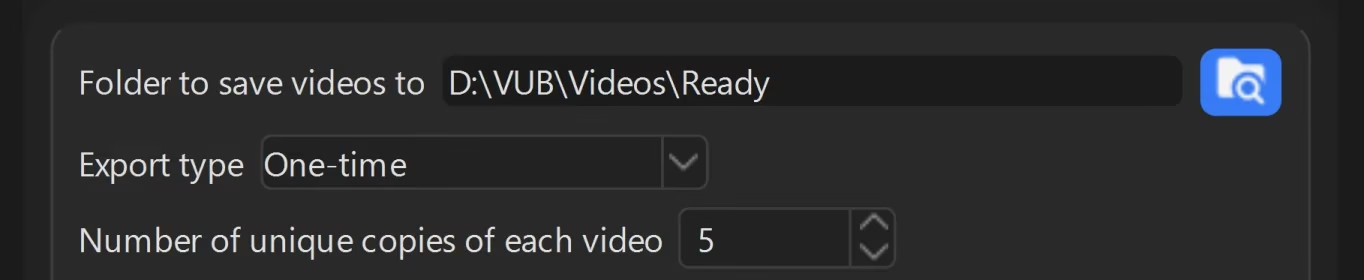
Different files are what Video Unique Booster makes. From one video it prepares several copies, each with its own changes. What changes is chosen on the settings pages, and it isn’t only cropping the edges and “Mirror the video horizontally” in “Geometry and framing”. Duration, light, color, frame texture and “Video sound” change too. You can add your own text, a watermark or additional audio. By our reading of the rule, your own text and sound are closer to a creative edit than cropping and mirroring, but TikTok’s rules set no threshold. So for TikTok we would turn on not only “Geometry and framing” but also “Text” and “Additional audio”. This advice hasn’t been tested. The number of copies is set in the “Export” section, in the “Number of unique copies of each video” field. The copies are created on your computer or in the program’s cloud. You publish them yourself, and that doesn’t override TikTok’s rules. Whether the copies help on your particular accounts can only be tested on your own network. Our experience publishing such copies on TikTok is a test on one account of our own in September 2026: of the seven copies with an overlay, six had between 123 and 202 views, and one stayed at zero.
We haven’t run an account network on TikTok, so we can compare videos with and without uniquification only on other platforms. On Instagram we had a network of about 300 accounts for Reels (March-August 2025). We did not publish videos without uniquification in that network. Before the network, on one account of our own, other people’s videos from other social networks, unedited, soon started getting zero views. We have no numbers for this. How many copies of one video an Instagram network can take is covered in the article on an Instagram account network (in Russian). How to prepare copies for Reels we covered in the article on a video uniquifier for Instagram (in Russian).
Different videos don’t rule out zero views either. A forum member who was building a network of new TikTok accounts published unique content. His first two accounts got an average of ten thousand views per video. The third got about a thousand, the fourth no more than a hundred. After that came zero views 13. He himself suspected the device or the identical names and bios on the accounts.
How many views a new account’s first videos get
The short answer: nobody has a confirmed number, and other people’s numbers aren’t worth going by.
Five of the nineteen pages write about how many views first posts get, and one of them is a forum. Three give a number: from 100 to 500 views or viewers in the first group, and one of the three writes about how things used to be 26 13. The other two say “a few hundred”. None of them gives a source for these numbers.
On forums, “100-300” comes up in three senses: as the usual level for a small channel, as the level after an account recovers, and as the number of people a video will be shown to first 13. None of the forum members has a primary source. We found no research papers that measured impressions of a new account’s first videos: not in OpenAlex, arXiv or CrossRef, in a search on September 24, 2026 14. The TikTok documents we opened don’t have a number either.
Forums name different time frames for letting an account sit idle: from “let it sit for at least a day” to “even a month won’t help” 13. We found no single time frame there.
The practical takeaway. While you are at zero, judge not by a number but by the order of checks above. Once views appear, look at your own data: how many people watched to the end and where the views came from.
Where this doesn’t work
The app’s menu paths come from TikTok’s help center; we didn’t go through them in the app. In the web version of TikTok Studio, on September 27, 2026, we went only through analytics: traffic sources, retention and a video set to “Only you”. We didn’t find “Account check” in the web version. In another version of the app, the items may be named differently.
The order of checks finds the reasons TikTok reports itself: a video kept out of the feed and an account restriction. If the problem is the device or the network, TikTok doesn’t tell you. For that case the article has only an indirect check: the device and network test after the decision point, and step 9.
On someone else’s account there is no analytics, and the states can’t be told apart at all.
And most importantly. We don’t know what exactly TikTok considers “new” in a video. The Community Guidelines set no thresholds, and the signs are named in general terms: reused or unoriginal material “without creative edits” and “Low-quality or minimally edited content” 1. A video with few changes may fall under the second sign. We didn’t find such a sign in the help center for advertisers.
Frequently asked questions
Where to start
Open “Account check” and the analytics of the video with zero views. That takes two minutes. Together they answer the main question sooner than all the other checks. If your videos go to an account network, look at how the copies are prepared: Video Unique Booster makes several different files from one video. How the program differs from browser-based services is covered in the article on video uniquification online (in Russian).
If you need many copies, how to process a folder of videos in one go is covered in the article on batch video processing (in Russian). If the zero appeared on an older account, see the breakdown 0 views on TikTok (in Russian).
Sources
The numbers in square brackets in the text refer here. TikTok’s rules are quoted from the current edition. TikTok’s help center and Creator Academy were opened on September 26, 2026.
- TikTok. Community Guidelines: Integrity and Authenticity. Community Guidelines page ↩︎
- TikTok for Business. Video play metrics: how views and impressions are counted. Help article ↩︎
- ZiSMO.biz, a Russian-language forum. Thread “Problems with views”, 34 posts (in Russian). Forum thread ↩︎
- LUDOBLUD. How to Warm Up a TikTok Account the RIGHT Way in 2026? A Complete Guide (in Russian). YouTube video, 2026. YouTube video ↩︎
- TikTok. Help center: account status, “Account check” (in Russian). Help article ↩︎
- Ivan Makaroff. Why Do Your TikTok Videos Get Stuck at 0 Views? (in Russian). YouTube video, 2025. YouTube video ↩︎
- Ivanich, a traffic arbitrage channel. Zero Views on Your Videos in 2025? (in Russian). YouTube video, 2025. YouTube video ↩︎
- Ad_trad3r. The Right Way to Warm Up Accounts for Running Traffic (in Russian). YouTube video, 2024. YouTube video ↩︎
- Schein A. I., Popescul A., Ungar L. H., Pennock D. M. Methods and metrics for cold-start recommendations. SIGIR 2002. Paper ↩︎
- Chen G., Sun R., Jiang Y., Li T., Dai Y., Shi Q. A Cold-start Recommendation System at Kuaishou Designed from the Short-video Perspective. WWW 2025. Paper ↩︎
- Jaspal A., Dalwani K., Ramineni A. SocRipple: A Two-Stage Framework for Cold-Start Video Recommendations. 2025. Preprint ↩︎
- Hu Q., Huang A., Huang N., Zhang R. Attention as Investment: Traffic Allocation for Long Tail Creators. Working paper with a study of creators who registered in January 2025. Paper, SSRN record from 2024 ↩︎
- ZiSMO.biz, a Russian-language forum, threads in the TikTok section, reviewed on September 24, 2026 (in Russian): “0 views on a video”, “TikTok 0 views”, “0 views on new accounts”, “Problems with views”, “Accounts aren’t taking off”, “TikTok shadow ban” ↩︎
- Research databases we searched: OpenAlex, arXiv, CrossRef ↩︎
- TikTok. Help center: content moderation, violations and account bans (in Russian). Help article ↩︎
- TikTok Creator Academy. How to find the cause of a drop in views (in Russian). The quotes in the text are from the English version of the same article (diagnose-traffic-issues). TikTok article ↩︎
- TikTok. Introduction to the TikTok recommendation system. Transparency Center page ↩︎
- TikTok Newsroom. How TikTok recommends videos #ForYou, June 18, 2020. TikTok post ↩︎
- TikTok Newsroom. Bringing more context to content on TikTok, March 2022 update. TikTok post ↩︎
- fb-killa.pro, a Russian-language forum. Thread “TT shadow bans” (misspelled in the original title), July-August 2026, reviewed on September 24, 2026 (in Russian). Forum thread ↩︎
- TikTok. For You feed eligibility standards. TikTok page ↩︎
- OneUp. Help center: Why are my TikTok videos getting 0 views?, updated September 4, 2025. Help article ↩︎
- AdManage. How Does TikTok Count Views in 2026?, July 7, 2026. Blog post ↩︎
- TikTok Creator Academy. Introduction to analytics (tool-analytics-intro). TikTok page ↩︎
- Zeng J., Kaye D. B. V. From content moderation to visibility moderation: A case study of platform governance on TikTok. Policy & Internet, 2022, vol. 14, pp. 79-95. DOI ↩︎
- Pages from the search results for the topic’s queries that we reviewed, opened on September 24, 2026: Kik, Eklipse, Airbridge, viral.app, Filmora, Miaoshou, detikInet, Trafficultras, Teletype, SMMGuru, AffCommunity, Influencer Marketing Hub, Post Bridge, Sked Social. Kik, Trafficultras, Teletype, SMMGuru and AffCommunity are in Russian, Miaoshou is in Chinese, detikInet is in Indonesian. Three more are [3], [22], [23]; we don’t cite two pages from sellers of services for account networks and money-making schemes. ↩︎
