
You are promoting a TikTok account and not paying for distribution. Your first videos got thousands of views, and the next ones are getting hundreds. Maybe you post two videos a day, or even on three accounts at once.
In TikTok promotion without spending money, three things are up to you. The first is viewer interest in the video 1. The second is consistency. TikTok itself recommends it 2. The third is something new in every video. Under the rules, a reused video without creative edits is ineligible for the For You feed 3. For people who post a lot, the third is the easiest to get wrong: identical copies of one video bring nothing new.
We are the Video Unique Booster team. Our program makes copies of one video with different edits, including different text and sound. Our promotion experience is with account networks. From March to August 2025, we ran an Instagram Reels network of about 300 accounts. On TikTok, we have only run a test on one account of our own, in September 2026. So the advice about TikTok itself here comes from its rules and its materials for creators. We bring in our Instagram experience where it carries over, and we name the platform every time. We also went through nine Russian-language pages from search results and checked whether their numbers have a source, and we measured how far apart copies of one video end up.
Who this article is for
For people who promote their own account. The first half of the article is for any creator. It covers how TikTok distributes videos, how many to post, and which tactics the platform itself recommends. The second half is for those who post a lot: creators who cut short clips from long videos, shops, affiliate marketers and agencies with dozens of accounts. One member of a Russian-language forum described his task like this: “I loaded 100 accounts and 1,000 unique videos, and the software uploads 5 to each one” 4. TikTok’s rules count this kind of automated uploading as spam: more on that in the section on multiple accounts.
If your account is new, start with the section on topic and profile. Paid options (Promote, the TikTok Ads Manager ad account and creator ads) have a section of their own.
The advice here is not tied to a country, but access to TikTok differs from country to country. In March 2022, TikTok announced that it was suspending livestreaming and new content in one country 5. According to Habr, a Russian-language tech news site, users in that country stopped seeing new videos from international accounts at the same time 6. We found no TikTok statement lifting these restrictions: we searched TikTok’s sites on September 26, 2026. So first make sure that your account can publish videos and that your viewers can see them. Here is how to check: publish a video and open its analytics in TikTok Studio. If views are coming in, open the “Viewers” tab: it shows which countries your viewers are in, as estimated by TikTok’s model 7. If the video will not publish, the advice in this article will not help your account yet. Zero views when publishing works can have other causes: they are covered below and in the article on 0 views on TikTok on a new account (in Russian). We do not advise getting around country restrictions. If you need a platform where your videos will be seen, our experience with Instagram Reels is described in the article on an Instagram account network (in Russian).
Video Unique Booster for Windows: hundreds of unique copies in one goBy hand, you edit copy after copy. The program creates them in batches. Each copy gets its own image, sound, metadata and duration.
Video Unique Booster: video uniquification for WindowsYou add a video and set the setting ranges. The program creates hundreds of copies. Each has its own image, sound and duration.
Hundreds of unique copies from one original videoThe manual way runs into one problem. Each copy has to be edited separately. More copies take more time.
Unique video copies for TikTok, YouTube and InstagramYou set the setting ranges once. Then the Windows program creates copies in batches. Hundreds in one go.
Video uniquification for Windows – Video Unique BoosterYou add one video. The program creates hundreds of copies. Each has its own image, sound, metadata and duration.
What you will need
- one account or several;
- a backlog of videos for at least two weeks ahead;
- analytics in TikTok Studio;
- time once a week to review your analytics.
Starting from zero: topic and profile
TikTok recommends starting with a topic rather than posting random videos 31. Pick one niche and stick with it. Within the niche, choose a few narrow topics: that way viewers know in advance what they will get and are more willing to follow you. TikTok’s example: someone who can cook and loves movies recreates dishes from famous films 31. When a format gets views, post it often; a series is the easiest way to do that 31.
TikTok recommends filling out your profile completely 29:
- Username: include words from your topic, and avoid random or hard-to-spell handles like @user123. You can change it once every 30 days, and your profile link changes with it.
- Name (the display name) can be changed once every 7 days.
- Profile picture: use the same one on all your social networks so people recognize you.
- Bio: up to 160 characters on what your videos are about, what value they bring and how to contact you. TikTok gives “I post cool stuff” as an example of a vague bio.
- You can add a website link to your profile once you have 1,000 followers or a Registered Business Account.

Profile edits go through moderation 29. For driving traffic to your profile, TikTok says your name and bio matter most. It recommends pinning your best videos to the top of your profile 30.
People rarely follow after a single video: a viewer needs to see that you make good content more than once 31. That is why a new account grows through a series of videos on one topic, not through one lucky hit.
How the TikTok algorithm decides who sees a video
The For You feed (in the Russian version of TikTok it is called “Recommendations” 18) picks videos for each viewer. TikTok’s rules give examples of what the system looks at. These are what the viewer likes, shares and comments on, and what they search for. It also looks at what is trending 1.
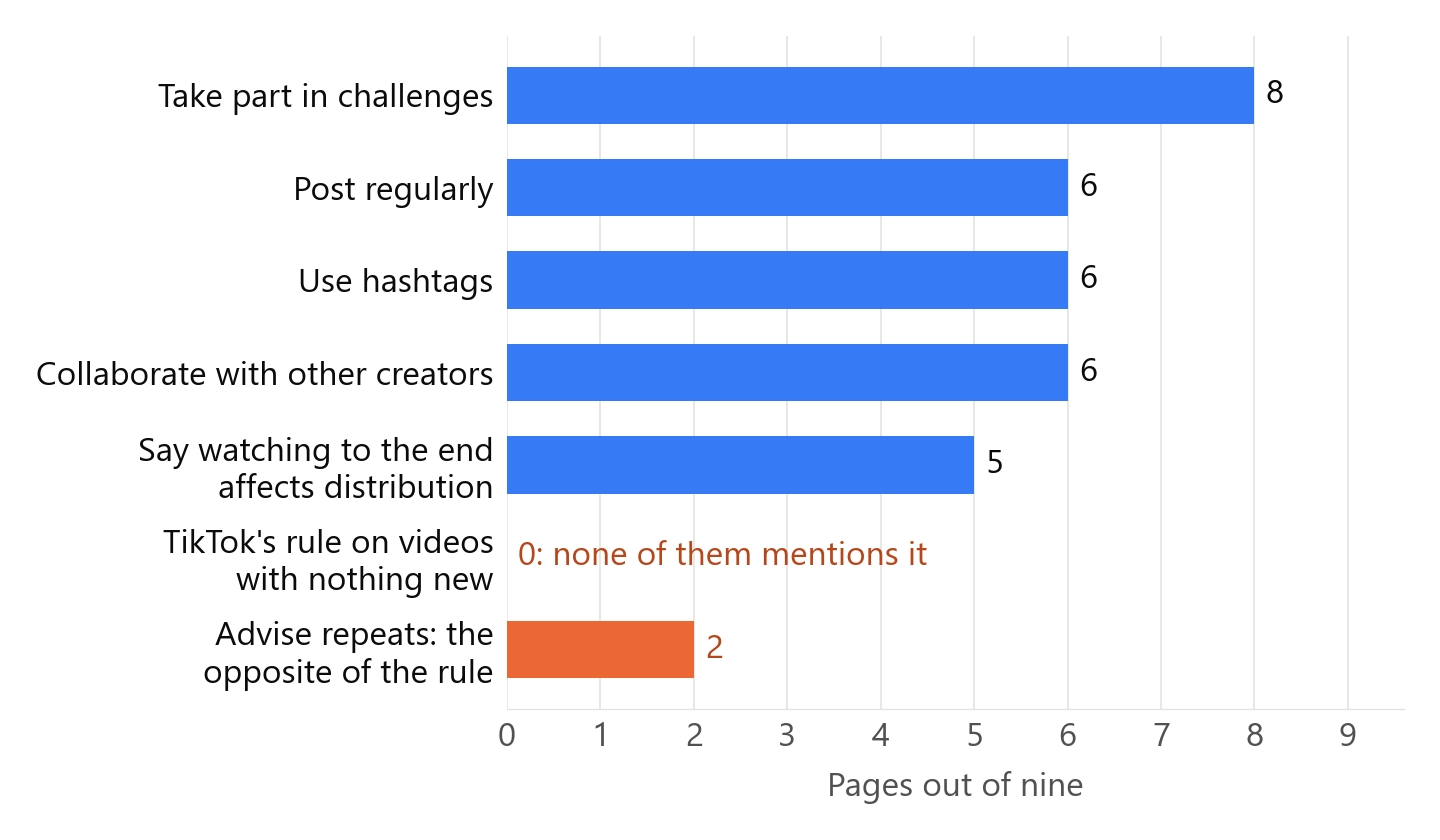
The rules say nothing about watching to the end, but the materials for creators address it directly. There, TikTok calls retention the most important metric for a video, and engagement (likes, comments and shares) the second most important. Watch time, it says, is weighted more heavily than likes, comments and shares, although a video’s success depends on all the metrics 8. TikTok wrote the same thing in 2020. It called watching a longer video from beginning to end a strong indicator of interest 9. Pages in search results write about watching to the end too. Of the nine we reviewed, five say that distribution depends on it. That is why the start of a video matters so much: someone who leaves in the first seconds will not watch to the end. We covered separately which other signals the TikTok algorithm (in Russian) takes into account and which of them weigh more.
The materials for creators also mention a “trending rate”: how quickly a video is gaining views, likes and shares. The higher it is, the more likely the video is to be featured on the For You feed 2.
The system is built for variety: “not just the same kinds of videos over and over” 1. The point is not to show a viewer the same thing again and again, above all things that could lead to a negative experience, such as videos about extreme fitness or dieting 1. This does not stop a creator from having series or a consistent style.
There is a lot of randomness in the feed. An audit of TikTok that researchers carried out in the summer of 2021 shows this 10. They set up bots. The bots only scrolled the feed and did not interact with anything. Even so, the feeds of two identical bots diverged. In the feeds of two such bots, 66% of the videos and 66% of the creators did not match 10. TikTok itself says that fluctuations in views are normal 8. So do not judge by a single video; compare weeks.
A 2025 study analyzed almost 25 million TikTok and musical.ly videos from 2014 to 2019 11. The researchers took creators in the top 10% by engagement. They looked at how often these creators made it into the top 10% of videos of the week. The gap between the first and second such appearance reached about 10 weeks, while the gap between the third and fourth was usually half as long 11. The study’s main conclusion: success goes to a few. It comes more easily to those who have already had it 11.
The data is old. But even strong creators went weeks between hits. If your first videos got thousands of views and the next ones get hundreds, that does not yet mean you broke something. A video from an account with more followers usually gets more views 9. But according to TikTok, neither follower count nor previous high-performing videos are direct factors in recommendations 8.
How many videos to post on TikTok
TikTok’s materials for creators say there is no one-size-fits-all answer. In the same article, TikTok refers to its success cases. In them, publishers that post multiple times a day get more video views and more exposure on the For You feed 2. The platform’s advice is to set a daily post target you can consistently hit 2. In another article, TikTok writes that consistency matters more than perfection 12. One Russian-language YouTube video cites TikTok’s developers and names five videos a week 13. The author refers to TikTok’s help center, which we did not open. The TikTok materials for creators that we opened on September 25-26, 2026 do not contain this number.
Practitioners give their own numbers, but none of them offers a comparison under equal conditions:
- A guide on launching accounts from Partnerkin, a Russian-language affiliate marketing blog, advises starting with 1-2 videos a day and then moving up to 5 14.
- An article on TikTok accounts for traffic arbitrage from Pirate CPA, another Russian-language affiliate marketing site, advises 2-3 videos a day, 2-4 hours apart 15. The same article advises: “Publish 6 identical videos in a row” 15. Elsewhere it says that before uploading, “it is advisable to uniquify the content a little” 15. Six identical videos without edits are a repeat.
- The author of a small Russian-language YouTube channel posted 5-7 videos a day on TikTok. He recommends 5 to 10 16. He suggests making up the volume by uploading videos again: “you take your old video or some top video” 16. He promises to explain separately how to get such a video onto the For You feed. Without edits, this is a repeat too.
- In our Instagram Reels network, each account posted three videos a day: at 7 a.m., noon and 6 p.m. This is our practice, not a measurement.
Pages in search results name numbers too. We reviewed nine Russian-language pages with advice (a web search with the region set to the US, September 25, 2026; how we selected them is described at the end of the article). Six of the nine advise posting regularly. Four name a frequency:
| What the page advises | Videos per week |
|---|---|
| “2-5 videos a week” | 2-5 |
| “several videos a week” | not stated |
| “1-2 videos a day for 14 days in a row” | 7-14 |
| “at least 1-2 videos a day” | 7 or more |
Three of them give a number. The extremes differ sevenfold: from 2 videos a week to 14. None of the pages names a source for its number. One of them lists under “don’ts”: “posting many videos in a row in one day.”
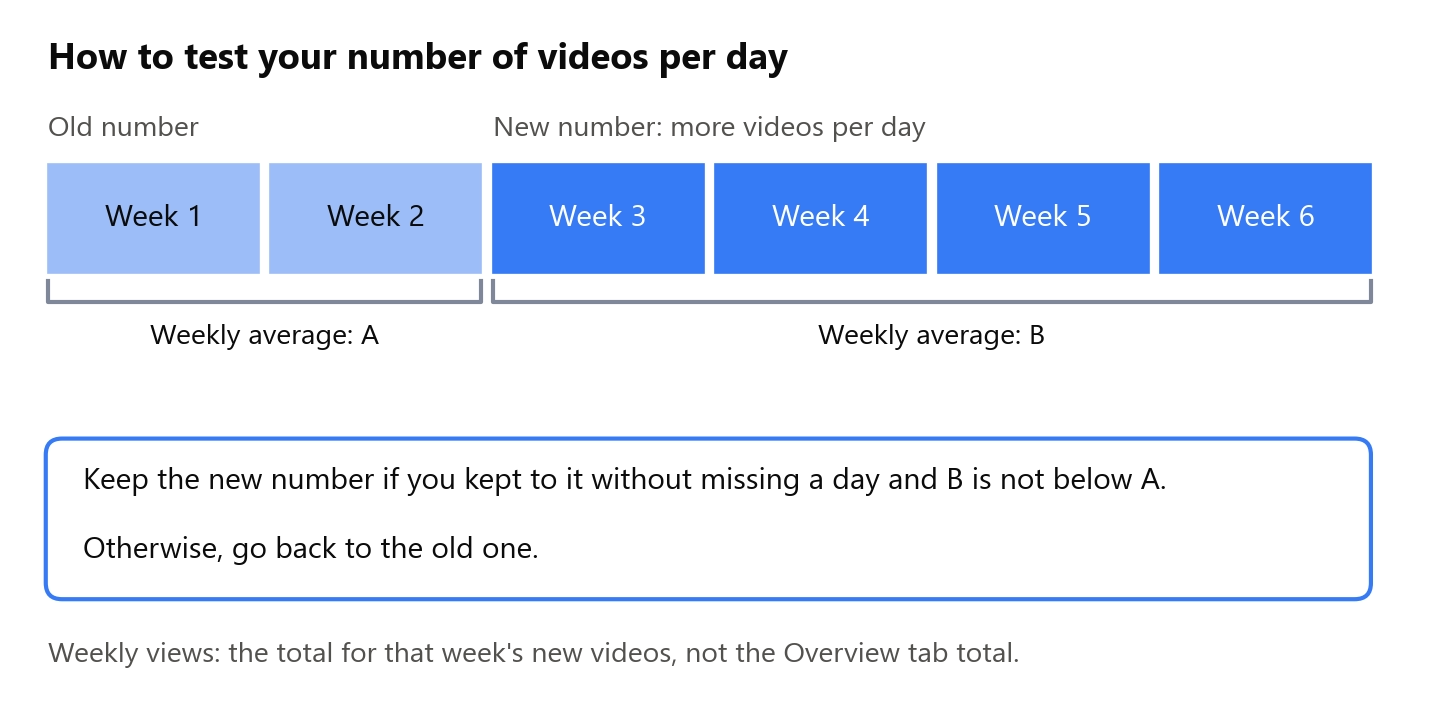
How to test your own number:
- Take the number of videos a day that you can keep up without missing a day, with some margin.
- Spread the videos across the day instead of posting them all in the same hour.
- Keep to that number for at least two weeks.
- Add more videos a day and keep to the new number for at least four weeks.
- Compare the weekly views of new videos at the old number and at the new one: for each week, add up the views of the videos published that week.
Any single week can turn out good or bad on its own, so compare averages over several weeks. Keep the number you can sustain without missing a day: TikTok gives the same advice 2. Keep the increase if you sustain it without missing a day and the average weekly views over four weeks at the new number are no lower than over two weeks at the old one. Each video’s views are shown in its analytics 7. The total on the “Overview” tab does not work for this comparison: it also includes views of older videos, so the increase looks better with it than it really is. Four weeks is our assumption. Of the pages in search results, one names a period: 14 days of 1-2 videos a day, “then review the analytics.” The TikTok materials for creators that we opened give no period.
The author of one Russian-language YouTube video suggests testing the posting time yourself: publish videos at 9 a.m., 3 p.m., 6 p.m. and 9 p.m. and compare 17. According to him, a video sometimes starts getting views only after 3-7 days. It happened in our Instagram network too: a video got nothing on the first day and then gained tens of thousands of views over the next five days. The opposite happened as well: a video got reach on the first day, and then its growth stopped. The author of the video believes that the posting time “has no effect on whether it gets into the recommendations feed” 17. TikTok advises otherwise: look in your analytics for the hours when your viewers are most active 7, 8. On the most active days, it recommends posting at most two hours before the peak: that way the video catches the earlier audience and builds momentum before the peak 8.
If you post a lot, scheduled posting helps. In the web version of TikTok Studio, you can schedule videos up to 30 days in advance 12. The platform recommends filming videos ahead of time, setting aside one or two days for filming 12.
Free tactics that TikTok recommends
The number of videos does not replace interest in each video. Here is what the platform itself recommends in its materials for creators.
Topics from search. The “Creation inspiration” tab in TikTok Studio shows popular topics in your niche. The Creator Search Insights tool helps you find topics that people search for often but that have few videos 12. TikTok recommends making videos on exactly those topics and writing ideas down in the notes on your phone right away 12.
A strong opening. TikTok recommends showing something in the first 5 seconds that makes the viewer stop scrolling 27. Techniques from its materials 28:
- a question that the video answers by the end;
- the finished result in the first shot, with the process after it;
- a time in the title: “Everything you need to know about buying a home in 2 mins”;
- a list with a promise: “7 best XYZ… (I saved the very best for last)”;
- a funny moment or a blooper at the very beginning.
TikTok recommends naming the topic of the video right away with short on-screen text 28. Add captions too: over 30% of TikTok survey respondents watch videos on mute and rely on captions 27. From there, the video is built like a story: a hook, then the details, and a call to action at the end 12.
Series. A repeatable format is easier to plan, and it makes the creator easier for viewers to remember. You can collect a series into a playlist on your profile, but playlists become available at 10,000 followers 30. You can post one format on a specific day of the week. TikTok’s example: a sports creator teaches a new drill every Tuesday 12.
Replying to comments with a video. TikTok recommends setting aside one day in your schedule for videos that respond to viewers’ comments 12.
Your profile on other social networks, LIVE, Stories. To gain followers, TikTok recommends sharing a link to your profile on other social networks, going LIVE and posting Stories 31. You can go LIVE from the age of 18, and the number of followers you need depends on the country 42. In some countries, TikTok has suspended livestreaming 5.
Trends and sounds. The platform recommends using trending sounds and effects 2. A topic you have already covered in depth can be presented again through a relevant trend 12. Eight of the nine pages in search results recommend challenges. Four of them advise adapting a trend to your own topic. One advises making a video “the same way as everyone else.”
A consistent style. The same pacing, fonts, filters, captions and video covers speed up editing and make the creator recognizable 12.
Collaborations. In its advice for lifestyle publishers, TikTok suggests collaborating with creators 2. TikTok also recommends that anyone who wants to reach a wider audience collaborate with and tag other creators 8. Six of the nine pages in search results also recommend collaborations.
Different formats and longer videos. To reach a wider audience, TikTok recommends experimenting with diverse content. It also recommends well-crafted, longer videos on a specialized topic 8. The traffic sources in your analytics show which formats viewers find more often 8.
Hashtags. In a 2020 text, TikTok lists hashtags among the video details that the system takes into account, along with captions and sounds 9. In its materials for creators, TikTok recommends 2-3 hashtags relevant to the video, since less is more 27. Six of the nine pages in search results recommend hashtags. Three of them say how many to use, and they recommend more than TikTok does, each a different number: 3-6, at least 3-5, a 3-5-2 scheme. None of them gives a source.
Search words in the title. Analytics shows the search queries that led viewers to a video 7. TikTok recommends including these words in the titles of future videos on the same topic 8.
Duet and Stitch. These are built-in TikTok features for responding to someone else’s video. If you respond to someone else’s video, add your own part: someone else’s material without creative edits does not get into the For You feed 3.
Videos from other platforms. Your own video from Reels or Shorts can also be published on TikTok. Use the original file, not one saved from another platform: TikTok counts a video with someone else’s watermark or superimposed logo as unoriginal 37.
Contests. TikTok runs its own post contests with cash prizes. A contest runs for around 4 weeks: you tap “Join Now” on its page and post an original video with the contest hashtag 39. You can take part from the age of 18, with a personal account based in the contest’s region. The Activity Hub in TikTok Studio, which shows the contests currently running, is available only in the US and Japan for now 39. If you run a contest of your own, do not make “like-for-like” a condition: such promises and false incentives for following make a video ineligible for the For You feed 3.
Topic and goal. Do not judge a topic by views alone. In our Instagram Reels network, videos featuring one well-known blogger got views but no link clicks. Explicit dating-themed videos often got zero views. This is Instagram; we have not checked how TikTok distributes such videos.
Other people’s successful videos. TikTok’s Creative Center collects high-performing ads from the platform, showing the moment in each video when viewers engage most, as well as trending hashtags 41. Look at how a video holds viewers in the first seconds and what format it uses, but make your own: someone else’s video without creative edits does not get into the For You feed 3.
TikTok recommends trying one or two tips over the next week and seeing how they affect your workflow 12. A week is enough to see whether a technique suits your work. One week is not enough to tell whether it affected views.
What to check in your analytics once a week
Analytics is in TikTok Studio. In the TikTok app, go to your profile, open the menu, then tap “TikTok Studio,” “Analytics” and “View all.” In the web version of TikTok Studio, it is the “Analytics” tab on the left 7. Views of all your videos over the selected period are on the “Overview” tab 7.
For each video, analytics shows three metrics of how far people watch 7:
- “Retention rate”: the percentage of the video that people watched; the chart shows the second at which viewers leave;
- “Average watch time”: how long people watched on average;
- “Watched full video”: the percentage of people who watched to the end.
If viewers leave at the same second, rewatch the video at that point. TikTok suggests asking yourself whether something there might be offensive and whether the video is engaging enough. The answers give you ideas for reworking the video 8. There is no point uploading it again unchanged: as far back as 2020, TikTok wrote that it does not recommend duplicated content in the feed 9.
Analytics also shows traffic sources: the For You feed, your profile, search 8. When your viewers are most active is shown on the “Viewers” tab (peak activity over 7 days) and on the “Followers” tab (by day and hour) 7.
If TikTok has made a video ineligible for the For You feed or removed it, it tells you. You can check this in three places 18:
- in your Inbox: the decision is in Account Updates, and your full record is in Account Status;
- on your profile: removed videos carry a “Community Guidelines violation” tag;
- in the video’s analytics: if the video is not eligible for the For You feed, a warning bar appears at the top of the “Performance” tab.
Sources 7 and 18 link to the Russian versions of these TikTok articles for creators; the section and tab names here follow the English versions of the same articles, where the section is called “Analytics” and the tab “Overview.” If you disagree with a decision, appeal it: tap “Appeal” in the upper right corner of the notification 18. Low views do not necessarily mean a violation: the rules say so too 1.
Once a week, check three things. First, whether any videos have that warning. Second, how people watch your new videos: the second at which viewers leave and where the views came from. Third, how many views your new videos got in the week: add them up from each video’s analytics 7. Watch whether this number rises or falls over several weeks in a row. The 7-day total on the “Overview” tab also counts older videos, so it is worse for this comparison. Other reasons for falling views are collected in the article on 0 views on TikTok (in Russian).

If you send viewers to a link, views alone are not enough. That was our experience with the Instagram Reels network: about 300 accounts, with traffic going to a Telegram channel. When a type of video was already getting views consistently, we put it on part of the network, 30-50 accounts, and watched whether link clicks came in. If views came in over a day or two but there were no link clicks, we dropped videos of that type and tried others. We counted clicks in the analytics of the Telegram channel that the main account’s link led to. This is Instagram, but the conclusion carries over: TikTok shows video views and profile views 7. Count clicks on your own link yourself, using the analytics of the website or channel it leads to.
Paid TikTok promotion: Promote, ads, creators
There are three paid options. Paying for distribution does not exempt you from the rules: campaigns must comply with the Community Guidelines and the additional advertising policies 19. Nor does it make a video more interesting. Below are the terms and TikTok’s own advice.

Promote is an advertising tool in the TikTok app. For a fee, it helps increase the reach of videos and LIVE streams 19. The “Boost account” goal is designed to grow video views, followers and profile views 19. You can pick a preset option with a set budget, duration and audience, or set up the promotion yourself 19. You can find the tool on the video itself: tap the three dots, then the Promote icon. It is also available in TikTok Studio, in Business Suite and on the web 20.
The terms are as follows 32:
- You must be at least 18; promoting a LIVE stream requires 1,000 followers 19.
- The tool is not available in every country: if you do not see the icon, it may not be available in your country.
- You pay in the currency of the country where your account is registered; with Apple Pay or Google Pay, an app store fee is added.
- The video is reviewed, usually within 48 hours. If it is rejected, or you end the promotion early, the unused money returns to your Promote balance.
- Background music in the video must be commercial music; TikTok recommends choosing it from its Unlimited Sounds Library.
TikTok’s advice on when to use Promote is this: a new creator can use it to test how the right audience receives their videos, and a creator who already has followers can promote their best-performing organic videos 40. How much promotion costs is not stated in the help pages or in the TikTok materials we opened, in either the English or the Russian version: the budget comes from a preset option or is set manually during setup 19, 32. TikTok advises starting with a low budget on the day you post, then repeating with a slightly higher budget and watching whether the cost per follower decreases 33. Its second tip: publish several videos in different formats, promote each with the same budget and goal, and then promote the one that worked best 33.
TikTok Ads Manager is for advertisers with larger budgets. The daily budget of a campaign there must be over $50, and of an ad group over $20 34. An ad group running for 31 days needs at least $620 34. TikTok lists the countries where you can create an ad account in its help center 35.
Creator ads. You make a deal with the creator directly, and the brand also pays the creator directly, not through TikTok 36. Through the TikTok One platform, a brand can, with the creator’s permission, boost the creator’s video as a Spark Ad. TikTok One is available in 26 countries and regions 36. TikTok’s materials give no prices for creator ads, and pages in search results name amounts without a source, so we do not quote them.
Multiple accounts: why people run them and what they risk
Why people run several accounts is explained in the Partnerkin guide: you cannot predict in advance which video will get views 14. Many accounts mean many attempts. That was the case in our Instagram network too: a copy of the same video got zero views on some accounts and brought views and link clicks on others. We did not publish copies of one video one after another: about 50 videos went out across the accounts mixed together, in random order.
In our Instagram network, not every account had a link. The accounts with videos pointed to one main account, and that account’s profile had the link to the Telegram channel. On TikTok, you can add a website link to your profile only with 1,000 followers or a Registered Business Account 29, so a new personal account will not have one.
TikTok’s rules allow multiple accounts, with a caveat: “not to deceive others or break the rules” 3. As examples of deception, the rules name covert influence operations, impersonation, spam and fake reviews 3. For deceptive account behavior, TikTok may ban the account, as well as additional or new accounts of the same person. It may also restrict the account: its ability to post new content and to appear in top search results and in the For You feed 3. If your account is restricted or banned, you may not create or use another account to get around it 3.
Anyone who runs several accounts should know about the other prohibitions too. Under the rules, spam includes using automation to run many accounts or send repetitive content. Circumvention includes spreading violating content across multiple accounts and using another account to avoid restrictions, including ineligibility for the For You feed. Automation tools, scripts and other tricks designed to bypass TikTok’s systems are prohibited separately 3. What this means for copies of videos is covered in the section “Where this does not work.”
There is also a restriction that does not involve breaking the rules. Sometimes an account posts a lot of videos that are ineligible for the For You feed. In that case, TikTok may make the whole account ineligible for the feed, and it becomes harder to find 21. For a network with the same videos on every account, this is a risk.
The author of one post about shadow bans on Pikabu, a Russian-language social site, names among the causes of restrictions, without citing the rules, “creating new and different accounts with identical or similar videos” 22. What to do when distribution has already been cut back is covered in the article on shadow bans on TikTok (in Russian). If you have had zero views from day one, start with the article on 0 views on TikTok on a new account (in Russian).
Posting a lot does not mean repeating a video
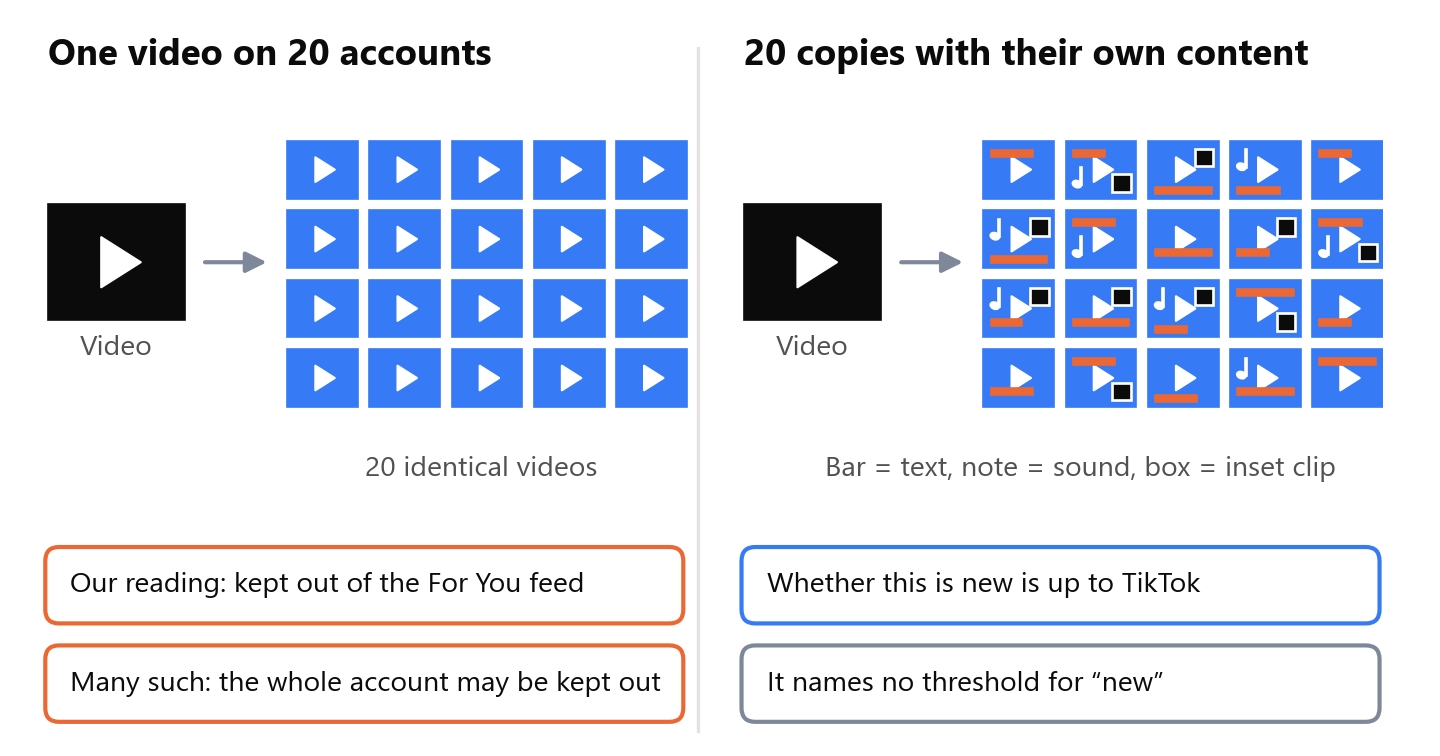
TikTok’s rules put it this way: “Content is also ineligible for the FYF if it includes unoriginal or reused material without anything new” 3. FYF here is the For You feed. People can still find such a video through search and on the creator’s profile 1. The rules give examples. The first is reused or unoriginal content posted without creative edits, such as a clip with someone else’s watermark. The second is low-quality or minimally edited content 3. On top of that, TikTok removes content that violates someone else’s copyright once it becomes aware of it 3. This rule is covered in detail in the article on 0 views on TikTok (in Russian).
The rule sits in the section about other people’s material, and its example is about someone else’s content: a video with someone else’s watermark. By TikTok’s definition, an unoriginal video is copied completely from others, largely repurposed from another source without creative edits, or combined from multiple sources with little that is new 37. Copies of your own video are not addressed directly: counting them as “reused material” is our reading. In 2020, TikTok wrote that the For You feed does not recommend duplicated content or content the viewer has already seen 9. That was about variety in one viewer’s feed, and it does not directly address copies on different accounts either. One video on twenty accounts is twenty identical videos. An old successful video uploaded again is also a repeat.
Practitioners also advise changing the video. “Simply uploading the same video again is almost always useless,” writes one on UBT Space, a Russian-language site 23. He also writes: “A unique opening is what matters most” 23. Another puts it more softly: “It is advisable to uniquify the content a little before uploading, to avoid a ban” 15.
The pages in search results do not mention TikTok’s rule about videos with nothing new: not one of the nine. Two come closest to the rule: both advise against uploading videos with other people’s watermarks, and that is the example from the rule itself. One of them also writes that low-quality trends repeated without changes get lower priority in recommendations. Two advise the opposite. One gives a success story in which the creator “simply posted someone else’s content.” The other advises to “upload the video again a few days later with a changed cover.”
Changing only the metadata is not enough. Methods for finding near-duplicate videos compare frames. There is a research paper on this, not about TikTok: in its video dataset, videos that share a common filmed scene are labeled as duplicates 24. This is labeling for finding similar videos, not a measurement of what TikTok detects. What stays in the file after the metadata is cleaned is covered in the article on how to remove metadata from a video (in Russian).
TikTok does not specify which edit makes a video new: the rules name no threshold.
We checked how different the copies themselves turn out: we made 20 copies per video from the open VISION video dataset 26 and compared pHash frame fingerprints 25. We counted how many copies stay at least two bits (out of 64) apart from one another. Of the copies where only brightness (within 3%), contrast and noise changed, one remained. Of the copies from our script with mirroring, cropping, a border, and changes to color, speed and sound, 13-16 remained; of the program’s copies, 15-18. The program’s copies were made with the settings of a new project and the set of edits from the article on account networks. The measure compares only frames: it does not see sound or speed, and it sees your own text and an inset clip only as a change in the picture, not as new content. The measurement does not show how these bits relate to TikTok’s decision. The method and caveats are in the article on an Instagram account network (in Russian).
The takeaway for you is simple: weak edits to brightness and noise produce nearly identical copies, no matter how many you make.

Copies with stronger frame edits ended up further apart. The rules speak of creative edits and of something new in the video 3. Each copy having its own content is closer to these words: its own text, sound, inset clip. No edit guarantees eligibility for the feed, but a copy with its own content is closer to the rule than an identical one.
In September 2026, we tested unique copies on TikTok ourselves, on one account of our own, and did not send traffic anywhere from it: we wanted to see whether such videos reach viewers. Of the seven copies published on September 22, by September 27 six had between 123 and 202 views, and one stayed at zero. The copies had an overlay from the “Template” page: an additional video on top of the original one.
What to make copies with
The first way is to edit each copy yourself in a video editor. That works for five copies, but for a hundred it takes a long time. How to do it by hand is covered in the article on a video uniquifier for TikTok (in Russian). If you are comfortable with the command line, the free program FFmpeg can make copies 38: this is covered in the article on video uniquification with FFmpeg (in Russian).
The second way is to make the copies in Video Unique Booster. The program makes copies of each imported video, and you set the number of copies. First, the edits that change a video’s content. Text on the video can be set with variants, and a variant is picked at random for each copy. The more variants, the fewer repeats. In the “Template” section, a segment of another of your videos is placed in the frame: the video and the segment are picked at random for each copy, and you set the position in the frame yourself. You can add additional audio, and the file for each copy is also picked at random from the ones you specify.
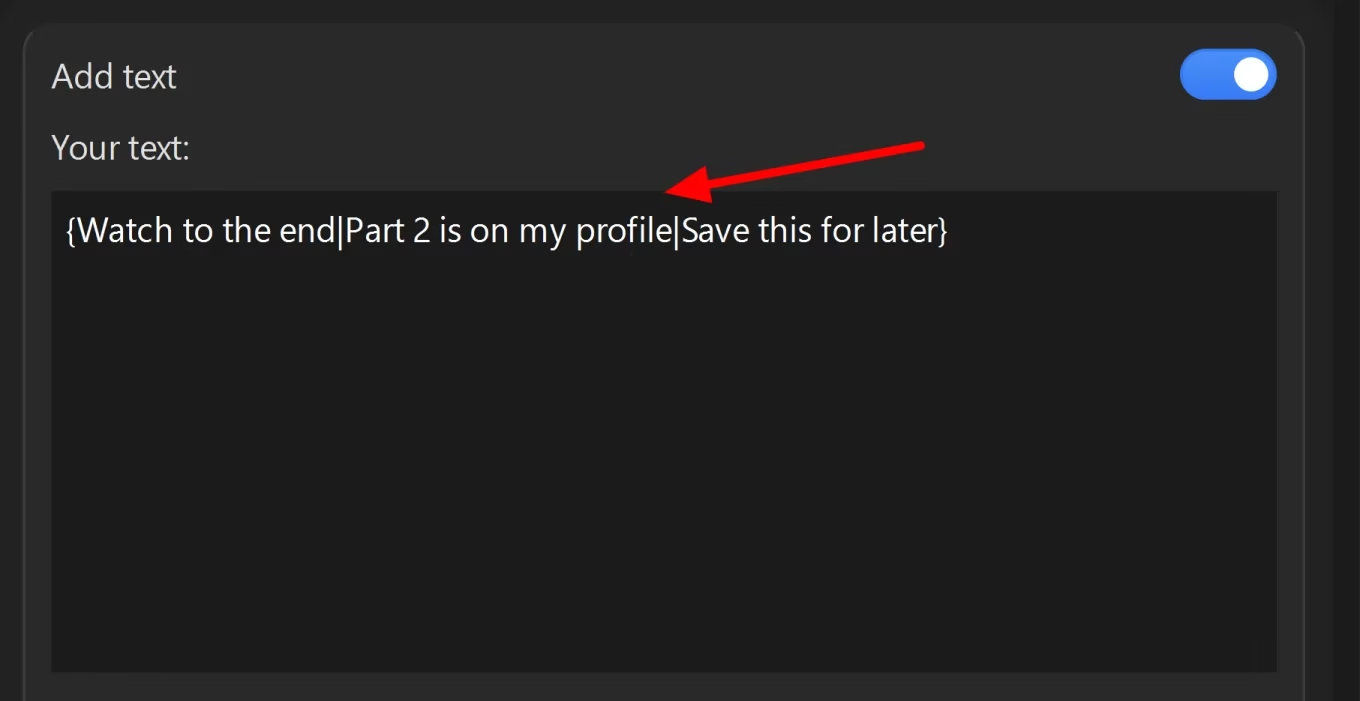
The second group is edits to the frame, color, sound and speed. Most of them have a range, and for each copy a value is picked from it at random. When the speed changes, the duration changes with it.
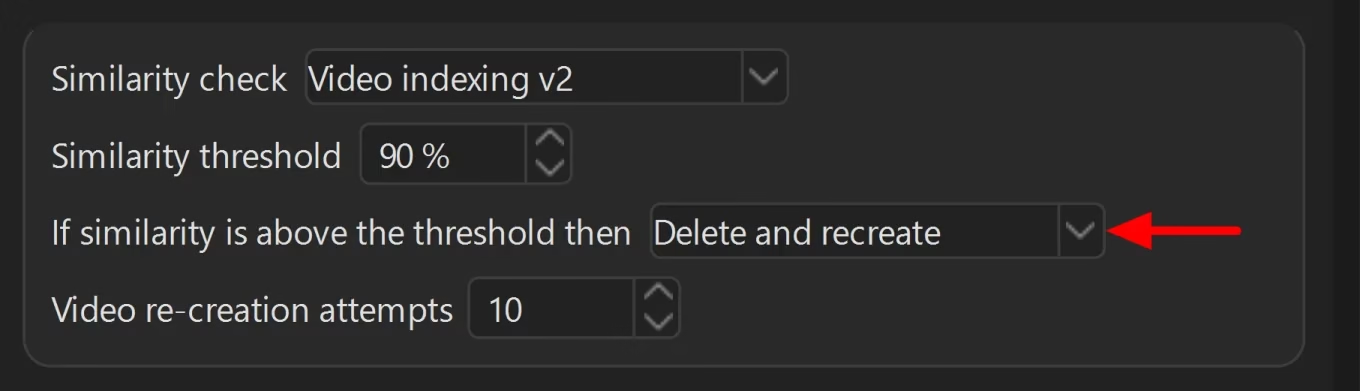
Random selection does not rule out matches: with three text variants for twenty copies, one variant will go to several copies, and the same audio track can also end up in several. The program also has a similarity check, but it compares only the picture: color, and with the v2 method, frames as well. It does not separately check whether copies share the same text or sound. Choose the check method to match your edits. If your copies differ in speed, choose “Video indexing v1.” The “Video indexing v2” method compares frames second by second. When the speed differs, the frames shift, and it misses most of the nearly identical copies. On our script’s copies from the measurement above, in the sets with speed changes, v1 flagged 13 of 24 nearly identical pairs, and v2 flagged 2. The v1 method makes mistakes too: it missed almost half of the close pairs and flagged about a third of the pairs that were different by our measure as similar. You can also check copies with your own measure separately, as in the articles on an account network (in Russian) and on checking a video for uniqueness (in Russian).
The check is enabled on the “Export” page. In the “If similarity is above the threshold then” setting, you can choose “Delete and recreate”: then a copy with similarity above the threshold is created again, up to the number of attempts in the “Video re-creation attempts” field (10 by default). If the similarity is still above the threshold after them, the copy is deleted.
You can drag a folder of videos into the “Imported videos” list. The program will import all the videos from it and from its subfolders. More on this in the article on batch video processing (in Russian). The program runs only on Windows. You can download it and try it for free.
Where this does not work
Copies do not make a video interesting. If viewers are not interested in a video, the number of accounts will not fix that.
Nor do copies replace the consistency discussed at the start of the article: TikTok recommends keeping a posting pace you can sustain 2.
Copies do not override the rules on spam and on bypassing TikTok’s systems. The program does not manage accounts and does not publish anything: it creates copy files on your computer or in the cloud, and you publish them yourself.
Frequently asked questions
Where to start
If your account is new, start with the topic and profile: one niche, a username with words from your topic, a clear bio. Then film a two-week backlog of videos and keep a pace you can sustain.
If you already have videos, start with the weekly analytics check: whether any videos have a warning about being ineligible for the feed, the second at which viewers leave, and how many views your new videos got in the week. Then take tactics from the section “Free tactics that TikTok recommends” and keep your pace. If you publish one video on several accounts, make copies with different content: their own text, sound and inset clip, and set plenty of variants. You can put such copies together in Video Unique Booster, and you can try it for free.
Related reading:
- An Instagram account network: how many video copies stay different (in Russian)
- A video uniquifier for TikTok (in Russian)
- 0 views on TikTok on a new account (in Russian)
How we gathered the material
We collected search results for two Russian spellings of the query “TikTok promotion” on September 25, 2026, using a web search tool with the region set to the US. This is a set of pages that were found, not rankings in Google.ru or Yandex. Of 13 URLs, nine pages with advice were counted. One page did not open, one turned out to be a news item, and two were help pages about a paid TikTok tool. We downloaded the texts, and one person annotated them by hand.
TikTok’s rules are quoted in the version in effect from September 24, 2026. We take the words of YouTube video authors from the automatic captions. We measured the script’s copies on September 23, 2026, and the program’s copies on September 24, on three videos from the open VISION video dataset 26. We did not measure reach on real accounts or check the practitioners’ numbers. The Instagram Reels network experience is our own: the numbers in those places come from memory and the network’s logs, not from a measurement. The numbers from the TikTok test come from TikTok Studio analytics as of September 27, 2026.
Sources
- TikTok. Community Guidelines: For You feed standards, 2026H2 version. Guidelines page ↩︎
- TikTok Creator Academy. Grow Your Account With Our Posting Cadence Tips for All Industries. Article ↩︎
- TikTok. Community Guidelines: Integrity and Authenticity, 2026H2 version. Guidelines page ↩︎
- searchengines.guru forum. Thread “Software for TikTok,” 2022 (in Russian). Thread ↩︎
- TikTok Newsroom. Bringing more context to content on TikTok, update of March 6, 2022. Article ↩︎
- Habr. What we do in the shadows: TikTok accused of promoting Russian content, August 10, 2022 (in Russian). News item ↩︎
- TikTok Creator Academy. Introducing TikTok analytics, Russian version of the article (in Russian). Article ↩︎
- TikTok Creator Academy. Using analytics as a tool to improve video performance. Article ↩︎
- TikTok Newsroom. How TikTok recommends videos #ForYou, June 18, 2020. Article ↩︎
- Boeker M., Urman A. An Empirical Investigation of Personalization Factors on TikTok. Proceedings of the ACM Web Conference 2022. DOI ↩︎
- Pilati F., Sacco P. L., Scianna M., Artime O. The broadcasting trap: TikTok and the “democratization” of digital content production. Humanities and Social Sciences Communications, 2025, vol. 12, 496. DOI ↩︎
- TikTok Creator Academy. Building a sustainable posting routine with these 3 tips. Article ↩︎
- FAQ TikTok. How often to post on TikTok. YouTube video (in Russian). Video ↩︎
- Partnerkin. How to farm and warm up TikTok accounts (in Russian). Article ↩︎
- Pirate CPA. Methods for working with TikTok accounts for traffic arbitrage, 2024 (in Russian). Article ↩︎
- Vse o Tik-toke. How many videos to upload to TikTok per day. YouTube video (in Russian). Video ↩︎
- Kak molvil Apollon. What time should you post videos on TikTok? YouTube video (in Russian). Video ↩︎
- TikTok Creator Academy. Moderation and Appeals, Russian version of the article (in Russian). Article ↩︎
- TikTok. Help page: about the Promote tool on TikTok, July 2026 (in Russian). Help page ↩︎
- TikTok. Help page: finding the Promote tool in the app and on the web, July 2026 (in Russian). Help page ↩︎
- TikTok. Community Guidelines: Accounts and Features, 2026H2 version. Guidelines page ↩︎
- Pikabu. How to get out of a TikTok shadow ban, 2025 (in Russian). Post ↩︎
- UBT Space. How to deal with warning labels on TikTok and get videos back into recommendations (in Russian). Article ↩︎
- Kordopatis-Zilos G. et al. FIVR: Fine-Grained Incident Video Retrieval. IEEE Transactions on Multimedia, 2019. DOI ↩︎
- McKeown S., Buchanan W. J. Hamming Distributions of Popular Perceptual Hashing Techniques. DFRWS EU 2023. Paper ↩︎
- Shullani D., Fontani M., Iuliani M., Al Shaya O., Piva A. VISION: a video and image dataset for source identification. EURASIP Journal on Information Security, 2017. Paper ↩︎
- TikTok Creator Academy. Elements of a TikTok video. Article ↩︎
- TikTok Creator Academy. Creating captivating content with great storytelling. Article ↩︎
- TikTok Creator Academy. How to personalize your TikTok profile. Article ↩︎
- TikTok Creator Academy. Maximize your video traffic: Profile. Article ↩︎
- TikTok Creator Academy. Growing your followers in 4 easy steps. Article ↩︎
- TikTok Creator Academy. Answering your Promote FAQs. Article ↩︎
- TikTok Creator Academy. Discovering your perfect Promote strategy. Article ↩︎
- TikTok Ads Manager. About budgets for ads in TikTok Ads Manager, July 2026. Help page ↩︎
- TikTok Business Center. Available countries and regions for self-serve ad account creation, November 2025. Help page ↩︎
- TikTok Creator Academy. Collecting more rewards through brand tagging and Spark Ad authorization. Article ↩︎
- TikTok Creator Academy. Understanding TikTok’s Originality Policy. Article ↩︎
- FFmpeg. Official website. Website ↩︎
- TikTok Creator Academy. Winning rewards and boosting your creativity with TikTok post contests, Russian version of the article (in Russian). Article ↩︎
- TikTok Creator Academy. Accelerating your growth with Promote. Article ↩︎
- TikTok Ads Manager. About Creative Center. Help page ↩︎
- TikTok. LIVE Safety Guide. Page ↩︎
